
ASP.js for Visual Studio Code

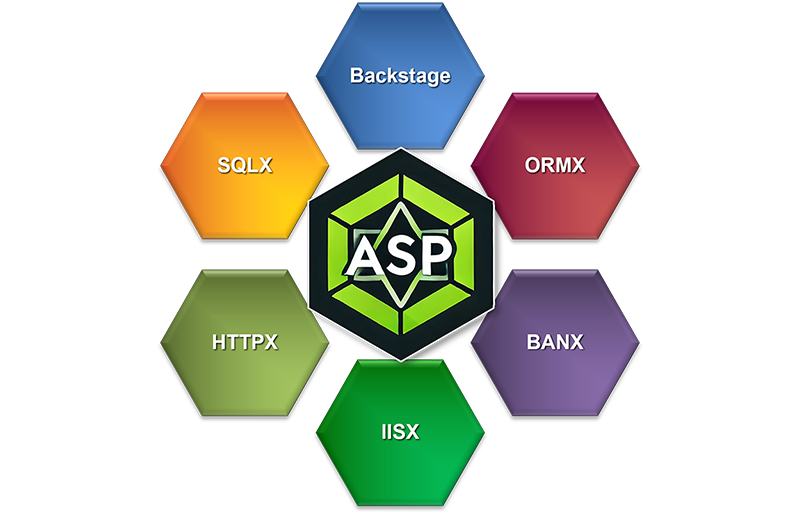
mobileFX | Architecture | Diagram
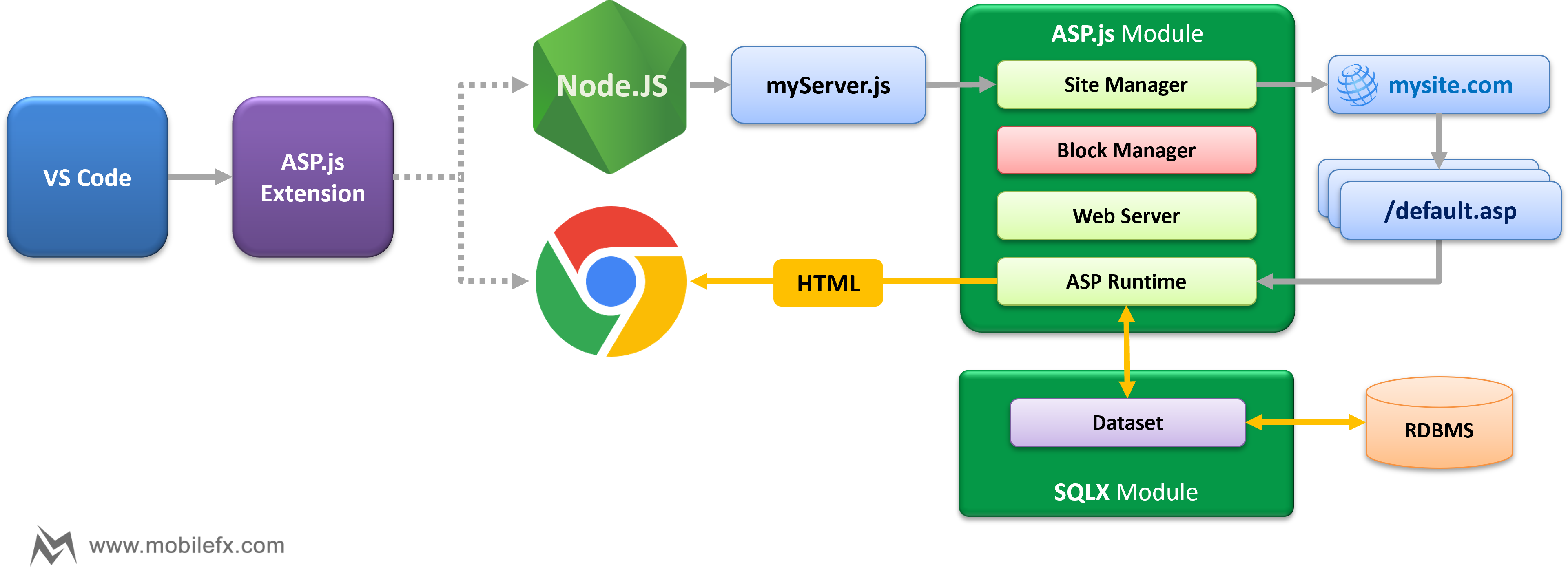
ASP.js brings Classic ASP back to life over Node.js … with some modern and innovative twists!
ASP.js is not confined to the mere mimesis of Classic ASP for reasons of legacy; it ascends beyond imitation. It reveals itself as a layered ecosystem, grounded in the archē of a database-first philosophy — where data is the primordial substance from which all logic flows. Upon this foundation rises a resilient full-stack application architecture, harmonized with cross-tier, end-to-end instruments of debugging, monitoring and security. In this way, the framework empowers the developer with the clarity, speed, and discipline required for the creation of data-driven business applications, uniting continuity with innovation into a single, coherent whole.
| Layer | Frameworks | Level |
|---|---|---|
| 🟩 Web Layer |
IISX / SITEX / HTTPX / ASPX Low-level web server runtime, emulating Classic ASP on Node.js. |
Low |
| 🟨 Data Access Layer |
SQLX Native dataset engine with SHAPE queries, pivots, and master–detail semantics. |
Mid-Low |
| 🟧 ORM Business Layer |
ORMX Modern ORM framework with field to property wrapping, and dynamic detail binding. |
Mid-High |
| 🟦 Application Layer |
Backstage Metadata-driven web framework that feels native, powered by Emscripten datasets. |
High |
At every layer you can choose how close to the metal — or how high-level — you want to work. And across them all, ASP.js delivers a robust end-to-end multi-tier Debugger. Step seamlessly from browser JavaScript → server logic → back to client. No other framework can do this. Unlike Angular, React, or Vue, which bury you in boilerplate, REST glue, and fractured tooling, ASP.js gives you one coherent stack where security, datasets, and UI are built-in.
Regardless of whether it fits your present needs or becomes part of your stack, take a moment to recognize the endeavor: an earnest effort to carry something old into the new, preserving its essence while opening paths to fresh creation.
Key Features
-
Classic ASP Language Support
-
Rich syntax highlighting for
.aspand.incfiles. -
Accurate parsing of
<% … %>script blocks and embedded JavaScript. - Diagnostics, code validation, and auto-completion for ASP symbols.
-
Ctrl+Clicknavigation for includes and server-side references. - Integrated ASP markup formatter and hybrid JS grammar support.
-
Rich syntax highlighting for
-
ASP Runtime Emulation
-
Full emulation of
Application,Session,Request,Response, andServerobjects. - ASP pages transpiled into pure JavaScript with precise source mapping.
- Execution on Node.js for cross-platform hosting.
- Built-in CSRF protection, secure cookies, and per-site security policies.
- Seamless integration with the Backstage framework for data binding and ORM support.
-
Full emulation of
-
Integrated Web Server & Site Manager
-
Lightweight
IIS replacement (
IISX.js) hosting multiple sites on one root domain. - Automatic HTTP→HTTPS redirection, SAN SSL certificates, and host header–based routing.
- Per-site configuration: MIME types, method allowlists, folder & extension rules.
-
Strong security features: CORS, CSP, anti-flood controls,
AutoBan (
BANX.js), and rate limiting (RATEX.js).
-
Lightweight
IIS replacement (
-
State-of-the-Art Debugging
- Unified server-side (Node.js) and client-side (Chrome) debugging.
- Step seamlessly between ASP server code and client JavaScript.
- Breakpoints, variable inspection, and call stacks in both contexts.
- Accurate source mapping: compiled JavaScript lines are traced back to original ASP.
- Variable inspection works across Proxies, Collections, and ASP objects.
-
Customizable Debugger Settings
- Flexible configuration of Node.js and Chrome debug ports.
- Adjustable workspace and web root mapping for complex project structures.
- Supports multiple site roots and domain-level project generation.
-
Project & Certificate Management
- Quick command to scaffold a new ASP project with sample pages and SSL.
- Built-in CA Root generation and self-signed certificate management.
-
Auto-generates
launch.jsonand project layout for immediate debugging. - Streamlines developer onboarding with ready-to-run sites and breakpoints.
Integration with VS Code
mobileFX | Architecture | Diagram
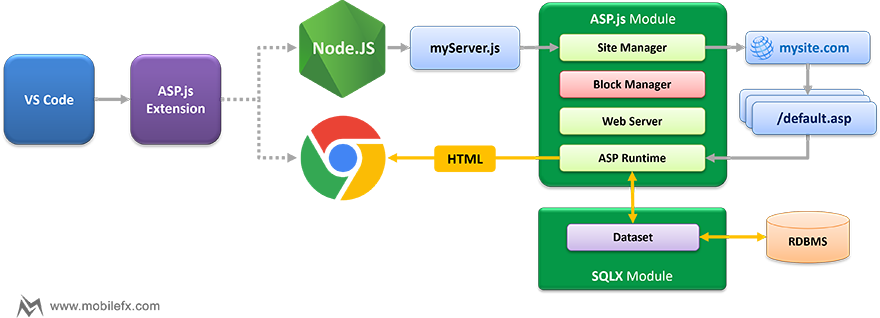
The extension enhances Visual Studio Code by:
-
Adding language definitions and configurations for
.asp,.inc,.jspp, and.jobjfiles. -
Supporting workspace-based activation (
workspaceContainstriggers for ASP files). - Providing intuitive commands for creating projects and debugging.
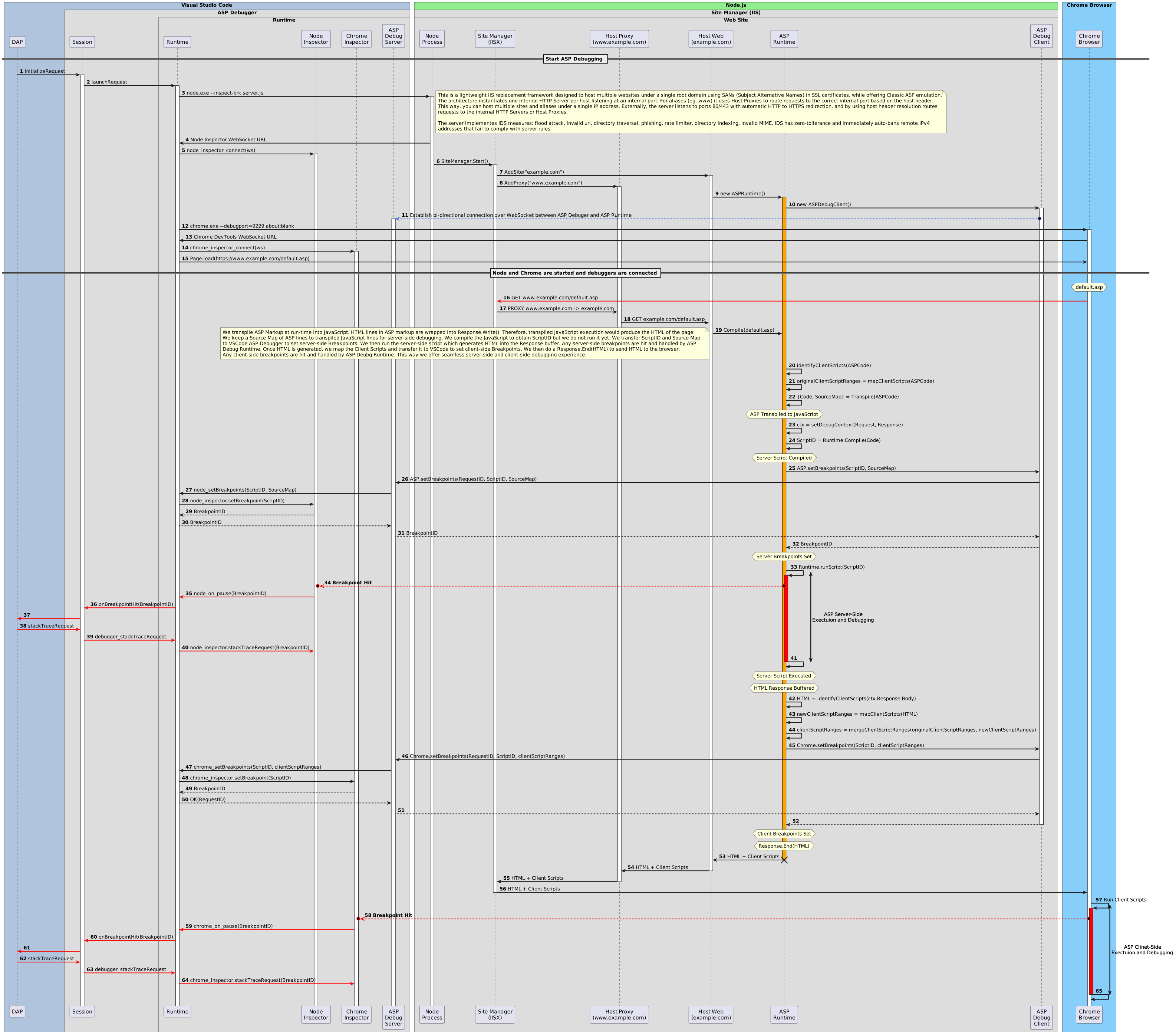
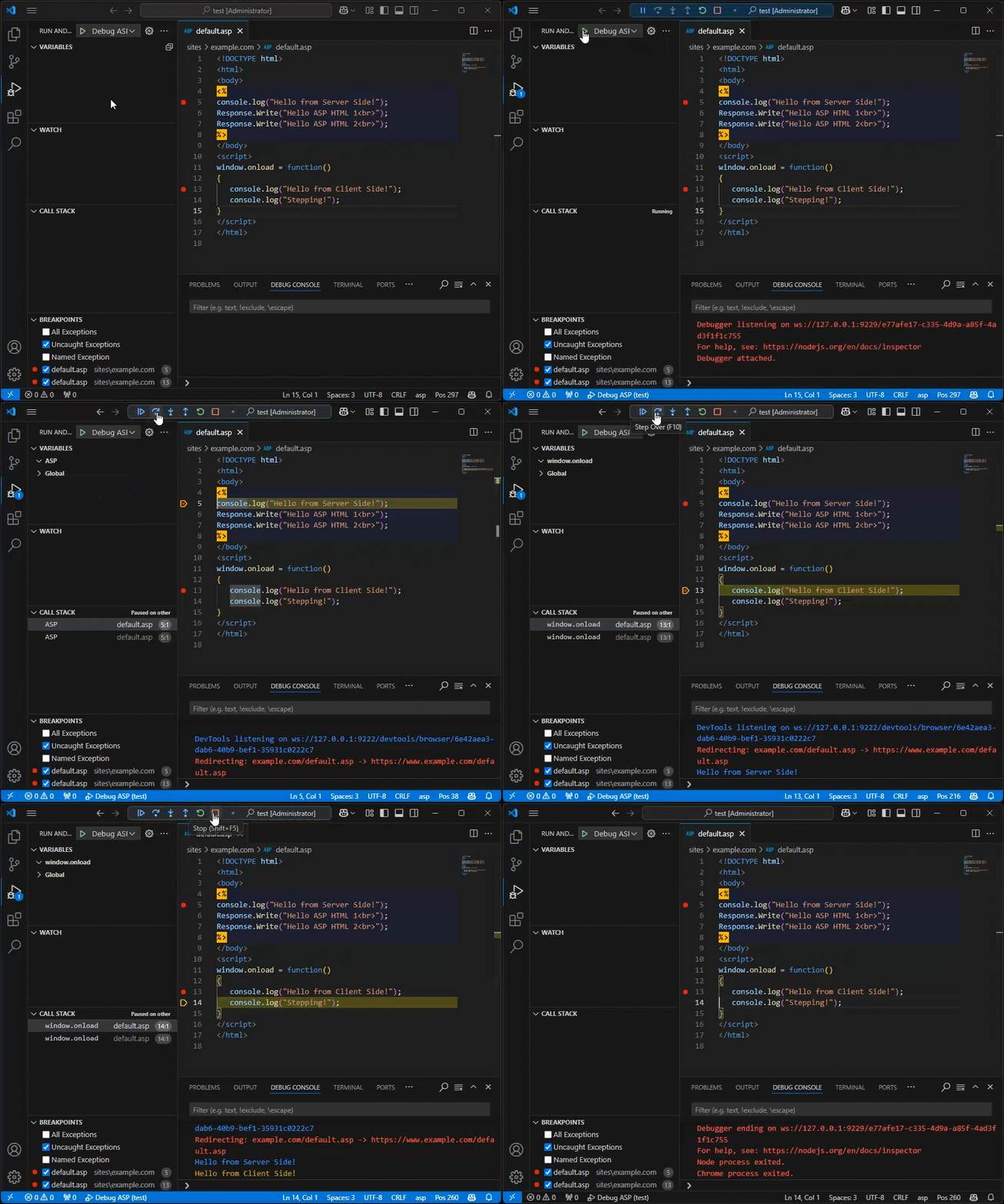
- Debugging spawns both Node.js and Chrome, both in debug mode.
- Node.js loads mobileFX ASP.js Runtime package that instantiates a lightweight IIS replacement framework.
- Server-side ASP code runs on Node.js, client-side ASP code runs on Chrome.
- ASP.js extension Debugger attaches and debugs JavaScript on both tiers.
Requirements
- Node.js: Version 20.16.0 or later
- Visual Studio Code: Version 1.17.0 or later
- @mobilefx/aspx: mobileFX ASP.js Runtime Node.js package
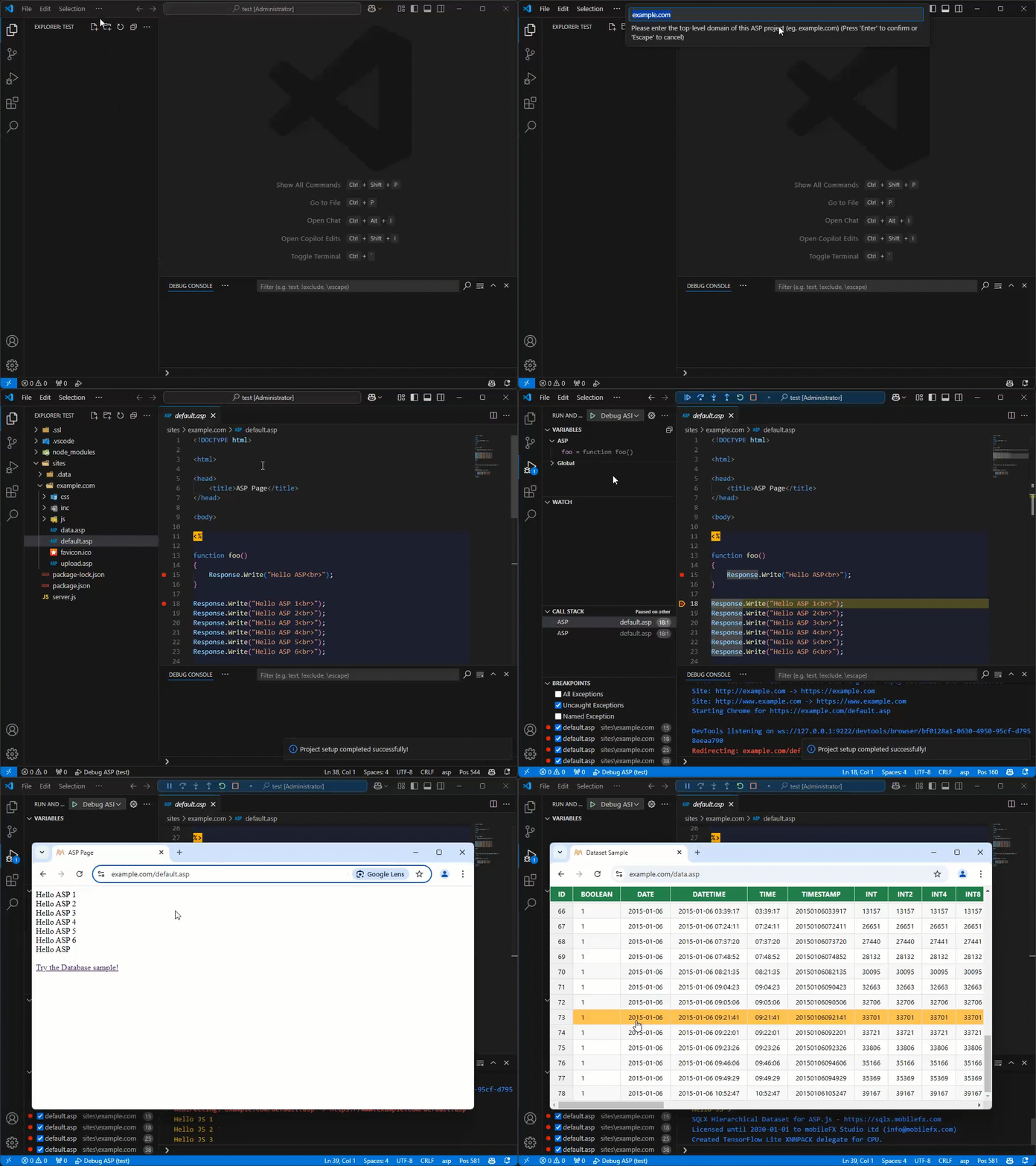
Create New ASP Project in seconds
You can create a production-level ASP host in seconds! From the
Command Palette select New ASP Project command and
provide the top-level domain name of your project.
The wizard will generate the entire project structure, including a
mock CA root authority and self-signed SSL certificates for your
tests. During project initialization the extension will copy ASP.js
Runtime package, and a free version of SQLX, the RDBMS Runtime package
for APS.js that offers read-only database access. When the project is
created, simply select Debug ASP an start debugging!
⚡ASP.js Developer’s Guide
Table of Contents
- 1. Part I – Framework Overview
- 2. Part II – Hosting & Site Management
- 3. Part III – Security & Compliance
- 4. Part IV – ASP Runtime
-
5. Part V – Data Access & ORM
- 5.1 SQLX.js – Database Abstraction
-
5.2 Native Data Engine Deep Dive
- 5.2.1 Overview
- 5.2.2 Dataset — Design Contracts & Lifecycle
- 5.2.3 DataField — Type System & UI/Lookup Metadata
- 5.2.4 SQLite Driver — Runtime Behaviors
- 5.2.5 Lookups — Caching, Filtering, Reverse Mapping
- 5.2.6 Pivot Engine — Virtual Table + SQL Macros
- 5.2.7 Audit — Table, Triggers, Attribution
- 5.2.8 Performance Characteristics
- 5.2.9 Current Scope & Limitations
-
5.3 ORMX.js – Object Relational Mapper
- 5.3.1 Overview & Goals
- 5.3.2 Datastream Transport (Backstage ⇄ Browser)
- 5.3.3 Dynamic SQL Engine (Filters & SHAPE)
- 5.3.4 Dynamic Field Wrappers (Auto Getters/Setters)
- 5.3.5 Dynamic Detail Wrappers (Iterators + Active-Record View)
- 5.3.6 The ORM Proxy (Why it’s required & how it’s used)
- 5.3.7 Dataset Wiring & Lookups (at Read time)
- 5.3.8 Error-Handling Philosophy
-
5.4 ORM Examples
- 5.4.1 Smallest possible ORM (table → iterate)
- 5.4.2 Filtered read (WHERE compiler, limit/order)
- 5.4.3 Insert / Update with dynamic field wrappers
-
5.4.4 JOINs + calculated fields (same shape as
EventItem) - 5.4.5 Master–Detail (SHAPE): Event → EventItems (+ JOIN) & EventArtists
- 5.4.6 Dictionary model (key/value via metadata)
- 5.4.7 Custom SQL / View models (pivot-friendly)
-
5.4.8 Validation before
Write()(required fields, formats, FK sanity) - 5.4.9 Linked-object accessors (lazy getters vs. JOINs)
- 6. Part VI – Utilities & Cross-Cutting Concerns
- 7. Part VII – Backstage Framework (Backoffice MMV)
- 8. Part VIII – Monitoring & Analytics
- 9. Part IX – Developer Experience
- 10. Part X – Conclusion
- 11. Licensing
- 12. Publisher Informatio
1. Part I – Framework Overview
Contents
1.1 Preface
The ASP Emulation Framework is a Node.js-based platform that recreates and extends the classic ASP programming model, while embedding modern web standards, security practices, and developer productivity features. This guide is written for developers, system architects, and researchers who seek both theoretical grounding and practical know-how. It emphasizes scientific validity, presenting each module with its objectives and innovations, and demonstrates how the framework unifies hosting, runtime, ORM, and MMV layers into a cohesive whole.
1.2 Framework Vision
- Objective: Enable the development of secure, data-driven web applications using familiar ASP semantics, but with the performance, scalability, and ecosystem of Node.js.
-
Innovations:
-
Emulation of ASP constructs (
Request,Response,Session,Application) with Proxy-based dictionaries. - A multi-site hosting model akin to IIS, implemented in pure Node.js.
- Strong integration of security policies, including AutoBan, rate limiting, per-site encryption, and WebAuthn.
- An ORM layer with SHAPE-style hierarchical recordsets and direct AI integration for dataset processing.
- A Backoffice framework (Backstage) that provides real data binding between server datasets and client UI controllers.
-
Emulation of ASP constructs (
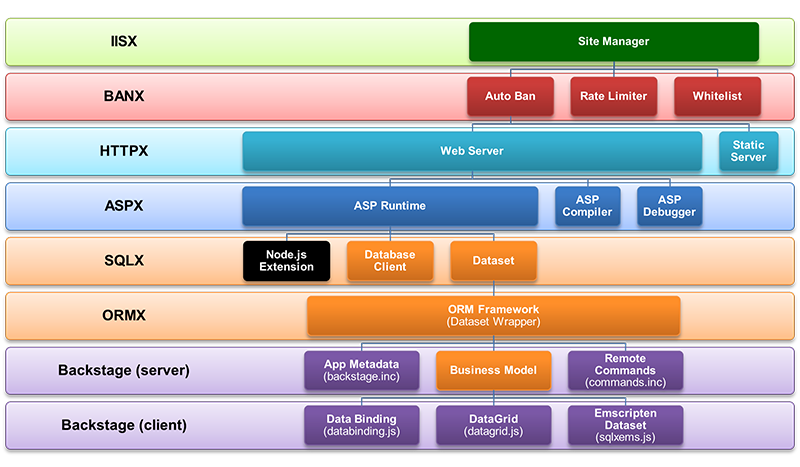
1.3 System Architecture Overview
The framework is designed in tiered architecture, with clear separation of concerns:
-
Hosting & Site Management
- IISX.js and HTTPX.js provide multi-site hosting, SSL, request routing, and ASP runtime integration.
-
Security & Compliance
- BANX.js and RATEX.js enforce IP banning, rate limiting, and automated security rules at runtime.
-
ASP Runtime
- ASPX.js emulates ASP semantics, while ERRX.js extends error handling into context-aware exceptions.
-
Data Access & ORM
- SQLX.js maps database types, and ORMX.js provides an ORM with hierarchical datasets, foreign key resolution, and AI descriptors.
-
Utilities
- UTILX.js supplies secure input sanitization, anti code-injection guards, templating, and string manipulation.
-
Backstage Framework
- A full-featured data binding framework connecting client-side Emscripten datasets with server-side ORM models.
-
Monitoring & Analytics
- Unified exception logging, session analytics, and compliance reporting.
-
Developer Experience
- Integrated seamless client–server debugging, extensibility points, and deployment automation.
- The debugger is state of the art: it allows developers to step seamlessly between client-side and server-side execution contexts.
- ASP pages are compiled into pure JavaScript with mapping tables that correlate compiled lines back to source ASP lines, enabling simple stepping between ASP and JavaScript code.
- Both plain JavaScript modules and ASP pages are supported, with the ability to switch smoothly from the browser’s client debugger to the Node.js server debugger (and vice versa).
At each tier, the framework introduces innovations that go beyond legacy ASP or conventional Node.js stacks, resulting in a platform that is simultaneously familiar, secure, and future-ready.
2. Part II – Hosting & Site Management
Contents
2.1 IISX.js – SiteManager
Objectives
- Orchestrate a multi-site hosting environment with centralized listeners on 80/443 and automatic HTTP → HTTPS redirection.
-
Route requests by Host header to isolated per-site
servers (or external proxies), with
per-host TLS via
SNICallback. - Provide an in-process reverse-proxy fabric to forward requests to each site’s internal HTTP server on a private port.
- Enforce early security (before app code runs): blocklisted IPs, invalid hosts, and flood/rate-limit conditions.
HTTP Proxy & Routing Model
- Dual listeners: a single HTTPS server (443) handles secure requests; a simple HTTP server (80) only performs sanitization + redirect to HTTPS.
-
Host-based dispatch: the HTTPS server inspects
Hostand selects the correct site context; TLS certificates are chosen dynamically viaSNICallback, enabling wildcard/per-host certs and per-site TLS settings. -
Internal site servers: each
Siteruns an internal Node HTTP server on a private port (assigned automatically if not specified).SiteManagercreates this server and wires it to the site’sWebServerhandler. -
Reverse proxy (http-proxy): the public HTTPS
listener forwards requests to the site’s internal server using an
http-proxy instance (
target: 127.0.0.1:<sitePort>). Forwarded requests includex-forwarded-for,x-forwarded-proto, and normalizedhostheaders to preserve client identity and scheme. Errors are handled gracefully (500 fallback), and request bodies are streamed (including buffered POST). -
External proxy entries: in addition to local sites,
SiteManagercan register Proxy hosts mapping a public hostname to another internal port, applying the same forwarding headers and default path rewrites when configured.
TLS & Certificate Handling
-
Per-host TLS contexts built
on demand using
SNICallback. For each hostname,SiteManagerconstructs atls.createSecureContext(...)from the site’s SSL options (min/max TLS versions and chain material). This allows SAN/wildcard deployments and fine-grained settings per site.
Early-Listener Security (pre-application)
- Autoban gate at the edge: both HTTPS and HTTP listeners resolve the client IPv4 and immediately deny requests from already blocked IPs (403 + legal banner) before any site code runs.
-
Host header validation on the HTTP (80) redirector:
missing/invalid
Hostor bare-IP hosts are treated as violations and reported to BlockManager (reasonINVALID_HOST), then short-circuited with 400/403. -
Flood/Rate-limit escalation:
SiteManagersubscribes toWebServer’sblockevents (emitted on policy violations likeRATE_LIMIT,METHOD_NOT_ALLOWED, etc.) and forwards them to BlockManager (AddViolation), enabling centralized, reason-based autoban strategies (zero-tolerance and rate-limit bans). -
Legal-grade responses: when a request is blocked at
the edge, a 403 HTML with GDPR/PSD2/NIS2 language
is served; this is implemented in
IISX.jsfor consistency across all sites.
Operational Resilience & DX
-
Crash resilience: global handlers for
uncaughtException/unhandledRejectionlog tocrash.logto avoid silent failures. - Host file management (dev): optional addition/removal of hosts entries to map virtual hosts to the local IP for frictionless local development; includes debug IPC to uninstall entries on command.
-
Transparent mappings: on boot,
SiteManagerlogs each host → internal port routing to aid troubleshooting and ops visibility.
💡 Why It Matters
IISX.jscentralizes TLS, routing, and edge security for every hosted site. By performing host/ban checks and flood detection at the listener, it reduces load on application layers and provides a single place to enforce organizational security posture.
2.2 HTTPX.js – WebServer
Objectives
-
Act as the execution engine of a
Sitedefined inSITEX.js, handling every incoming HTTP(S) request. - Bridge between the Node.js HTTP server and the ASPX runtime.
- Dispatch requests to either static assets, ASP pages, or proxied upstream targets.
- Enforce all security policies defined in the site’s configuration (CORS, CSP, CSRF, MIME validation, etc.).
- Provide the foundation for high-performance streaming, compression, and caching.
Innovations
-
ASP-Aware Request Pipeline
-
.asppages are compiled into JavaScript modules and executed via ASPRuntime (fromASPX.js). -
HTTPX.jsorchestrates request flow and policy enforcement, then invokes the runtime for execution.
-
-
Integrated Security Enforcement (per-site)
- Every incoming request passes through SITEX-defined policies before reaching content.
-
Enforces:
- CSRF protection: Missing/invalid tokens immediately blocked.
- CSP headers: Script-src, frame-src, and nonce support.
- CORS rules: Origins, methods, headers validated against whitelist.
- MIME-type validation: Unknown or forbidden MIME requests rejected.
- Input length limits: Prevents oversized query strings, headers, and body payloads.
-
Path filtering: Blocks hidden-path access
(
/.git/,..traversal).
-
Web Application Firewall (WAF) Features
- Detects and blocks phishing attempts, directory indexing, and invalid URLs.
- Integrates with BANX.js and RATEX.js to escalate suspicious requests into bans or throttling.
- Suspicious behavior triggers auto-logging and exception raising (via ERRX.js).
-
Performance & Streaming
- Supports HTTP Range requests (video/audio streaming).
- Optimized static file serving with caching and optional gzip/deflate compression.
-
Integrates per-site HTTP cache policies defined
in
SITEX.js.
-
Session & Authentication Hooks
- Tightly integrates with ASP sessions (cookie or header-based).
-
Provides hooks for WebAuthn flow defined at the
SITEXlevel. - Supports CSRF token lifecycle management on form submission.
-
Developer Productivity
-
Unified error handling through
ERRX.jsexceptions → logs + DB. -
Requests include context-aware ASP objects (e.g.,
Request.Form,Response.Cookies). - Debugger hooks allow stepping directly from request entry to ASP source line.
-
Unified error handling through
💡Why It Matters >
HTTPX.jstransforms a plain Node.js HTTP server into a full ASP-style web server with enterprise-grade security and modern web capabilities (CORS, CSP, streaming).
It is the execution layer that turns per-site definitions (SITEX.js) into real runtime behavior, ensuring every request is both safe and efficient.
2.3 SITEX.js – Site & Proxy
Objectives
- Represent the runtime definition of a single web site, including host, root path, ports, and default pages.
-
Act as the security configuration center for each
site, dictating how its
HTTPX.jsinstance enforces security. - Define proxy mappings for upstream services with optional per-proxy SSL.
- Provide a declarative model for developers to configure CORS, CSP, session, and encryption rules without touching the core server.
Innovations
-
Per-Site Security Container:
EachSiteobject is not just a server wrapper but a security contract.HTTPX.jsconsults the site definition to enforce CSP, CORS, CSRF, and input filtering rules. -
CORS (Cross-Origin Resource Sharing):
Fine-grained per-site CORS policies:- Allow/Deny lists of origins
-
Method-specific controls (
GET,POST, etc.) - Header whitelisting/blacklisting
-
CSP (Content Security Policy):
Each site can define strict CSP rules to mitigate XSS and injection:- Default-src policies
- Script-src with nonce/sha256 support
- Frame-src, img-src, style-src segregation
- Report-only vs enforce mode
-
Encryption Layer:
- Per-site encryption keys used for form field hashing, cookie sealing, and secure dataset transfer.
- Transparent field-level encryption of sensitive data before it leaves the server.
- Optional double encryption for high-security environments (hash + AES/GCM).
-
Whitelisting & Blacklisting:
- Path-based allow/deny rules (regex-based).
- MIME-type validation with fail-fast mode.
-
Extension restrictions (block
.exe,.aspby default, etc.). - Hostname and IP whitelists for restricted endpoints.
-
Anti-Abuse Controls:
- Request rate limit parameters (window, max requests) defined per site.
- Input size limits (query string, form data, headers).
- Automatic rejection of requests missing CSRF tokens.
- Built-in phishing detection (blocking of suspicious redirections, fake login forms, etc.).
-
WebAuthn Integration:
Full integration with@simplewebauthn/server, enabling passwordless authentication at the site level, with challenge/response state stored per-site. -
Proxy Abstraction:
Proxyobjects describe upstream targets.- Can define per-site load balancers or microservices routing.
- Supports optional SSL on proxy endpoints, enabling secure internal service federation.
-
Developer Productivity:
- Configs are plain JavaScript objects, but expressive enough to describe enterprise-level security rules.
- Eliminates the need for reverse proxies like NGINX for many scenarios — the features are native.
💡Why It Matters Where
IISX.jsis the multi-tenant orchestrator andHTTPX.jsis the execution engine,SITEX.jsis the policy brain. It centralizes all per-site rules so that developers can configure powerful security, CORS, CSP, encryption, and access controls without re-writing server logic.
3. Part III – Security & Compliance
Contents
3.1 BANX.js – AutoBan Manager

Objectives
- Provide an automated IP banning system to mitigate abuse such as brute-force attacks, flood requests, and suspicious behavior.
- Centralize violation tracking, ban decisions, and enforcement across all sites hosted by the framework.
- Offer a configurable, strategy-driven model so each deployment can adapt to its own threat profile.
- Persist bans in durable storage (JSON or SQLite) for analysis and compliance reporting.
Innovations
-
Auto Ban Reasons
Standardized Auto Ban reasons as defined in BANX.js, forming the basis for ZeroTolerance and RateLimit strategies.
Reason Description FLOOD_ATTACK Excessive requests intended to overwhelm the service (DoS / DDoS flood). ACCESS_DENIED Attempt to access forbidden resources (unauthorized). METHOD_NOT_ALLOWED Usage of disallowed HTTP methods (e.g., TRACE,CONNECT).HIDDEN_PATH_ACCESS Probing hidden or sensitive paths. INVALID_HOST Requests with invalid or unrecognized Hostheaders.INVALID_INPUT Malformed or suspicious request input detected. FRAUD_DETECTION Fraud patterns detected (e.g., identity or payment fraud signals). PHISHING Activity indicative of phishing attempts. EXTENSION_DENIED Requests targeting blacklisted file extensions. DIRECTORY_DENIED Access attempts to forbidden directories. DIRECTORY_TRAVERSAL Path traversal attempts ( ../) to break out of root.DIRECTORY_INDEXING Unauthorized directory listing attempts. INVALID_SITE Requests for invalid/unknown site in multi-host setups. INVALID_URL Malformed or illegal URL structures. INVALID_MIME Suspicious or disallowed MIME types. INVALID_USER Invalid or unauthorized user references. RATE_LIMIT Excessive request rate within a sliding window. INVALID_CSRF Invalid or missing CSRF tokens in sensitive operations. INVALID_ENDPOINT Access to endpoints not defined/allowed by the application. -
Strategy-Based Ban Engine
Strategy Trigger logic Ban duration Reset / forgiveness Default reasons ZeroTolerance Ban when violations >= maxViolations(counter-based).banDuration(often Infinity for permanent).Optional resetAfterper config (e.g., none for permanent, 24h for medium severity).High-severity set (e.g., FLOOD_ATTACK,ACCESS_DENIED,METHOD_NOT_ALLOWED,HIDDEN_PATH_ACCESS,INVALID_HOST,INVALID_INPUT,FRAUD_DETECTION) and medium sets (e.g.,PHISHING,EXTENSION_DENIED,DIRECTORY_DENIED,DIRECTORY_TRAVERSAL,DIRECTORY_INDEXING,INVALID_SITE), plus softer set (INVALID_URL,INVALID_MIME,INVALID_USER).RateLimitBan (aka “TimeBan” alias maps here) Ban if requests within sliding timeWindowexceedmaxRequests(timestamp windowed).banDuration(e.g., 5 minutes).Typical resetAfterforgives burst after inactivity (e.g., 10 minutes).RATE_LIMIT,INVALID_CSRF,INVALID_ENDPOINT.-
Implements multiple strategies via the
IBanStrategyinterface. - Includes ZeroTolerance strategies for severe threats (e.g., phishing, directory traversal).
- Includes RateLimitBan strategies for time-window-based violations.
-
Strategies define both
conditions (
shouldBan) and ban durations (temporary vs permanent). - Developers can easily extend with custom ban strategies.
-
Implements multiple strategies via the
-
Per-IP Violation Tracking
- Maintains violation history for every IP, including counts and timestamps.
-
Supports
forgiveness windows (
resetAfter) so well-behaved clients recover over time. - Stale violations automatically pruned after configurable periods.
-
Centralized Enforcement
-
When a ban triggers,
BlockManagercreates anAutoBanrecord, stores it, and adds it to the in-memory blocklist. - Expired bans automatically cleared, minimizing false positives.
-
Blocked IPs are intercepted at the
earliest HTTP listener stage (in
IISX.js), saving server resources.
-
When a ban triggers,
-
Persistent Storage
-
Records written to either a flat JSON log or an
SQLite database (via
SQLX.js/ORMX.js). - Enables forensic analysis of past violations, ban durations, and patterns of abuse.
- Provides compliance-ready evidence for audits (GDPR, PSD2, NIS2).
-
Records written to either a flat JSON log or an
SQLite database (via
-
Fine-Grained Ban Reasons
-
Predefined set of
AUTOBAN_REASONS(e.g.,FLOOD_ATTACK,INVALID_CSRF,DIRECTORY_TRAVERSAL,PHISHING). - Each violation reason can be linked to a different ban strategy.
- Developers can extend the reasons list for site-specific abuse cases.
-
Predefined set of
💡 Why It Matters
BANX.jsacts as the first line of defense against hostile traffic. By separating strategy definition, violation tracking, and ban enforcement, it achieves a balance of flexibility and robustness. Developers gain a security layer that adapts to both high-severity attacks (immediate bans) and low-and-slow abuses (rate-limited bans), while preserving forensic data for compliance and audits.
3.2 RATEX.js – Rate Limiter
Objectives
- Throttle abusive clients by IP to prevent resource exhaustion, credential stuffing, and low-and-slow DoS.
- Offer fixed-window and sliding-window algorithms selectable per site.
- Operate with minimal overhead and zero external dependencies for high-throughput environments.
Innovations
-
Dual Algorithms
- Fixed Window: lightweight counters with periodic reset—predictable ceilings and minimal cost.
- Sliding Window: timestamp pruning for accurate burst modeling—mitigates boundary spikes.
-
Self-Cleaning State
- Periodic housekeeping purges stale entries and is unref’d to avoid keeping the event loop alive.
-
Low-Latency Hot Path
- O(1) checks for fixed window; bounded O(k) for sliding window (k ≤ maxRequests within the window).
-
Policy-Driven Configuration
-
Per-site knobs:
maxRequests,windowMs,slidingWindow,cleanupInterval, aligned with SITEX policies.
-
Per-site knobs:
-
Tight Integration with the Stack
-
Enforced inside
HTTPX.jsearly in the request pipeline; emitsblockevents with reason codes. -
IISX.jssubscribes to these events and forwards violations toBANX.jsfor strategic autoban escalation.
-
Enforced inside
💡 Why It Matters
RATEX.jsis the first pressure valve in the stack: cheap, accurate throttling that shields application code from surges while feeding precise signals toBANX.js. This two-stage design (throttle → escalate) preserves good traffic, absorbs bursts gracefully, and clamps down on abuse only when warranted.
3.3 Security Innovations
Objectives
- Provide a defense-in-depth model spanning edge listeners, per-site policy, request pipeline, and data layer.
- Make strong security the default: safe-by-construction sites with explicit opt-ins for risky capabilities.
- Deliver auditable security with policy-driven enforcement, reason codes, and durable logs suitable for GDPR/PSD2/NIS2 contexts.
Innovations (Defense-in-Depth)
-
Edge & Transport (IISX.js)
- Early autoban gate at HTTPS/HTTP listeners: blocked IPs rejected before any app code executes.
- Host header validation and bare-IP denial prevent spoofed routing and virtual-host abuse.
- HTTP→HTTPS normalization with per-host TLS SNI contexts; HSTS-ready posture.
- Bot/user-agent screening and flood detection coupled to rate-limit/autoban escalation.
-
Per-Site Security Policy (SITEX.js)
- CORS: origin/method/header allowlists; strict preflight handling.
- CSP: default-src, script-src (nonce/sha256), frame/img/style-src; enforce vs. report-only.
- Whitelists/Blacklists: path and extension rules; hidden-path denial; directory indexing prevention.
- MIME discipline: type checks with fail-fast option; no content sniffing.
- Input safeguards: maximum lengths for query/form/headers; strict URL normalization; traversal blocking.
- Encryption layer: per-site keys for form hashing, cookie sealing, and sensitive field protection.
- WebAuthn integration: passwordless authentication with per-site challenge state.
- CSRF lifecycle: token issuance, binding, and mandatory validation for form posts.
- Cookie security: secure/HttpOnly/SameSite defaults aligned with transport and session policy.
-
Request Pipeline Enforcement (HTTPX.js)
- WAF-like checks: phishing indicators, invalid URLs, suspicious redirects, method checks.
- Range-aware streaming with policy controls to mitigate abuse of large-object reads.
- Strict error handling: uniform rejection paths with legal-grade 403/429 responses.
-
Abuse Control & Escalation (RATEX.js + BANX.js)
- Rate limiting: fixed and sliding windows, self-cleaning state, early fail-fast gates.
- Autoban strategies: zero-tolerance for high-severity (e.g., traversal, phishing); progressive bans for rate violations.
-
Reason codes: granular violation taxonomy
(e.g.,
FLOOD_ATTACK,INVALID_CSRF,DIRECTORY_TRAVERSAL) enabling targeted responses.
-
Data & Input Hygiene (UTILX.js + ORMX/SQLX)
- Sanitization: anti–code-injection guards, diacritics/controls filtering, and conservative parsing.
- Typed data flows: SQL/HTML type mapping, JSON/HTML5 datatypes, and safe stringification paths.
- Form integrity: field hashing to detect tampering; optional double-encryption for sensitive payloads.
-
Observability, Audit, and Compliance (ERRX.js)
- Context-rich exceptions: IP, user agent, URL, session, and compiled→source line mapping via ASP runtime.
- Durable storage: file/DB logs for violations, bans, and crashes; retention aligned with regulatory needs.
- Consistent legal responses: GDPR/PSD2/NIS2 language on access restrictions across all sites.
-
Configurability & Least Privilege
- Policy-as-code per site: explicit toggles/thresholds; secure defaults.
- Isolation by design: each site has independent keys, limits, routes, and enforcement surfaces.
💡 Why It Matters
Security isn’t a bolt-on: it is embedded at every layer—from the listener to the data model. Early rejection of bad traffic preserves capacity; per-site policies reduce blast radius; rate-limit + autoban provide proportionate responses; and uniform logging produces audit-grade evidence. The result is a platform that is secure by default, observable, and adaptable to evolving threats.
4. Part IV – ASP Runtime
Contents
4.1 ASPX.js – ASP Emulation
The ASPX.js module is the heart of the framework: it
emulates the classic ASP runtime model on top of Node.js.
It
provides all the familiar ASP intrinsic objects (Request,
Response, Session, Application,
Server) while introducing a modern execution and
debugging context.
By combining JavaScript’s async model with ASP semantics, ASPX.js allows developers to run ASP pages compiled into pure JavaScript, while still coding against the objects and idioms of Classic ASP. This duality is further enhanced with a debugger integration that can seamlessly map between the compiled JavaScript lines and the original ASP source.
4.1.1 ASPRequest
Objectives
-
Emulate Classic ASP’s
Requestobject using Node’s HTTP request as the foundation. -
Expose ASP-compatible collections (
Form,QueryString,Cookies,ServerVariables) and request metadata. - Handle file uploads securely with per-site validation.
- Provide a consistent entry point for CSRF validation, session access, and ban enforcement.
Object Model & Lifecycle
-
Constructed per request (
new ASPRequest(site, req, ctx)). - Eagerly parses cookies, form data, query strings, hash fragments, server variables, and file uploads.
-
Exposes ASP dictionaries (
Form,QueryString,HashString,Cookies,ServerVariables) through proxy wrappers, enabling classic ASP-style indexing. -
Adds request utilities:
TotalBytes,BinaryRead,Body, and upload helpers (FilesCount,File(i)).
Security & Enforcement
-
Upload allow-list: Only permitted file extensions
(defined per site) are wrapped into
ASPFileUploadobjects; others are rejected early. -
Server variable normalization: All HTTP headers
exposed both under original names and
HTTP_*projections, ensuring consistency for filtering and logging. -
Ban hook:
Request.Block()integrates directly with BANX/RATEX, marking abusive requests at the object level. -
CSRF validation: Supports token validation by
exposing form/query/header/cookie surfaces for
ASPRuntime.ValidateCSRFToken.
Innovations Beyond Classic ASP
-
Hash fragment support (
HashString) as a first-class collection, extending Classic ASP’s request model for modern single-page apps. - Proxy-based dictionaries with VBScript-style indexing and JavaScript idiomatic access.
- Client-certificate surface (subject, issuer, validity) for mTLS deployments.
- Centralized upload hardening at parse time.
- Direct integration with autoban pipeline through request-level blocking.
Differences vs Classic ASP
-
Adds
HashStringcollection (not present in Classic ASP). -
All headers are automatically projected into
ServerVariableswithHTTP_*names. - Uploads filtered proactively per-site, instead of exposing all posted files.
- Built-in, standardized client-certificate support.
💡 Why It Matters
ASPRequestbridges raw Node.js HTTP with the emulated ASP world. It ensures that every input — from query strings to uploads — is normalized, validated, and secured before reaching page logic.
Developers get the familiar ergonomics of Classic ASP, but with modern enhancements like hash parsing, proactive upload filtering, and direct security hooks, making request handling both safer and more expressive.
4.1.2 ASPResponse
Objectives
-
Emulate Classic ASP’s
Responseobject on top of Node’sServerResponse. - Manage HTTP output buffering, headers, cookies, and redirections in a way consistent with Classic ASP.
- Provide page-level control over caching, encoding, and script termination.
- Integrate security features like CSRF token injection and per-site cookie policies.
Object Model & Lifecycle
-
Instantiated per request (
new ASPResponse(ctx, res)) and attached to theASPContext. -
Wraps the underlying Node.js response object, exposing high-level
ASP-style methods and properties:
-
Write(),End(),Flush(),Clear()for output control. -
AddHeader(),RemoveHeader(),Status,ContentTypefor HTTP control. -
Cookiescollection for per-request cookie setting. -
BufferandCharsetproperties for output management.
-
- Supports deferred sending: output can be buffered until explicitly flushed or the request ends.
Security & Enforcement
-
Cookie Policy: Enforces
HttpOnly,Secure, andSameSiteattributes by default, aligning with per-site TLS and CSRF requirements. - CSRF Token Injection: Automatically injects anti-CSRF hidden fields into form outputs when site policies require it, binding tokens to session state.
-
Header Safety: Prevents overwriting critical
headers (e.g.,
Content-Length) unless explicitly allowed; blocks unsafe values. - Cache Control: Provides defaults that prevent caching of sensitive content; developers can opt-in to caching policies.
- Encoding Enforcement: Ensures response charset is declared and consistent across the entire output.
Innovations Beyond Classic ASP
- Per-Site Cookie Encryption: Cookies can be transparently encrypted with per-site keys, preventing tampering and information leakage.
- CSRF Integration: Unlike Classic ASP (which relied on developer code), CSRF tokens are seamlessly injected and validated.
-
Secure Headers by Default: Modern security headers
(CSP, X-Frame-Options, Referrer-Policy) are applied automatically,
in sync with
SITEX.jssite definitions. - Stream-Safe Output: Integrates with Node’s streaming model, allowing large responses or file downloads with partial flush, while still respecting ASP buffering semantics.
-
Unified Error Output: When exceptions bubble,
Responseensures uniform error presentation, enriched byERRX.jscontext.
Differences vs Classic ASP
-
Classic ASP
Responseleft CSRF, CSP, and secure headers entirely to the developer — here they are framework-enforced. - Cookie handling is stricter: per-site encryption and secure attributes are default.
-
Output buffering is integrated with Node streams, so developers can
mix ASP-style
Write()with modern async file streaming. -
Error handling is unified with
ERRX.js, ensuring consistent logging and client feedback.
💡 Why It Matters
ASPResponsetransforms output from a simple write buffer into a security-enforcing boundary. Developers can use familiar ASP-style methods, but every response is automatically wrapped in modern protections — secure cookies, CSRF defense, strict headers. This duality makes the response both ergonomic for legacy ASP developers and robust for contemporary security requirements.
4.1.3 ASPSession
Objectives
-
Provide a faithful Classic ASP–style
Sessionwith predictable lifecycle and per-user state across requests. - Expose a rich operational surface (timers, metrics, audit identity, crypto helpers, background job tracking) beyond legacy ASP, while staying lightweight (in-memory) and per-site isolated.
Object Model & Lifecycle
-
Created by
ASPRuntime.GetSession()under an async mutex to serialize creation/lookup and avoid races; SID resolved from cookie or minted as UUIDv4;Session_OnStart/OnEndfromglobal.asaare invoked. -
Stores timestamps and
derived metrics:
m_Started,m_LastVisit,Uptime,IdleTime,ExpiresInwith human-readable*String/*Agoaccessors;Update()refreshes last visit and initializes start. -
Session expiration =
IdleTime > Timeoutor JIT flag. -
Timeout is expressed in minutes
(
site.session_timeout_min) and converted internally. - JIT (Just In Time) sessions die immediately after the current request is served. They are cleared as soon as the response is flushed, never persisting across multiple requests.
Surface & Data Structures
-
Dictionaries:
ContentsandStaticObjectsareASPDictionaryinstances exposed via proxies for ASP-style indexing. -
Identity & context:
AuditUser,IPv4,UserAgent, and mobile emulation toggle bound to site (EmulateMobile). -
Locale/encoding:
CodePage,LCID. -
Security token: a per-session
CSRF token (
m_CSRFtoken) used byASPRuntime.ValidateCSRFTokenand injected into forms byASPResponse.
Security & Cryptography
-
Ephemeral per-session AES-256-CBC key+IV are
generated lazily and
kept in memory (
ENCRYPTION_KEY/IV). -
High-level helpers:
Encrypt(string)→ base64url for URL/cookie safety;Decrypt(string)reverses; robust error logging includes session ID (not plaintext). - CSRF lifecycle: token must appear in form/query/header/cookie and match session token, with site policy controlling block/fail behavior.
Operational Diagnostics & Jobs
-
Built-in job tracker:
CreateJob,UpdateJob,GetJobStatusmanage per-session long-running tasks with progress/status/timestamps (running → done). -
Readable telemetry:
StartedAgo,UptimeString,IdleTimeString,ExpiresInStringaid admin UIs and auditing. - Site analytics hook: on new session the framework records user-agent/platform statistics via the site manager.
Integration Points
-
ASPResponse.End()sets cookies forSIDandcsrf_tokenwith secure attributes; forms written viaResponse.Write()auto-inject hidden CSRF input. -
ASPRuntime.ValidateCSRFToken()validates againstSession.CSRFTokenand may signal BAN pipeline per site policy. -
EmulateMobileis bridged to site config for UI adaptation.
Innovations Beyond Classic ASP
- Ephemeral session-scoped encryption (AES-256-CBC) with URL-safe ciphertext—enables secure param/cookie patterns without global keys.
- First-class job tracking inside the session object—native progress/status channel for async workflows.
- Rich time semantics (humanized “ago”/durations) for observability and admin tooling.
- JIT session model: disposable sessions that expire immediately after a request, ideal for stateless or high-security endpoints.
- Strict CSRF choreography integrated with the Response writer (transparent form token injection).
Differences vs Classic ASP
- No out-of-proc/SQL session modes; design is single-process, in-memory, with explicit cleanup and mutex-guarded creation.
- Adds encryption helpers, job tracking, mobile emulation toggle, audit identity fields, telemetry accessors, and JIT sessions—all absent in Classic ASP.
- CSRF is a first-class runtime contract (validation + auto-injection) rather than app-level convention.
💡 Why It Matters
ASPSessionis more than a key–value bag: it’s a security-aware, observable, and operational nucleus for each user. Ephemeral per-session crypto, CSRF coupling, JIT mode, and built-in job tracking let apps coordinate long tasks and protect state without custom scaffolding. The result is lower ceremony, stronger guarantees, and clearer insight into session behavior at scale.
4.1.4 ASPApplication
Objectives
-
Emulate Classic ASP’s
Applicationobject as a global, per-site state container. - Provide a safe, centralized store for configuration values, counters, caches, and static objects shared across all sessions.
-
Coordinate lifecycle hooks (
Application_OnStart,Application_OnEnd) defined inglobal.asa. - Enable shared memory semantics without compromising site isolation or security.
Object Model & Lifecycle
- Instantiated once per site during site startup.
-
Exposed to every ASP page through the
ASPContext. -
Uses an
ASPDictionaryinternally, with a proxy wrapper to allow ASP-style indexing (Application("Key")). -
Supports methods and properties similar to Classic ASP:
Contents— main key–value store.-
StaticObjects— declared objects initialized at startup. -
Lock()/UnLock()— concurrency control for multi-request mutation.
-
Lifecycle events:
-
Application_OnStartexecutes once when the site starts. -
Application_OnEndexecutes once during shutdown.
-
Security & Isolation
-
Each
Applicationobject belongs to a singleSITEX.jssite and is isolated from others — no cross-site contamination in multi-tenant hosting. - All modifications can be logged via the exception/monitoring pipeline for observability.
- Locks prevent race conditions when multiple requests mutate global counters or cached data.
- Developers cannot directly tamper with internal runtime metadata, only with the exposed dictionary surface.
Innovations Beyond Classic ASP
-
Site-Isolated Application Scope: In IIS/ASP,
Applicationscope was tied to the entire IIS pool. Here, it is strictly scoped to a single site definition inSITEX.js. -
Proxy-based Dictionary: Brings consistency with
Request,Session, andServerVariables, while keeping VBScript-style indexing. - Security-Aware Locking: Lock/unlock mechanisms are integrated with the runtime’s async event loop to prevent deadlocks.
- Observability Hooks: Application-level variables can be surfaced in monitoring dashboards (e.g., global counters, feature flags).
- Policy Coupling: Application state can be combined with site policies (e.g., global CSRF salt, per-site analytics counters).
Differences vs Classic ASP
-
Classic ASP
Applicationwas global to the entire application pool; here it is explicitly per site. - Extended with observability and monitoring hooks for production readiness.
- Locking is adapted to Node.js async execution, not OS-level threads.
- Integration with modern site policies (encryption, CSRF, analytics) gives it a broader operational role than Classic ASP.
💡 Why It Matters
ASPApplicationprovides a safe, per-site global memory space that Classic ASP developers expect, but redesigned for a multi-tenant, async Node.js world. It enables caching, counters, and configuration sh
4.1.5 ASPServer
Objectives
-
Emulate Classic ASP’s
Serverobject as the utility and environment façade inside the ASP runtime. -
Provide script-time controls (e.g.,
ScriptTimeout), safe object creation, encoding helpers, virtual→physical path resolution, and facilities for persisting generated scripts.
Object Model & Surface
-
Lifetime: one
ASPServerper site/runtime; exposed to every page via the ASP execution context. - ScriptTimeout (seconds): getter/setter with a default of 90s to bound per-page execution.
-
CreateObject(clsid): curated factory for
framework-native objects (e.g.,
SQLX.Dataset) instead of arbitrary COM; returnsnullon failure. -
HTMLEncode(s): character-wise HTML entity encoding
(includes
for spaces and numeric entities for all other characters). - URLEncode(s): URL encoding suitable for embedding in links (implemented via modern URI encoding).
- MapPath(url): resolves virtual/absolute URLs to site-rooted absolute file paths with normalization.
-
SaveScript(code): writes runtime-generated
JavaScript to
/scripts/<sha256>.jsunder the site, using atomic temp-file rename and directory auto-creation. -
GetLastError(): placeholder for future diagnostic
surface;
Transfer(url)/Execute(url)present as stubs (the processor handles include/transfer semantics).
Design & Safety Properties
- CreateObject policy: intentionally non-generic—whitelisted constructors only—to avoid the security and portability issues of Classic ASP’s COM activation.
- MapPath hardening: normalizes protocol prefixes, fixes slashes/case, strips root duplication, and computes within the site root to prevent directory traversal.
-
Script persistence:
SaveScriptuses content hashing for idempotent filenames, creates the/scriptsfolder if missing, writes to a.tmpthen renames to avoid partial writes, and returns a stable public URL for client reuse (good for caching/CDN). -
Encoding correctness:
HTMLEncodeeliminates raw special characters in HTML contexts;URLEncodealigns with modern URL rules to avoid double-encoding pitfalls.
Innovations Beyond Classic ASP
- Content-addressed script storage: deterministic names by SHA-256; safe, atomic writes; zero overwrite races; ideal for asset caching and reproducible builds.
-
Site-anchored
MapPath: always resolves relative to the site’s root, removing ambiguity and reducing attack surface compared to machine-wide roots. -
Secure object creation model: replaces COM registry
lookups with framework-native factories (e.g.,
SQLX.Dataset), yielding portability and fewer privilege risks. - Modern encoding semantics: built on standards-compliant URI/HTML handling, ensuring consistent results across browsers and servers.
Differences vs Classic ASP
-
No arbitrary COM activation: Classic
Server.CreateObjectcould instantiate any registered COM class; here it’s curated and portable (datasets and framework objects). -
MapPathsemantics are stricter: always bounded to the site’s path, with normalization safeguards. -
Execute/Transferbehavior: not performed directly byServer.*; the processor handles page inclusion/transfer during compilation/execution. -
Encoding behavior:
HTMLEncodeemits numeric entities broadly (including spaces as ), and URL encoding follows modern JavaScript routines, which may differ from legacy IIS quirks.
💡 Why It Matters
ASPServeris the developer’s toolbelt inside ASP pages—now redesigned for security and portability. By constraining object creation, hardening path resolution, and offering content-addressed script persistence, it turns common tasks into safe, deterministic operations. The result is a familiar surface for Classic ASP developers that maps cleanly to modern Node.js practices without inheriting legacy risks.
4.1.6 ASPRuntime
Objectives
- Orchestrate the entire ASP emulation cycle for a request: construct context, compile/execute page, enforce policy, emit response, cleanup.
- Provide a deterministic execution environment that mirrors Classic ASP semantics while embracing Node.js async I/O and modern security.
- Act as the integration hub for debug mapping, CSRF validation, session lifecycle, and site-level policies.
Architecture at a Glance
-
Context Factory: builds
ASPContextper request and wiresRequest,Response,Session,Application,Server. - Page Processor: loads/compiles ASP pages and includes into pure JavaScript functions/modules.
- Security Gate: central point for CSRF validation, method/verb checks, and per-site policy enforcement.
-
Debugger Bridge: maintains
compiled→source mapping tables for line-accurate
stepping from JS back to
.asp. -
Lifecycle Engine: invokes
global.asahooks (Application_OnStart/End,Session_OnStart/End) and per-request enter/leave callbacks. - Schedulers & Housekeeping: timers for session pruning/JIT teardown and deferred cleanup once response is flushed.
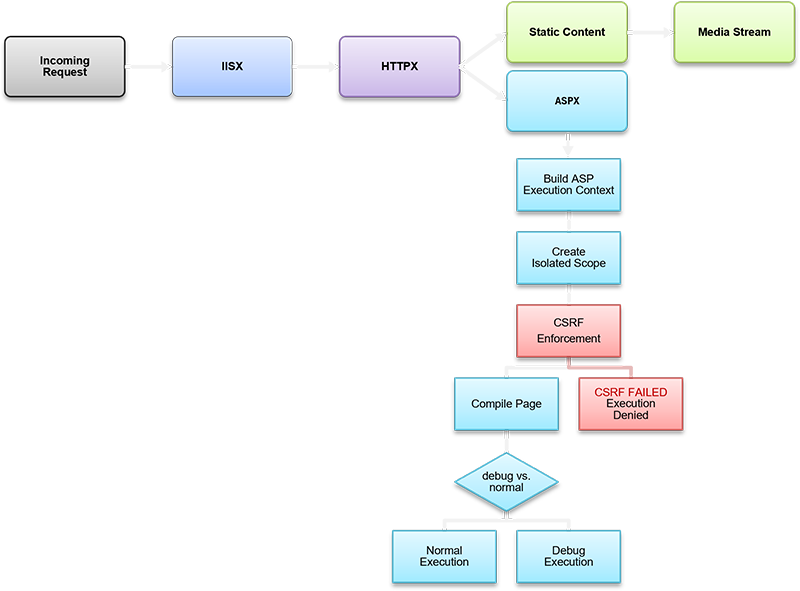
Request Lifecycle (high level)
-
Admission:
HTTPX.jspasses a normalized request toASPRuntime. -
Context:
ASPRuntimecreatesASPContextand attaches intrinsics (Request/Response/Session/Application/Server). -
Security Preflight: validate CSRF (if required),
check site policy switches (CSP/CORS already applied by
HTTPX.js). - Compilation/Binding: resolve the target page, compile ASP → JS, cache artifacts, bind mapping tables.
-
Execution: call page entry with
ASPContext(sync/async allowed). - Commit & Cleanup: flush buffers, finalize cookies/headers, fire teardown hooks, process JIT sessions, release references.
Compilation & Caching Pipeline
- Resolver: maps virtual path to site-rooted absolute file.
- Preprocessor: handles directives (e.g., includes), normalizes encodings, and prepares a single logical unit.
-
Transpiler: converts ASP blocks + inline script
into strict JS with an
execution wrapper that receives
ASPContext. - Mapping Tables: produce line/column maps from compiled JS to original ASP; cached alongside the compiled artifact.
- Hot Cache: compiled JS and mappings are cached per site with invalidation on file change (mtime/hash).
Debugger & Mapping Integration
- Emits stable object identities and canonical evaluate names so the VSCode extension can inspect variables across frames.
- Exposes mapping lookups: given a compiled location (file:line:col), return the corresponding ASP source location (and vice versa where applicable).
-
Supports mixed stepping: when pausing in compiled
JS generated from
.asp, the debugger UI can show the original ASP line.
Concurrency & Determinism
-
Per-request isolation: one
ASPContextper request; no sharing of mutable state except viaApplication(guarded by locks). - Async correctness: all I/O awaited; response commit guarded so headers/cookies finalize exactly once.
- Session Mutex: session creation/lookup is serialized to avoid duplicate SIDs and lost updates.
- Idempotent Teardown: teardown hooks always run (success or error); JIT sessions end immediately after response completes.
Security Responsibilities
-
CSRF Validation: the canonical gate that checks
token presence/equality across
form/query/header/cookie surfaces against
Session.CSRFToken; failure short-circuits the request and can signal the autoban/rate-limit pipeline. -
Form Integrity & Cookie Policy: coordinates
with
Responseso tokens and secure cookie attributes are consistently applied. - Surface Minimization: only the sanctioned ASP objects plus the page’s locals are exposed to page code; no ambient Node internals leak.
Error Handling & Observability
-
Structured Exceptions: wraps thrown errors into
Exception(ERRX) enriched with URL, IP, user-agent, and source mapping back to ASP line. - Uniform Client Output: consistent 5xx/4xx responses; sensitive data never echoed.
- Telemetry Hooks: records session starts/ends, JIT disposals, CSRF denials, and compilation faults for site analytics.
Performance Characteristics
-
Zero-copy request data where feasible;
single-pass parsing in
Request. - Compile-once with cache reuse; fast invalidation on mtime/hash change.
- Streaming-aware response: buffering compatible with Node streams to serve large payloads without sacrificing ASP semantics.
- Low-overhead mapping: mapping lookups are O(1)/O(log n) via table offsets; no recomputation on hot paths.
Compatibility Notes vs Classic ASP
- Execution is async-capable; long I/O does not block the process.
- CSRF, secure cookies, and strict headers are framework defaults, not per-page conventions.
-
Server.CreateObjectis curated (framework objects) rather than arbitrary COM activation. - Compilation targets modern JS; VBScript quirks are intentionally not emulated.
Innovations Beyond Classic ASP
-
First-class compiled→source mappings enabling
line-accurate debugging from generated JS back to
.asp. - Policy-driven CSRF choreography that spans Request, Session, and Response with automatic form token injection.
- Deterministic lifecycle (context build → policy gate → compile → execute → commit → teardown) designed for idempotence and observability.
- JIT session mode for ephemeral interactions where state must not persist beyond a single request.
- Cache-coherent compilation with safe invalidation, giving static-site-like responsiveness for dynamic ASP pages.
💡 Why It Matters
ASPRuntimeis the brain of the framework: it preserves Classic ASP’s developer ergonomics while delivering modern guarantees—async safety, strong security defaults, and source-accurate debugging. By centralizing compilation, policy, and lifecycle, it makes page execution predictable, observable, and fast, turning legacy semantics into a production-grade Node.js runtime. The result is a platform where classic patterns and contemporary engineering co-exist without compromise.
4.1.7 ASPContext
Objectives
-
Represent the per-request environment that ties
together all ASP intrinsic objects (
Request,Response,Session,Application,Server). - Provide a single handle that the ASP runtime and compiled page function can use to access the correct state for the current request.
- Act as the parent container for debugging, context proxies, CSRF tokens, and lifecycle state.
Object Model & Lifecycle
-
Created by
ASPRuntimeat the start of every request. -
Holds references to:
Request(ASPRequest)Response(ASPResponse)-
Session(ASPSession, created or restored if SID cookie present) Application(ASPApplication, per site)Server(ASPServer, per site)
- Contains execution metadata: site handle, URL, method, start time, and async mode flag.
-
Passed as
ctxinto the compiled ASP page function. -
In debug mode,
ctxis also registered inglobalThis.__asp_debug_ctx[ctxid]so the VSCode debugger can resolve locals.
Responsibilities
- Context Assembly: ensures all intrinsics are instantiated and wired consistently.
-
Debug Scope Proxy: builds the
executionContextproxy used in thewith(executionContext){…}wrapper so page code seesRequest,Response, etc. as globals. -
Lifecycle Control: manages
async()toggle, finalization hooks, and context cleanup after the response flush. - Security: provides a trusted channel for CSRF token injection and validation.
-
Teardown: releases references to prevent leaks; in
debug mode, expires
__asp_debug_ctxentries after a short timer.
Innovations Beyond Classic ASP
-
Proxy-based scope binding: Classic ASP used ambient
globals; here, a
Proxyoverctx+globalThisensures names resolve predictably and are debugger-visible. -
Debug context map: Multiple concurrent debug
sessions can run safely, keyed by unique
ctxid. -
Async toggle: Pages can explicitly declare async
execution (
ctx.async()), a feature that never existed in Classic ASP. - Uniform lifecycle hooks: Finalization and cleanup run deterministically regardless of exceptions, ensuring consistent request boundaries.
Differences vs Classic ASP
-
Classic ASP globals were injected by IIS; here they are
scoped explicitly via
ctxand a proxy wrapper. - Debug integration (context maps, proxy traps, mapping tables) is a new feature designed for modern IDEs.
- Async handling and explicit teardown are modern guarantees not present in legacy ASP.
- Site-aware context (per-site Application, security policies) replaces machine-wide hosting assumptions from IIS.
💡 Why It Matters
ASPContextis the spinal cord of ASP.js: it carries every intrinsic, tracks per-request state, and enables source-accurate debugging.
By combining classic semantics with proxy-based scope control and async awareness, it ensures each request is isolated, debuggable, and secure, forming the foundation on which the ASP emulation rests.
4.2 ERRX.js – Exception Handling
Objectives
-
Extend JavaScript’s native
Errorinto a richerExceptionclass suitable for Classic ASP emulation and enterprise-grade diagnostics. - Provide uniform error capture, logging, and reporting across all tiers: ASP runtime, Site Manager, ORM, and security modules.
- Support both developer-friendly stack traces and production-grade logging (to files, databases, or monitoring dashboards).
-
Integrate tightly with the ASP lifecycle so exceptions can be
surfaced in
Response, tracked in sessions, and audited by site policies.
Exception Model
-
Base Class:
Exceptionderives fromError, adding structured fields:-
Name,Message,Stack(from Error) -
Site,URL,Method,UserAgent,IPv4(request context) InnerException(nesting support)-
Severity,Category,Tags(classification for logging/alerting)
-
-
Extended Features:
- Timestamped creation.
- Unique exception ID for correlation across logs.
-
Methods:
toString(),toJSON(),logToFile(),logToDatabase().
-
Augmented Stack Trace: Captures both Node.js trace
and ASP runtime mappings back to source
.asplines.
Integration Points
-
ASP Runtime: All unhandled exceptions inside pages
are wrapped in
Exceptionand passed throughERRX. - ASPResponse: In development, exceptions may render as formatted HTML with ASP source mapping; in production, generic error pages are sent.
- Site Manager: Exceptions can be recorded per-site, correlated with request/session for auditing.
-
Debugger: Exceptions raised during execution are
surfaced with original ASP line numbers using mapping tables from
ASPX.js. - Security Modules: BANX and RATEX can escalate repeated exceptions (e.g., CSRF failures, flood detection) into bans or throttles.
Innovations Beyond Classic ASP
-
Structured Exception Data: Classic ASP’s
Errobject only exposed number/description. Here, exceptions carry full context (URL, method, user identity). -
Nested Exceptions: Chain errors across async
boundaries (
InnerException). - Cross-Layer Logging: Same class logs to file, database, or event sinks; no duplication of logic.
- Mapping-Aware Stacks: Developers see errors pinned to the original ASP source, not only the compiled JS.
- Severity & Tagging: Enables monitoring tools to prioritize critical exceptions vs warnings.
Differences vs Classic ASP
-
Classic ASP offered only
Err.Number,Err.Description,Err.Source. No structured logging or stack traces. - ASP.js exceptions integrate with modern Node.js error handling while preserving ASP-like accessibility.
- Enhanced logging targets (files, DB, dashboards) were not part of Classic ASP.
- Exceptions are first-class citizens in the debugger, not opaque runtime errors.
💡 Why It Matters
ERRX.jsturns error handling into a predictable, structured, and observable part of the framework. Developers gain richer diagnostics than Classic ASP ever provided, with direct source mapping, contextual logging, and full lifecycle integration. The result: faster debugging in development and stronger audit/compliance guarantees in production.
5. Part V – Data Access & ORM
Contents
-
5. Part V – Data Access & ORM
- 5.1 SQLX.js – Database Abstraction
-
5.2 Native Data Engine Deep Dive
- 5.2.1 Overview
- 5.2.2 Dataset — Design Contracts & Lifecycle
- 5.2.3 DataField — Type System & UI/Lookup Metadata
- 5.2.4 SQLite Driver — Runtime Behaviors
- 5.2.5 Lookups — Caching, Filtering, Reverse Mapping
- 5.2.6 Pivot Engine — Virtual Table + SQL Macros
- 5.2.7 Audit — Table, Triggers, Attribution
- 5.2.8 Performance Characteristics
- 5.2.9 Current Scope & Limitations
-
5.3 ORMX.js – Object Relational Mapper
- 5.3.1 Overview & Goals
- 5.3.2 Datastream Transport (Backstage ⇄ Browser)
- 5.3.3 Dynamic SQL Engine (Filters & SHAPE)
- 5.3.4 Dynamic Field Wrappers (Auto Getters/Setters)
- 5.3.5 Dynamic Detail Wrappers (Iterators + Active-Record View)
- 5.3.6 The ORM Proxy (Why it’s required & how it’s used)
- 5.3.7 Dataset Wiring & Lookups (at Read time)
- 5.3.8 Error-Handling Philosophy
-
5.4 ORM Examples
- 5.4.1 Smallest possible ORM (table → iterate)
- 5.4.2 Filtered read (WHERE compiler, limit/order)
- 5.4.3 Insert / Update with dynamic field wrappers
-
5.4.4 JOINs + calculated fields (same shape as
EventItem) - 5.4.5 Master–Detail (SHAPE): Event → EventItems (+ JOIN) & EventArtists
- 5.4.6 Dictionary model (key/value via metadata)
- 5.4.7 Custom SQL / View models (pivot-friendly)
-
5.4.8 Validation before
Write()(required fields, formats, FK sanity) - 5.4.9 Linked-object accessors (lazy getters vs. JOINs)
5.1 SQLX.js – Database Abstraction
Objectives
-
Provide a native-performance database layer (Windows-only for now) with a Node.js bridge to compiled SQLX Data Access Engine.
-
Expose an ADO-like Dataset: cursor-based, hierarchical recordsets, metadata-rich
DataFields, and master–detail relations.Sample SQLX Dataset Code:
// Create an instance of the SQLX.Dataset object for database operations const dataset = Server.CreateObject("SQLX.Dataset"); // Map the relative path to the SQLite database file to an absolute path const database_path = Server.MapPath("../.data/database.db"); // Open the database and execute a SELECT query on the TEST table if (dataset.open(database_path, "SELECT * FROM TEST")) { // Start generating an HTML table to display the data Response.Write("<table class='DATAGRID' rules='all'>"); // Generate the table header Response.Write("<thead>"); Response.Write("<tr>"); for (let i = 0; i < dataset.fieldCount; i++) { // Access field metadata by index const f = dataset.fieldByIndex(i); // Write the field name as a table header Response.Write("<th nowrap>" + f.NAME + "</th>"); } Response.Write("</tr>"); Response.Write("</thead>"); // Generate the table body, iterate through each record in the dataset Response.Write("<tbody>"); while (!dataset.DB_EOF) { Response.Write("<tr>"); for (let i = 0; i < dataset.fieldCount; i++) { // Access the field value for the current row by index const f = dataset.fieldByIndex(i); // Write the field value as a table cell Response.Write("<td nowrap>" + f.value + "</td>"); } Response.Write("</tr>"); // Move to the next row in the dataset dataset.moveNext(); } Response.Write("</tbody>"); // Close the table Response.Write("</table>"); } -
Offer simple entry points for one-shot queries and commands (
Run,Exec) while enabling advanced dataset behaviors (constraints, lookups, caching, auditing).SQLX Run and Exec methods:
/** * Executes a SQL query and returns a result set. * * @param {string} SQL - The SQL query string to execute. * @param {string} [ConnectionString] - Optional connection string; uses default if not provided. * @returns {object} Dataset result set object. * @throws {Exception} If the query fails to open. */ function Run(SQL, ConnectionString) { const rs = new SQLX.Dataset(); ConnectionString = SQLX.Database.NormalizeConnectionString(ConnectionString); if (!rs.open(ConnectionString, SQL)) throw new Exception(`SQLX.Run failed ${rs.getLastError()}`); return rs; } /** * Executes a parameterized SQL command (e.g. INSERT, UPDATE, DELETE). * * @param {string} SQL - The SQL command string with parameter placeholders. * @param {any[]} Params - Array of array of parameter values [ [a,b,c] ] * @param {string} [ConnectionString] - Optional connection string; uses default if not provided. * @throws {Exception} If the connection or execution fails. */ function Exec(SQL, Params, ConnectionString) { const rs = new SQLX.Dataset(); ConnectionString = SQLX.Database.NormalizeConnectionString(ConnectionString); if (!rs.open(ConnectionString)) throw new Exception(`Exec failed ${rs.getLastError()}`); if (!rs.exec(SQL, Params)) throw new Exception(`SQLX.Exec failed ${rs.getLastError()}`); } -
Centralize driver lifecycle (load, cache, backup) and error logging to the Exceptions table (no throws).
Architecture & Drivers
-
Native Extension Loader: SQLX.js normalizes connection strings, selects the correct
.nodebuild (CPU/Node ABI), and loads the native engine.SQLX Native Extension Loader fragment:
/** * Loads the platform-specific SQLX native module for Windows. * Logs errors to console if loading fails. */ LoadNativeModule() { if (process.platform !== "win32") { console.error("SQLX native module is only available for Windows."); return; } let arch = process.arch === 'ia32' ? 'x86' : process.arch; const version = process.versions.node; try { const filename = path.join(__dirname, '..', 'bin', `SQLX_v${version}_${arch}.node`); this.m_native = require(filename); } catch (error) { console.error(`Failed to load SQLX native module for Node.js ${version} (${arch})`, error); } } -
Driver Surface: Declares multiple drivers (
SQLite,MySQL,MSSQL,Oracle,Firebase,OLEDBX) but onlySQLiteis implemented at present; others are stubbed for forward compatibility. -
Driver Cache: Utilities for clearing and inspecting the cache (e.g., multiple connections/connection pooling reuse).
-
Backup: Provides a consistent backup routine for supported drivers (SQLite implemented).
Core Types (from the native API)
SQLX Native Node.js Dataset Class:
-
Dataset– the primary, cursor-based recordset with ADO-like navigation and editing semantics.export const SQLITE_COLUMN_FLAGS: { IS_UNIQUE: number; IS_KEYCOLUMN: number; IS_SEARCHABLE: number; IS_COMPUTED: number; IS_AUTOINCREMENT: number; IS_SORTABLE: number; IS_WRITABLE: number; IS_SEARCHABLE_LIKE: number; IS_NULLABLE: number; IS_ROWID: number; IS_FIXED_LENGTH: number; HAS_DEFAULT: number; UI_HIDDEN: number; UI_CLIENT: number; UI_EDITABLE: number; }; export const RECORD_STATUS: { RECORD_NO_RECORD: number; RECORD_UNCHANGED: number; RECORD_CHANGED: number; RECORD_INSERTED: number; RECORD_DELETED: number; RECORD_EDITABLE: number; RECORD_ALL: number; }; // Dataset Interface export class Dataset { // --- Main methods --- /** Returns the numeric driver identifier for the dataset */ getDriver(): number; /** Sets the dataset codepage (character encoding) */ setCodePage(codepage: number): number; /** Adds a new column definition to the dataset with extended metadata options */ AddColumn( ordinal: number, name: string, type?: number, precision?: number, scale?: number, length?: number, flags?: number, baseColumnName?: string, baseTableName?: string, id?: string, lcid?: number, size?: number, declaredType?: string, lookupTable?: string, lookupIdColumn?: string, lookupValueColumn?: string, sqliteDataType?: number, defaultValue?: string ): boolean; /** Adds a new record (row) to the dataset */ AddRecord(values: any[] | any[][]): boolean; /** Opens a schema from a connection string with a given schema type */ openSchema(connectionString: string, schema: number): boolean; /** Creates a backup of the database from srcFile to dstFile */ backup(srcFile: string, dstFile: string): boolean; /** Opens a dataset with optional SQL and metadata/shape information */ open(connectionString: string, sql?: string, metadataOnly?: boolean, shapeInfo?: string | object): boolean; /** Opens a shaped dataset (hierarchical data) with metadata options */ shape(connectionString: string, shapeInfo: string, metadataOnly?: boolean): boolean; /** Returns a detail dataset (child table) by name */ detail(detailName: string): Dataset | null; /** Reopens the dataset using the original parameters */ reopen(): boolean; /** Executes a SELECT SQL statement and loads results */ select(sql: string): boolean; /** Executes an SQL statement with optional parameter values */ exec(sql: string, params?: any[]): boolean; /** Re-queries the dataset, optionally preserving the bookmark position */ requery(useBookmark?: boolean): boolean; /** Sorts dataset records by field (name or index), ascending or descending */ sort(field?: string | number, ascending?: boolean): boolean; /** Closes the dataset */ close(): boolean; /** Creates an audit table for change tracking */ CreateAuditTable(connectionString?: string, auditTable?: string): boolean; /** Creates triggers for auditing multiple tables */ CreateAuditTriggers(tableNames: string[]): boolean; /** Adds an index on given fields */ addIndex(fields: string): boolean; /** Removes an index by name */ removeIndex(indexName: string): boolean; /** Rebuilds indexes in the dataset */ reindex(): boolean; /** Locates a record by field name and value */ locate(fieldName: string, fieldValue: string | number): boolean; // --- Record navigation --- /** Moves cursor to a specific record index */ move(recordIndex: number): boolean; /** Moves cursor to the first editable record */ moveFirst(): boolean; /** Moves cursor to the last editable record */ moveLast(): boolean; /** Moves cursor to the next editable record */ moveNext(): boolean; /** Moves cursor to the previous editable record */ movePrev(): boolean; /** Returns true if the dataset cursor has moved */ moved(): boolean; /** Moves cursor to the first record (editable or deleted) */ first(): boolean; /** Moves cursor to the last record (editable or deleted) */ last(): boolean; /** Moves cursor to the next record (editable or deleted) */ next(): boolean; // --- Record status --- /** Returns current record status */ status(): number; // --- Field access --- /** Returns a DataField object by index or name */ field(indexOrName: number | string): DataField; /** Returns a DataField object by numeric index */ fieldByIndex(index: number): DataField; /** Returns a DataField object by field name */ fieldByName(name: string): DataField; /** Gets the raw string value for a record/field */ getValue(recordIndex: number, fieldIndex: number): string; /** Gets a typed value with optional conversions for dates, decimals, or JSON */ getTypedValue(recordIndex: number, fieldIndex: number, returnDates?: boolean, returnDecimalsAsStrings?: boolean, returnParsedJSON?: boolean): any; /** Updates a field value in a record */ putValue(recordIndex: number, fieldIndex: number, value: any): boolean; // --- Record operations --- /** Returns lookup constraints for a column */ getLookupConstraints(ordinal: number, type?: string): object; /** Appends a new record */ insertRecord(): boolean; /** Deletes the current record */ deleteRecord(): number; /** Deletes multiple records by index */ deleteRecords(indexes: number[]): boolean; /** Deletes records matching a field value, returns the number of records deleted */ deleteRecordsByValue(fieldName: string, fieldValue: any): number; /** Applies updates to the underlying storage */ update(): boolean; /** Normalizes dataset by removing deleted records and clearing changed flags on rest */ normalize(): boolean; /** Invalidates cached lookup values */ invalidateLookupCache(): void; // --- Transactions --- /** Begins a transaction */ transactionBegin(): boolean; /** Commits the current transaction */ transactionCommit(): boolean; /** Rolls back transaction to a given savepoint */ transactionRollback(savepoint: string): boolean; // --- Bookmarking --- /** Returns a bookmark buffer for the current record */ getBookmark(): ArrayBuffer; /** Restores dataset position using a bookmark */ setBookmark(buffer: string | ArrayBuffer): boolean; /** Returns true if current record has been modified */ modified(): boolean; // --- Diagnostics --- /** Returns the last error message */ getLastError(): string; // --- Record counts / matrix --- /** Returns total number of records, optionally filtered by status */ recordCount(status?: number): number; /** Maps a row index to a record index given optional status * It is intented to map editable records to visible datagrid rows */ row_to_record(rowIndex: number, status?: number): number; /** Gets a value by row/column matrix position */ getMatrix(row: number, col: number): string; /** Updates a value in the row/column matrix */ putMatrix(row: number, col: number, value: string): boolean; // --- Import/Export --- /** Loads dataset contents from a Base64 string */ loadBase64(base64String: string): boolean; /** Exports dataset to Base64 encoded buffer */ toBase64(): ArrayBuffer; /** Loads dataset contents from a byte buffer */ loadBytes(buffer: ArrayBuffer): boolean; /** Exports dataset to raw bytes */ toBytes(): ArrayBuffer; /** Exports dataset to ArrayBuffer */ toArrayBuffer(): ArrayBuffer; /** Opens dataset directly from ArrayBuffer */ openFromArrayBuffer(buffer: ArrayBuffer): boolean; // --- Special --- /** Applies lookup filters to a related dataset */ setLookupFilters(datasetName: string, filters: object): void; // --- Properties --- /** Number of fields in the dataset */ readonly fieldCount: number; /** True if positioned before the first record */ readonly DB_BOF: boolean; /** True if positioned after the last record */ readonly DB_EOF: boolean; /** Current record index */ readonly recordIndex: number; /** If true, updates changed records inside transactions */ UpdateInTransaction: boolean; /** If true, dataset is requeried automatically on update */ RequeryOnUpdate: boolean; /** Enables lookup constraints based on metadata */ EnableMetadataLookupConstraints: boolean; /** Enables caching of lookup values */ EnableLookupCache: boolean; /** Arbitrary user signature stored with operations */ UserSignature: string; /** Name of the audit table used for tracking changes */ AuditTable: string; /** User identifier used in auditing */ AuditUser: string; /** Placeholder string used for NULL values */ StringForNull: string; /** If true, date fields return native Date values */ ReturnDateValues: boolean; /** If true, decimals are returned as strings */ ReturnDecimalsAsStrings: boolean; /** If true, JSON fields are parsed into objects */ ReturnParsedJSON: boolean; }-
Record Navigation: move-first/last, next/prev;
RecordCount,EOF/BOF.Sample Code with Dataset cursor navigation:
// Create the native SQLX Dataset const ds = new SQLX.Dataset(); ds.stringForNull = 'null'; ds.setCodePage(CP_UTF8); ds.EnableMetadataLookupConstraints = false; // Open a Database connection if (ds.open(ConnectionString, SQL)) { // Move to first record ds.moveFirst(); // Loop on all records while (!ds.DB_EOF) { // Load filed by name const id = ds.fieldByName('id').value; const value = ds.fieldByName('value').value; // Load all other field values for (let i = 0; i < ds.fieldCount; i++) { const field = ds.field(i); const name = field.NAME.toLowerCase(); } // Move cursor ds.moveNext(); } } -
Editing Model: add/edit/delete;
RecordStatusflags (unchanged, added, modified, deleted);UpdateInTransaction,RequeryOnUpdate.Sample Code with Dataset CRUD operations:
const dataset = new SQLX.Dataset(); dataset.open(ConnectionString, SQL); dataset.insertRecord(); dataset.fieldByName(originalFieldName).value = newValue; dataset.moveLast(); dataset.delete(); -
Hierarchies: master–detail datasets (SHAPE-like) with joined detail sets and foreign-key constraints driven by metadata.
SHAPE SQL command Syntax:
SHAPE
(
  SELECT * FROM [Users] WHERE [WHERE]; -- WHERE [WHERE] and semicolon are required
)
AS [Users]
APPEND
(
  ( SELECT * FROM [UserCredentials] WHERE [WHERE]; ) -- WHERE [WHERE] and semicolon are required
  RELATE [UserCredentials].[UserID] TO [Users].[UserID]
  AS [UserCredentials]
);
Using SHAPE SQL with SQLX Datasets:
const SQL = `SHAPE (...);`;

const master = new SQLX.Dataset();

// read ALL master and ALL detail records
master.open(ConnectionString, SQL);

for (master.moveFirst(); !master.DB_EOF; master.moveNext()) {

  const userId   = master.fieldByName('UserID').intValue;
  const userName = master.fieldByName('UserName').value;

  // obtain the detail dataset by its SHAPE alias
  const detail = master.detail('[UserCredentials]');

  // iterate detail record for the current master record
  for (detail.moveFirst(); !detail.DB_EOF; detail.moveNext()) {

    const credId   = detail.fieldByName('CredentialID').intValue;
    const provider = detail.fieldByName('Provider').value;
    const hash     = detail.fieldByName('PasswordHash').value;

    console.log(`[${userId}:${userName}] -> cred ${credId} @ ${provider} (${hash.slice(0, 8)}...)`);
  }
}
-
-
Metadata-Rich Fields: each column is a
DataFieldwith type, size/length, precision/scale, flags, constraints, UI hints (format, validation, control type, CSS), and lookup descriptors (lookup table/id/value).Native Node.js DataField Class:
// DataField Interface export class DataField { value: string | number | boolean | Date | object | null; // Current field value, varies by DB type lookupValue: string | null; // Display value from lookup table (if any) readonly isNull: boolean; // True if the field is NULL readonly intValue: number; // Value coerced to signed integer readonly uintValue: number; // Value coerced to unsigned integer readonly floatValue: number; // Value coerced to float (single precision) readonly doubleValue: number; // Value coerced to double (double precision) readonly boolValue: boolean; // Value coerced to boolean readonly ORDINAL: number; // Column ordinal position in dataset readonly ID: string; // Unique metadata identifier readonly NAME: string; // Column name as defined in query/schema readonly BASECATALOGNAME: string; // Originating catalog name (if provided) readonly BASESCHEMANAME: string; // Originating schema name readonly BASETABLENAME: string; // Originating table name readonly BASECOLUMNNAME: string; // Originating column name in base table readonly TYPE: number; // SQLX_VARTYPE enum (internal variable type) readonly SQLX_DATATYPE: number; // SQLite internal type code readonly DECLARED_TYPE: string; // Declared SQL type (TEXT, INT, etc.) readonly LCID: number; // Locale identifier for collation readonly PRECISION: number; // Numeric precision (total digits) readonly SCALE: number; // Numeric scale (digits after decimal) readonly SIZE: number; // Storage size in bytes readonly LENGTH: number; // Maximum length of string/binary data readonly FLAGS: number; // Column flags (nullable, PK, etc.) readonly DEFAULTVALUE: string; // Default value expression (if defined) readonly CHECK_CONSTRAINTS: string; // SQL CHECK constraint(s) definition readonly UI_HINT: string; // UI rendering hint (e.g., “multiline”) readonly UI_FORMAT: string; // Display format string (e.g., “dd/MM/yyyy”) readonly UI_VALIDATION: string; // Validation rules/regex for UI readonly UI_CONTROL: string; // Suggested UI control type (textbox, select) readonly UI_CSS: string; // CSS class hints for UI styling readonly LOOKUP_TABLE: string; // Related lookup table name readonly LOOKUP_ID_COLUMN: string; // Column holding lookup key readonly LOOKUP_VALUE_COLUMN: string; // Column holding lookup display text } -
Lookup Resolution: optional metadata-driven lookups (FK → caption/value) with an enable/disable switch and lookup cache (per-dataset) for performance.
⚡For defining Lookups in SQLite databases please download and use mobileFX SQLite Express.
-
Audit & Identity:
AuditTable,AuditUser,UserSignaturesurface audit-friendly writes and change attribution.this.dataset = new Dataset; this.dataset.UserSignature = Session.SessionID; // User-defined Data Integrity Tail this.dataset.AuditUser = Session.AuditUser; // User-defined Data Access Tag -
Return Modes:
ReturnDateValues(Date objects),ReturnDecimalsAsStrings,ReturnParsedJSONfor typed or pre-parsed values. -
String Nulls:
StringForNullto standardize UI rendering of DB nulls. -
Constraints:
EnableMetadataLookupConstraintsenforces foreign-key validations from metadata before committing edits. -
DataField– typed field descriptor bound to a dataset column.- Type/Flags: SQL type, precision/scale/length, nullability, computed/readonly flags.
- Constraints: default value, check constraints (expressions).
-
UI Hints:
UI_HINT,UI_FORMAT,UI_VALIDATION,UI_CONTROL,UI_CSS. -
Lookup Info:
LOOKUP_TABLE,LOOKUP_ID_COLUMN,LOOKUP_VALUE_COLUMNenabling FK captioning.
-
Datastream– streaming transport for datasets (used by Backstage). -
Enums & Flags:
DriverType,RecordStatus,ColumnFlags(readonly, identity, computed, nullable, etc.).
Convenience Layer
-
Run(sql, [conn])– Execute a query and return aDatasetready for navigation (single resultset). -
Exec(sql, params, [conn])– Execute commands (INSERT/UPDATE/DELETE), return affected counts/keys. -
Errors from both paths are
logged via the framework’s
Exceptionfacility into the Exceptions table and do not throw; callers should check return status where applicable.
Editing & Commit Semantics
- In-Place Editing: records are edited in the dataset; status flags track pending changes.
-
Commit Flow: when committing, optional
transactional updates
(
UpdateInTransaction) and post-commit requery (RequeryOnUpdate) keep the dataset synchronized. - Constraints & Lookups: before commit, metadata constraints validate FK integrity; lookup caching avoids redundant roundtrips for caption values.
- Auditing: if configured, updates include user signature and write to an audit table (table- and column-level attribution).
Interoperability with ORMX.js
- SQLX.js focuses on the low-level data plane (types, cursors, edits, constraints, lookups).
- ORMX.js builds on top to provide entity mappings, model classes, and controller-facing behaviors (e.g., data binding to Backstage components).
-
Guidance: Use
Datasetdirectly for reporting, data-entry forms, and hierarchical views; use ORMX for domain-model code and business rules.
Limitations & Current Scope
- Windows-only native extension at this time.
- SQLite implemented; other drivers are placeholders.
- Error handling is log-first (no throws), so application code should check results and consult logs/Exceptions table when failures occur.
💡 Why It Matters
SQLX.jsdelivers an ADO-like developer experience—hierarchical, cursor-based datasets with rich metadata—on a modern Node.js stack. It pairs UI-aware fields, lookup resolution, constraints, and auditing with a fast native engine, letting you build data-heavy screens and workflows without hand-rolling boilerplate. By separating the dataset engine (SQLX) from the entity layer (ORMX), the framework keeps performance predictable while giving you a clean path to higher-level modeling.
5.2 Native Data Engine Deep Dive
5.2.1 Overview
The native SQLX engine implements an ADO-inspired Dataset with rich DataField metadata and a high-performance SQLite driver. It provides cursor navigation, in-place editing, master–detail hierarchies, UI/validation hints on columns, metadata-driven lookups, a pivot virtual table with SQL macros, and zero-ceremony auditing.
5.2.2 Dataset — Design Contracts & Lifecycle
-
Construction defaults
- Safe, predictable flags; edit status tracking enabled.
-
Deterministic teardown via
close(); no leaked handles.
-
Driver cache (per thread)
- Reuses connections for identical connection strings.
- Self-quarantines on corruption; cache can be disabled if a driver misbehaves.
-
Transactions
- RAII guard (begin/commit/rollback); rollback on scope exit if not committed.
-
Optional
UpdateInTransactionwraps multi-record changes atomically.
-
Schema/metadata reads
- Performed with constraints temporarily relaxed, then restored; avoids FK/UI metadata interfering with discovery.
-
Error model
- Errors accumulated on the dataset; last error introspectable.
- Call sites in JavaScript log to Exceptions rather than throwing.
Cursor & editing surface (selected)
-
Navigation:
BOF/EOF,RecordCount,MoveFirst/Last/Next/Prev. -
Editing:
AddNew,Edit,Delete, field assignment throughDataFields. -
Status:
RecordStatusflags (Unchanged, Added, Modified, Deleted). -
Refresh:
RequeryOnUpdate(post-commit sync),Requery(manual).
Hierarchies
- Parent/child datasets (master–detail) with metadata-driven joins and FK integrity checks.
- Optional lookup resolution for FK columns (caption values) with per-field caches.
5.2.3 DataField — Type System & UI/Lookup Metadata
Each column is a DataField with
database facts + UI semantics:
-
Type normalization
-
SQL types normalized to a compact
SQLX_VARTYPE(integers, reals, currency, date/time, text, blob, JSON, HTML5, ENCRYPTED, ENUMFLAGS, etc.).SQLX Data Types:
// Compatibility with ADO const SQLX_DBTYPEENUM = { SQLX_DBTYPE_EMPTY: 0, SQLX_DBTYPE_NULL: 1, SQLX_DBTYPE_I2: 2, SQLX_DBTYPE_I4: 3, SQLX_DBTYPE_R4: 4, SQLX_DBTYPE_R8: 5, SQLX_DBTYPE_CY: 6, SQLX_DBTYPE_DATE: 7, SQLX_DBTYPE_BSTR: 8, SQLX_DBTYPE_IDISPATCH: 9, SQLX_DBTYPE_ERROR: 10, SQLX_DBTYPE_BOOL: 11, SQLX_DBTYPE_VARIANT: 12, SQLX_DBTYPE_IUNKNOWN: 13, SQLX_DBTYPE_DECIMAL: 14, SQLX_DBTYPE_UI1: 17, SQLX_DBTYPE_ARRAY: 0x2000, SQLX_DBTYPE_BYREF: 0x4000, SQLX_DBTYPE_I1: 16, SQLX_DBTYPE_UI2: 18, SQLX_DBTYPE_UI4: 19, SQLX_DBTYPE_I8: 20, SQLX_DBTYPE_UI8: 21, SQLX_DBTYPE_GUID: 72, SQLX_DBTYPE_VECTOR: 0x1000, SQLX_DBTYPE_RESERVED: 0x8000, SQLX_DBTYPE_BYTES: 128, SQLX_DBTYPE_STR: 129, SQLX_DBTYPE_WSTR: 130, SQLX_DBTYPE_NUMERIC: 131, SQLX_DBTYPE_UDT: 132, SQLX_DBTYPE_DBDATE: 133, SQLX_DBTYPE_DBTIME: 134, SQLX_DBTYPE_DBTIMESTAMP: 135, SQLX_DBTYPE_HTML5: 136, // Special SQLX_DBTYPE_JSON: 137, // Special SQLX_DBTYPE_ENUMFLAGS: 148, // Special SQLX_DBTYPE_ENCRYPTED: 149, // Special }; // SQLX Vartypes const SQLX_VARTYPE = { SQLX_VARTYPE_I1: SQLX_DBTYPEENUM.SQLX_DBTYPE_I1, SQLX_VARTYPE_I2: SQLX_DBTYPEENUM.SQLX_DBTYPE_I2, SQLX_VARTYPE_I4: SQLX_DBTYPEENUM.SQLX_DBTYPE_I4, SQLX_VARTYPE_I8: SQLX_DBTYPEENUM.SQLX_DBTYPE_I8, SQLX_VARTYPE_UI1: SQLX_DBTYPEENUM.SQLX_DBTYPE_UI1, SQLX_VARTYPE_UI2: SQLX_DBTYPEENUM.SQLX_DBTYPE_UI2, SQLX_VARTYPE_UI4: SQLX_DBTYPEENUM.SQLX_DBTYPE_UI4, SQLX_VARTYPE_UI8: SQLX_DBTYPEENUM.SQLX_DBTYPE_UI8, SQLX_VARTYPE_R4: SQLX_DBTYPEENUM.SQLX_DBTYPE_R4, SQLX_VARTYPE_R8: SQLX_DBTYPEENUM.SQLX_DBTYPE_R8, SQLX_VARTYPE_CY: SQLX_DBTYPEENUM.SQLX_DBTYPE_CY, SQLX_VARTYPE_DECIMAL: SQLX_DBTYPEENUM.SQLX_DBTYPE_DECIMAL, SQLX_VARTYPE_BOOL: SQLX_DBTYPEENUM.SQLX_DBTYPE_BOOL, SQLX_VARTYPE_DATE: SQLX_DBTYPEENUM.SQLX_DBTYPE_DBDATE, SQLX_VARTYPE_TIME: SQLX_DBTYPEENUM.SQLX_DBTYPE_DBTIME, SQLX_VARTYPE_DATETIME: SQLX_DBTYPEENUM.SQLX_DBTYPE_DATE, SQLX_VARTYPE_TIMESTAMP: SQLX_DBTYPEENUM.SQLX_DBTYPE_DBTIMESTAMP, SQLX_VARTYPE_BLOB: SQLX_DBTYPEENUM.SQLX_DBTYPE_BYTES, SQLX_VARTYPE_HTML5: SQLX_DBTYPEENUM.SQLX_DBTYPE_HTML5, SQLX_VARTYPE_JSON: SQLX_DBTYPEENUM.SQLX_DBTYPE_JSON, SQLX_VARTYPE_ENUMFLAGS: SQLX_DBTYPEENUM.SQLX_DBTYPE_ENUMFLAGS, SQLX_VARTYPE_ENCRYPTED: SQLX_DBTYPEENUM.SQLX_DBTYPE_ENCRYPTED, SQLX_VARTYPE_STRING: SQLX_DBTYPEENUM.SQLX_DBTYPE_WSTR, }; -
Precision/scale/length carried alongside the normalized type.
-
Storage class recorded (SQLite:
INTEGER,REAL,TEXT,BLOB,NULL).
-
-
Constraints & flags
- Nullability, default value, computed/readonly/identity flags, check constraints.
-
UI hints
-
UI_HINT,UI_FORMAT,UI_VALIDATION,UI_CONTROL,UI_CSS→ drive auto-form generation, formatting, and validation in Backstage or custom UIs.
-
-
Lookup descriptors
-
LOOKUP_TABLE,LOOKUP_ID_COLUMN,LOOKUP_VALUE_COLUMN(+ optional filters). - Allow the dataset to display/store FKs as (id,value) pairs with caching and reverse resolution.
-
5.2.4 SQLite Driver — Runtime Behaviors
-
Connection lifecycle
- Handles prepared statements, busy timeouts, and safe resets after errors.
- Detects irrecoverable states (e.g., corrupt/not-a-DB) and fences the handle.
-
Context UDFs
-
Registers
CURRENT_USER()bound to the current dataset for auditing/attribution.
-
Registers
-
Encoding & pragmas
- Detects database encoding; aligns string conversions accordingly.
-
Transactions
- Defers begin until first write; integrates with the dataset’s RAII guard.
5.2.5 Lookups — Caching, Filtering, Reverse Mapping
-
Local (id,value) cache per field
- Warmed on first use; avoids repeated round-trips for captions.
- Evicts by bound size to keep memory predictable.
-
Forward resolution (id → caption)
- Uses descriptors or, if absent, falls back to first textual column.
- Respects per-field lookup filters (WHERE fragments with safe parameterization policy).
-
Reverse resolution (caption → id)
- Enables assigning captions in editors; resolved to FK id via cache or targeted query.
- On success, updates the underlying FK cell; on miss, flags validation error.
-
Commit-time checks
-
If
EnableMetadataLookupConstraintsis on, unresolved FKs block commit.
-
If
5.2.6 Pivot Engine — Virtual Table + SQL Macros
-
One-liner pivot in SQL
-
Recognizes
FROM PIVOT(Source, RowKey, PivotKey, Value)in statements. -
Rewrites to a temporary in-memory
virtual table
memdb.pivotbacked by a custom VTab implementation for the duration of the query.
-
Recognizes
-
Column synthesis
-
Distinct
PivotKeyvalues become columns;Valuecells are aggregated row-wise. - Missing cells return 0 for numeric aggregates (stable math and UX).
-
Distinct
-
Projection macros
-
PIVOT_COLUMNS(alias.* [, Ex...])→ expands to the generated pivot columns. -
PIVOT_SUM/AVG/MIN/MAX/COUNT/COUNT_NONNULL/COUNT_POSITIVE(alias.*
									[, Ex...])
→ row aggregations over the synthesized columns. - Macros are textual (not parsed inside string/comment literals).
-
-
Contracts & limits
- One
PIVOT(...)per statement. -
Metadata-only probes add
LIMIT 0to keep discovery cheap. - Column order is deterministic (by discovered distinct key); prefilter large domains for performance.
- One
-
SQLX SQLite Driver PIVOT SQL Syntax:
-- PIVOT(SourceTable, GroupByColumn, PivotColumn, AggregationColumn or 1 for count) WITH P AS ( SELECT * FROM PIVOT(CampaignResults, CampaignID, Value, 1) ) SELECT C.[Name], PIVOT_COLUMNS(P.*, CampaignID), PIVOT_SUM(P.*, CampaignID, [no]) AS [Positive], PIVOT_SUM(P.*, CampaignID) AS [Total] FROM P JOIN Campaigns C ON C.[ID] = P.[CampaignID]; -
Actual post-processed SQL executed by SQLite:
-- Create memory database and run custom SQLite PIVOT_ENGINE
ATTACH ':memory:' AS memdb;
CREATE VIRTUAL TABLE memdb.pivot USING PIVOT_ENGINE(
    CampaignResults,
    CampaignID,
    Value,
    1
);

WITH P AS (
    SELECT * FROM memdb.pivot
)
SELECT
    C.[Name],

    -- PIVOT_COLUMNS(P.*, CampaignID) => select all pivot columns except CampaignID
    [P].[yes], [P].[no], [P].[maybe],

    -- PIVOT_SUM(P.*, CampaignID, [no]) AS [Positive] => Sum all pivot columns except CampaignID and [no]
    (COALESCE([P].[yes],0) + COALESCE([P].[maybe],0)) AS [Positive],

    -- PIVOT_SUM(P.*, CampaignID) AS [Total] => Sum all pivot columns except CampaignID
    (COALESCE([P].[yes],0) + COALESCE([P].[no],0) + COALESCE([P].[maybe],0)) AS [Total]
FROM P
JOIN Campaigns C ON C.[ID] = P.[CampaignID];

-- Epilogue
DROP TABLE IF EXISTS memdb.pivot;
DETACH memdb;
5.2.7 Audit — Table, Triggers, Attribution
-
Audit table synthesis
-
Creates a canonical
AuditLogwith:AuditID,Date,AuditUser,Operation,TableName,PrimaryKey,Changes.
-
Creates a canonical
-
Trigger generation
-
Emits
INSERT/UPDATE/DELETEtriggers per target table. - Captures human-readable diffs (“old → new” per changed column).
- Primary key convention: first column unless configured otherwise.
-
Emits
-
User stamping
-
Triggers call
CURRENT_USER()from the driver to attribute changes to the active dataset/user.
-
Triggers call
-
Operations coverage
- UPDATE includes only changed columns; INSERT/DELETE capture full rows as needed.
-
Works with
UpdateInTransaction; failures roll back atomically.
5.2.8 Performance Characteristics
- Dataset operations are O(1) for cursor moves; edits tracked by flags (no hidden copies).
- Lookup reads are O(1) after warm-up; bounded caches keep memory stable.
- Pivot VTab executes in-engine; avoids client-side reshaping.
- Transaction guard eliminates partial writes; driver cache eliminates connection churn.
5.2.9 Current Scope & Limitations
- 🚧 Windows-only native binary at present.
- 🚧 Implemented driver: SQLite (others are declared but not yet implemented).
- 🚧 Errors are logged (Exceptions table) rather than thrown; callers should check results.
- 🚧 Pivot rewriter/macros are textual; avoid embedding them in string/comment literals.
- 🚧 Lookup filters are executed server-side; ensure inputs are validated/quoted.
💡 Why It Matters
SQLX’s native core combines strict metadata, smart caches, and SQLite extensions (UDFs, VTabs) to deliver a dataset that’s both UI-aware and transaction-safe. Lookups render foreign keys as human-readable values without extra queries; pivots become a single SQL construct; auditing is synthesized with readable diffs and user attribution. The result is a high-leverage data layer that preserves ADO ergonomics while exploiting modern SQLite capabilities.
5.3 ORMX.js – Object Relational Mapper
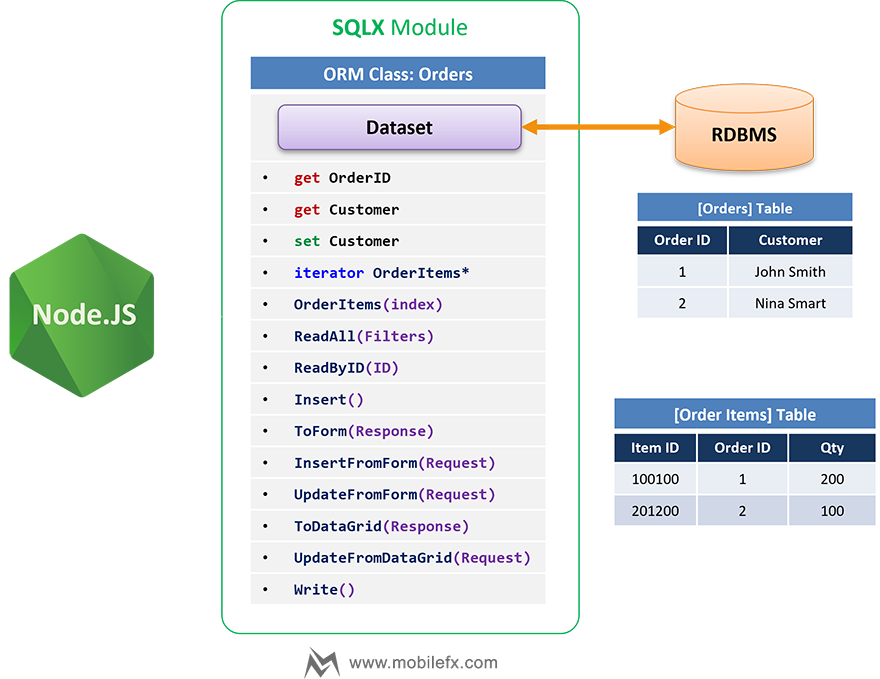
5.3.1 Overview & Goals
ORMBase lifts SQLX datasets into ergonomic JavaScript
objects using three core mechanisms:
- Dynamic SQL composition with robust filters, multiple JOINs and SHAPE-style master–detail queries.
- Dynamic field wrappers that expose dataset columns as JS properties (getters/setters) with editability rules from metadata.
- Dynamic detail wrappers that surface child datasets as iterable collections and per-record accessors.
An instantiated ORM object has a dual nature: it
represents the current record view and it is also a
generator usable in for…of to stream
records.
ORM Master-Detail Business Object Sample:
class User extends SQLX.ORMBase
{
    constructor()
    {
        super();
        this.meta.Class = User;
        this.meta.TableName = '[Users]';
        this.meta.ID = '[Users].[UserID]';
        this.meta.Limit = 0;

        this.AddDetail(UserCredentials,
          '[UserCredentials]',
          '[UserCredentials].[ID]',
          [],
          '[Users].[UserID]',
          '[UserCredentials].[UserID]');

        this.Meta();
    }

    get HasCredentials()
    {
        for (const cred of this.UserCredentials)
            return true;

        return false;
    }

    InsertUserCredential({ UserID, CredentialID, PublicKey, SignCount, Transports })
    {
        const cred = new UserCredentials();
        cred.Insert();
        cred.UserID = UserID;
        cred.CredentialID = CredentialID;
        cred.PublicKey = PublicKey;
        cred.SignCount = SignCount;
        cred.Transports = Transports;
        cred.Write();
    }
};
5.3.2 Datastream Transport (Backstage ⇄ Browser)
ORM objects serialize their bound SQLX datasets into a binary Datastream for fast round-trips. This keeps metadata, rows, state (insert/update/delete), and constraints in one compact payload.
On the client-side (browser), we use an EMSCRIPTEN port of the Node.js Native Dataset. Thus, we can rely on same Dataset API on both the server and the client tiers.
Server: Backstage Model Fetch & Update Endpoints
// Client performs GET/POST to ModelData,
// the function returns a binary Datastream with the requested model
async function ModelData() {
 const { Arguments, Filters: rawFilters = [] } = Request.Body
  ? JSON.parse(Request.Body)
  : {}

 const Filters = rawFilters.map((f) => new SQLX.FILTER(f))
 const modelId = Request.ServerVariables('HTTP_X_SQLX_MODEL_ID')
 const property = Request.ServerVariables('HTTP_X_SQLX_MODEL_PROPERTY')

 let model = new MyApp.CreateModel(modelId, Arguments)

 if (Filters.length) model.meta.Filters = [...model.meta.Filters, ...Filters]

 // If model set length is small, prefetch
 if (model.Length <= 1) await model.Read()

 // Resolve nested property if requested (e.g. master-detail)
 if (property && property !== 'undefined')
  model = property.split('.').reduce((o, k) => o?.[k], model)

 // Serialize dataset (data + metadata + state)
 Response.ContentType = 'application/octet-stream'
 Response.BinaryWrite(model.dataset.toBytes())
 Response.End()
}

// Client performs POST to ModelUpdate,
// accepts a binary Datastream with changes;
// applies constraints and returns requery
async function ModelUpdate() {
 const ab = Request.BinaryRead() // ArrayBuffer

 const dataset = Server.CreateObject('SQLX.Dataset')
 dataset.UserSignature = Session.SessionID
 dataset.AuditUser = Session.AuditUser

 if (!dataset.loadBytes(ab)) throw new Error('Invalid DataStream')

 dataset.RequeryOnUpdate = true // return fresh rows after update
 dataset.EnableMetadataLookupConstraints = true // enforce FK, unique, ranges, etc.

 if (!(await dataset.update())) throw new Error(dataset.getLastError())

 // Send updated snapshot
 Response.ContentType = 'application/octet-stream'
 Response.BinaryWrite(dataset.toBytes())
 Response.End()
}
Client: DataBind Fetch & Update HTTP Calls
// Browse: POST to Backstage,
// Receive binary Datastream,
// Write Datastream to Emscripten Dataset,
// Refresh UI bindings.
async function Browse(dataset, options = {}) {
 dataset.FetchOptions = options // remember last fetch options

 try {
  // Build URL + search params (e.g. paging, search form fields)
  const url = new URL(
   `${this.options.URL}?method=${options.method || 'data'}`, window.location.origin
  )
  if (options.search)
   for (const [k, v] of Object.entries(options.search))
    url.searchParams.append(k, v)

  // Pass model/property via headers to the Backstage endpoint
  const headers = {
   'Content-Type': 'application/json',
   'x-csrf-token': this.options.CSRF,
   'x-sqlx-model-id': options.modelId, // e.g. 'Reservation'
   'x-sqlx-model-property': options.property || '', // e.g. 'Details.Payments'
   ...options.headers
  }

  // Optional server-side arguments/filters
  const body = JSON.stringify({
   Arguments: options.arguments || {},
   Filters: options.filters || [] // client-proposed filters (server still enforces)
  })

  const res = await fetch(url.toString(), { method: 'POST', headers, body })
  if (!res.ok) {
   if (res.status === 520) throw new Error((await res.json()).message)
   throw new Error(`HTTP ${res.status}`)
  }

  // Hydrate dataset from binary stream
  const ui8 = new Uint8Array(await res.arrayBuffer())
  if (!(await dataset.write(ui8))) throw new Error('Invalid DataStream')

  // Repaint DataGrids, forms, etc.
  await this.RefreshBindings(dataset)

 } catch (e) {
  w2utils.notify(('Fetch failed\n' + e.message).replace(/\n/g, '<br>'), { error: true })
 }

 return this
}

// Save: POST dataset deltas as binary to Backstage,
// Server applies constraints and returns re-queried data snapshot.
async function Save(dataset) {
 try {
  // Read current change set (minimal deltas) as Uint8Array
  const ui8 = dataset.read()

  const res = await fetch(`${this.options.URL}?method=update`, {
   method: 'POST',
   headers: {
    'x-csrf-token': this.options.CSRF,
    'Content-Type': 'application/octet-stream'
   },
   body: ui8.buffer
  })

  if (!res.ok) {
   if (res.status === 520) throw new Error((await res.json()).message)
   throw new Error(`HTTP ${res.status}`)
  }

  // Reload dataset from server’s post-update snapshot (with RequeryOnUpdate)
  const uui8 = new Uint8Array(await res.arrayBuffer())
  await dataset.write(uui8)

  // Refresh UI Data Bindings
  await this.RefreshBindings(
   dataset,
   /*rebind*/ false,
   /*preserveSelection*/ true
  )

  w2utils.notify(`Saved OK. Fetched ${dataset.recordCount} records.`, { timeout: 2000 })
 } catch (e) {
  w2utils.notify(('Update failed\n' + e.message).replace(/\n/g, '<br>'), { error: true })
 }

 return this
}
5.3.3 Dynamic SQL Engine (Filters & SHAPE)
-
Descriptor-driven composition: table, id, fields,
calculated fields, joins, groups, orders, distincts, limit/offset,
and optional
CustomSQLare assembled into a finalSELECT. -
WHERE compiler:
-
Nested groups with AND/OR; supports
IN,LIKE,IS NULL/NOT NULL, and aDATE(...)wrapper that is auto-selected from the column datatype (DATE/TIME/DATETIME) or forced by the operator. -
Generates either
WHERE 1=1(stand-alone reads) or the placeholder formWHERE [WHERE]when composing detail queries (so the clause can be injected into a parent template).
-
Nested groups with AND/OR; supports
-
Custom SQL placeholders:
-
WHERE [view.WHERE]→ substitutes the generated WHERE with the proper table/view aliasing. -
WHERE [WHERE]→ generic substitution for templates that expect a clause insertion point.
-
- Limit/offset applied when configured; joins/groups/orders are rendered as declared.
-
SHAPE master–detail:
-
If details are defined, the engine emits a
SHAPE block: master
SELECTplusAPPEND (…) RELATE <detail> TO <master> AS <DetailName>. - The native dataset opens a compound hierarchical result, wiring child rowsets under each master row.
-
If details are defined, the engine emits a
SHAPE block: master
5.3.4 Dynamic Field Wrappers (Auto Getters/Setters)
-
Per-field properties are created after the dataset
is opened; names are
sanitized to valid identifiers and also listed in a
FieldNamescollection. -
Getter reads from the current cursor (aligns the
cursor first if a deferred
RecordIndexwas requested). -
Setter (when allowed by metadata) validates:
- Editability of the current record (status flags).
- Column flags: read-only/computed, nullability, default presence, key/ROWID protection.
- Writes through to the underlying dataset field.
-
A unified
IDconvenience property is exposed when a key column exists.
5.3.5 Dynamic Detail Wrappers (Iterators + Active-Record View)
For every declared detail:
-
A method
Get<DetailName>At(index)returns a stand-alone child ORM bound to the specific detail record and linked back viaParent. -
A property
<DetailName>exposes a live active-record façade bound to the detail dataset and provides an iterator that yields detached child ORM instances record-by-record. -
Master/Detail identifiers are attached on yielded children, along
with a
Parentreference, enabling navigation and edits without re-opening datasets.
5.3.6 The ORM Proxy (Why it’s required & how it’s used)
Every ORM instance is returned through a Proxy to enforce shape and enable advanced behavior:
class ORMBase extends EventEmitter
{
    /** @type {import('./@types/Dataset').CocoDataset} */
    dataset = null;

    /** @type {boolean} Wrap an existing dataset */
    LINKED_DATASET = false;

    /** @type {DESCRIPTOR} */
    meta = null;

    /** @type {AI_DESCRIPTOR} */
    openai = null;

    /** @type {boolean} suppresses sealing when setting dynamic properties */
    __internalDefine = false;

    /***************************************************************************************
     * Initializes a new instance of the ORM base class.
     * - Sets up metadata, dataset, and details as non-enumerable properties.
     * - Ensures that a valid connection string is defined before proceeding.
     *
     * @param {string} TableName - The name of the table associated with the ORM instance.
     * @param {string} ID - The primary key column name for the table.
     * @param {FILTER[]} [Filters=[]] - An array of filters to apply to the table.
     * @throws {Exception} - If the global `Database.ConnectionString` is not defined.
     */
    constructor(...args)
    {
        super();

        // Detect inheritance signature: `super(this, TableName, ID, Filters)`
        if (args[0] && typeof (args[0]) === "function" && args[0].prototype instanceof ORMBase)
        {
            const [Class, TableName, ID, Filters = []] = args;
            this.__constructor(Class, TableName, ID, Filters);
        }
        else
        {
            // Stand-alone signature: `new ORMBase(TableName, ID, Filters)`
            const [TableName, ID, Filters = []] = args;
            this.__constructor(ORMBase, TableName, ID, Filters);
        }

        this.__sealed = false;

        // Wrap the object in a Proxy to prevent adding new properties
        return new Proxy(this, {

            get(target, prop, receiver)
            {
                if (prop === "$proxy_target") return target;

                // Enable `for (let record of instance)` by handling Symbol.iterator
                // Only inject an iterator if target hasn't defined one itself
                if (prop === Symbol.iterator && !Reflect.has(target, Symbol.iterator))
                {
                    return function* ()
                    {
                        target.First();
                        while (!target.EOF)
                        {
                            yield target;
                            target.Next();
                        }
                    };
                }

                return Reflect.get(target, prop, receiver);
            },

            set(target, prop, value, receiver)
            {
                if (target.__sealed && !(prop in target))
                {
                    const name = target.constructor.name;
                    const msg = `⛔ Data Field "${prop}" not in ORM ${name} instance.`;
                    console.log(msg);
                    throw new Exception(msg);
                }
                // Respect accessors and prototype chain
                return Reflect.set(target, prop, value, receiver);
            },

            deleteProperty(target, prop)
            {
                const name = target.constructor.name;
                const msg = `⛔ Cannot delete Data Field property "${prop}" from ORM ${name} instance.`;
                console.log(msg);
                throw new Exception(msg);
            },

            ownKeys(target)
            {
                return Reflect.ownKeys(target);
            },

            getOwnPropertyDescriptor(target, prop)
            {
                return Reflect.getOwnPropertyDescriptor(target, prop);
            },

            has(target, prop)
            {
                return Reflect.has(target, prop);
            },

            defineProperty(target, prop, descriptor)
            {
                // 1) Always allow symbols (debug hooks, proxy escape hatch, etc.)
                if (typeof prop === 'symbol')
                {
                    return Reflect.defineProperty(target, prop, descriptor);
                }

                // 2) Allow known internal properties used by dynamic detail objects
                if (prop === 'Parent' || prop === '__MasterID' || prop === '__DetailID')
                {
                    return Reflect.defineProperty(target, prop, descriptor);
                }

                // 3) Allow framework-initiated defines while building wrappers
                if (target.__internalDefine === true)
                {
                    return Reflect.defineProperty(target, prop, descriptor);
                }

                // 4) If redefining an existing configurable property, allow it
                const existing = Reflect.getOwnPropertyDescriptor(target, prop);
                if (existing && existing.configurable)
                {
                    return Reflect.defineProperty(target, prop, descriptor);
                }

                // 5) Enforce sealing for any *new* non-symbol props when sealed
                if (target.__sealed && !(prop in target))
                {
                    const name = target.constructor.name;
                    throw new Exception(`⛔ Data Field "${String(prop)}" not in ORM ${name} instance.`);
                }

                return Reflect.defineProperty(target, prop, descriptor);
            },
        });
        ...
    }
}
-
Iteration: the
gettrap suppliesSymbol.iteratorso the instance itself can be used infor…of, streaming records by moving the cursor (constant memory footprint). - Sealing: once dynamic properties are defined, adding new properties or deleting existing ones throws; this prevents accidental shape drift and silent typos.
-
Controlled definition: while the framework is
building wrappers (
__internalDefine = true),definePropertyis allowed. After sealing, only:- Symbols,
-
Known internal links (
Parent,__MasterID,__DetailID), - Or re-definitions of existing configurable properties are permitted.
-
Debugging escape hatch:
$proxy_targetcan be read to access the underlying object if needed by tooling.
This Proxy is essential: it preserves a stable, metadata-driven object model while still supporting streaming iteration and controlled augmentation for details.
5.3.7 Dataset Wiring & Lookups (at Read time)
Before/while reading:
- The dataset is configured with audit identity, string/null presentation, code page, and performance switches (e.g., disable post-commit requery when appropriate).
-
Lookup behavior is enabled:
- Per-field (id,value) lookup descriptors drive caption resolution for foreign keys.
- A bounded lookup cache accelerates FK → caption reads and caption → FK writes.
- Optional lookup constraints enforce FK validity before commit.
- Lookup filters can be applied so UI pickers show only allowed values in context.
5.3.8 Error-Handling Philosophy
-
SQL open/compose failures surface through the framework’s
Exceptionflow (with context); the native layer focuses on logging (not throwing) so operations are recorded in the Exceptions table. - Application logic should check results and use metadata/flags to validate edits pre-commit.
💡 Why It Matters You write business objects, not plumbing: columns become safe properties with rules derived from metadata; details behave like typed collections. The Proxy gives you the best of both worlds: a sealed, predictable object model and generator-style iteration for streaming large result sets. The SQL engine handles real-world composition (nested filters, alias-aware templates, SHAPE), while lookup/caching integrates cleanly with UI and validation.
5.4 ORM Examples
5.4.1 Smallest possible ORM (table → iterate)
class Country extends SQLX.ORMBase {
 constructor() {
  super()
  this.meta.Class = Country
  this.meta.TableName = '[Countries]'
  this.meta.ID = '[Countries].[CountryID]'
  this.meta.Orders = [new SQLX.ORDER_BY('[Countries].[Name]', 'ASC')]
  this.meta.Limit = 0
  this.Meta() // load metadata only (no rows yet)
 }
};

// read & stream rows with dual-nature iterator
const countries = new Country()
countries.ReadAll() // open dataset
for (const c of countries) {
  // uses Proxy+iterator over cursor
  console.log(c.CountryID, c.Name)
}
5.4.2 Filtered read (WHERE compiler, limit/order)
class Mailer extends SQLX.ORMBase {
 constructor(nameOrId) {
  super()
  this.meta.Class = Mailer
  this.meta.TableName = '[EmailAccounts]'
  this.meta.ID = '[EmailAccounts].[EmailID]'
  this.meta.Limit = 0

  if (typeof nameOrId === 'number') {
   this.ReadByID(nameOrId)
  } else if (typeof nameOrId === 'string') {
   this.meta.Filters = [
    new SQLX.FILTER('[EmailAccounts].[Identifier]', '=', nameOrId),
    new SQLX.FILTER('[EmailAccounts].[IsActive]', '=', '1')
   ]
   this.Read()
  } else {
   this.ReadAll()
  }
 }
};
5.4.3 Insert / Update with dynamic field wrappers
class Artist extends SQLX.ORMBase {
 constructor() {
  super()
  this.meta.Class = Artist
  this.meta.TableName = '[Artists]'
  this.meta.ID = '[Artists].[ArtistID]'
  this.meta.Limit = 0
  this.Meta() // define getters/setters for columns
 }
};

const artist = new Artist()

// INSERT
artist.Insert()
artist.ArtistName = 'New Artist' // setter writes to dataset column (editable-only)
artist.Write() // commit

// UPDATE (load → edit → write)
artist.ReadByID(1)
artist.Edit()
artist.Genre = 'House'
artist.Write()
5.4.4 JOINs + calculated fields (same shape as EventItem)
class EventItem extends SQLX.ORMBase {
 constructor() {
  super()
  this.meta.Class = EventItem
  this.meta.TableName = '[EventItems]'
  this.meta.ID = '[EventItems].[EventItemID]'
  this.meta.Limit = 0

  // JOIN Items
  this.meta.Joins = [
   new SQLX.JOIN('INNER', '[Items]', [
    new SQLX.FILTER('[EventItems].[ItemID]', '=', '[Items].[ItemID]')
   ])
  ]

  // Calculated field (server-side expression)
  this.meta.Calculated = [
   `
            COALESCE((
                SELECT SUM(1 + COALESCE(SPLITCOUNT([OtherNames], '|'), 0))
                FROM [Reservations]
                WHERE [Reservations].[Status] = 'CAPTURED'
                AND [Reservations].[EventID] = [EventItems].[EventID]
                AND [Reservations].[ItemType] = [Items].[Type]
            ), 0) AS [ReservedTickets]
            `
  ]

  this.Meta()
 }
};

// Example: read items for one event date (via lookup filter)
const items = new EventItem()

items.meta.LookupFilters = {
 '[EventItems].[EventID]': [
  new SQLX.FILTER('[Events].[EventDate]', 'LIKE', `%${FISCAL_YEAR}%`)
 ]
}

items.ReadAll()

for (const it of items) {
 console.log(it.EventItemID, it.ItemID, it.ReservedTickets)
}
5.4.5 Master–Detail (SHAPE): Event → EventItems (+ JOIN) & EventArtists
This mirrors your Event model with two details and extra
options.
class Event extends SQLX.ORMBase {
 constructor(idOrDate) {
  super()
  this.meta.Class = Event
  this.meta.TableName = '[Events]'
  this.meta.ID = '[Events].[EventID]'
  this.meta.Limit = 0
  this.meta.Filters = [
   new SQLX.FILTER('[Events].[EventDate]', 'LIKE', `%${FISCAL_YEAR}%`)
  ]
  this.meta.Orders = [new SQLX.ORDER_BY('[Events].[EventDate]', 'ASC')]

  // Detail 1: EventItems joined with Items
  const D1 = this.AddDetail(
   EventItem,
   '[EventItems]',
   '[EventItems].[EventItemID]',
   [],
   '[Events].[EventID]',
   '[EventItems].[EventID]'
  )
  D1.LookupFilters = {
   '[EventItems].[EventID]': [
    new SQLX.FILTER('[Events].[EventDate]', 'LIKE', `%${FISCAL_YEAR}%`)
   ]
  }
  D1.Orders = [new SQLX.ORDER_BY('[Items].[Sort]', 'ASC')]
  D1.Joins = [
   new SQLX.JOIN('INNER', '[Items]', [
    new SQLX.FILTER('[EventItems].[ItemID]', '=', '[Items].[ItemID]')
   ])
  ]
  D1.Fields = ['[EventItems].*', '[Items].*']

  // Detail 2: EventArtists
  const D2 = this.AddDetail(
   EventArtist,
   '[EventArtists]',
   '[EventArtists].[EventArtistsID]',
   [],
   '[Events].[EventID]',
   '[EventArtists].[EventID]'
  )
  D2.LookupFilters = {
   '[EventArtists].[EventID]': [
    new SQLX.FILTER('[Events].[EventDate]', 'LIKE', `%${FISCAL_YEAR}%`)
   ]
  }

  if (typeof idOrDate === 'number') this.ReadByID(idOrDate)
  else if (typeof idOrDate === 'string') this.ReadByDate(idOrDate)
  else this.Meta()
 }

 ReadByDate(date) {
  this.meta.ID_VALUE = null
  this.meta.Filters = [
   new SQLX.FILTER(
    '[Events].[EventDate]',
    'DATE',
    new Date(date).toISOString().split('T')[0]
   )
  ]
  this.Read()
 }
};

// Iterate masters and details (dual-nature object + iterable detail proxies)
const events = new Event()
events.ReadAll()
for (const ev of events) {
 console.log('Event:', ev.EventID, ev.EventDate)
 for (const row of ev.EventItems) {
  // detail iterator (shared handle)
  console.log('  Item:', row.ItemID, row.Item?.Type, row.ReservedTickets)
 }
 for (const ea of ev.EventArtists) {
  console.log('  Artist:', ea.ArtistID, ea.Artist?.ArtistName)
 }
}
5.4.6 Dictionary model (key/value via metadata)
class Settings extends SQLX.ORMBase {
 constructor() {
  super()
  this.meta.Class = Settings
  this.meta.TableName = '[Settings]'
  this.meta.ID = '[Settings].[ID]'
  this.meta.Limit = 0
  this.meta.isDictionary = true
  this.meta.KEY = 'Name'
  this.meta.VALUE = 'Value'
  this.ReadAll()
  this.RegisterVars() // publish key→value into ReplaceVars pipeline / globals
 }
}
5.4.7 Custom SQL / View models (pivot-friendly)
class CampaignResultsPivot extends SQLX.ORMBase {
 constructor() {
  super()
  this.meta.Class = CampaignResultsPivot
  this.meta.TableName = '[CampaignResultsPivot]'
  this.meta.ID = '[CampaignResultsPivot].[CampaignID]'
  this.meta.IsView = true
  this.meta.Limit = 0
  this.SetCustomSQL(`
            WITH P AS ( SELECT * FROM PIVOT(CampaignResults, CampaignID, Value, 1) )
            SELECT C.[Name],
                    PIVOT_COLUMNS(P.*, CampaignID),
                    PIVOT_SUM(P.*, CampaignID, [no])   AS [Positive],
                    PIVOT_SUM(P.*, CampaignID)         AS [Total]
            FROM P JOIN Campaigns C ON C.[ID] = P.[CampaignID];
        `)
  this.Meta()
 }
}
5.4.8 Validation before Write() (required fields,
formats, FK sanity)
class Artist extends SQLX.ORMBase {
 constructor() {
  super()
  this.meta.Class = Artist
  this.meta.TableName = '[Artists]'
  this.meta.ID = '[Artists].[ArtistID]'
  this.meta.Limit = 0
  this.Meta() // define dynamic getters/setters
 }

 // Minimal, explicit validation (add your own rules here)
 validate() {
  const errs = []

  // Required fields (example)
  if (!this.ArtistName || !this.ArtistName.trim())
   errs.push('ArtistName is required.')

  // Format check
  if (this.Website && !/^https?:\/\//i.test(this.Website))
   errs.push('Website must be http(s) URL.')

  // FK presence (optional, SHAPE/constraints also guard this on commit)
  if (this.GenreID == null) errs.push('Genre is required.')

  // Uniqueness (simple example check)
  const dup = SQLX.Run(
   `
            SELECT 1 FROM [Artists] WHERE [ArtistName] = ? AND [ArtistID] <> ? LIMIT 1
            `,
   this.ArtistName,
   this.ArtistID || 0
  )

  if (!dup.EOF) errs.push('ArtistName must be unique.')
  if (errs.length) throw new Error(errs.join('\n'))
 }
}

// Usage
const a = new Artist()
a.Insert()
a.ArtistName = 'New Artist'
a.GenreID = 3
a.Website = 'https://example.com'
a.validate() // throws if invalid
a.Write() // commit (FK/lookup constraints will also enforce DB rules)
Notes
- Keep validation close to the model.
-
DB-side rules (nullability, FK, lookup constraints) still protect on
Write(). - This pattern surfaces friendly messages before hitting DB constraints.
5.4.9 Linked-object accessors (lazy getters vs. JOINs)
Lazy getter (no JOIN; fetch on demand)
class Item extends SQLX.ORMBase {
 constructor() {
  super()
  this.meta.Class = Item
  this.meta.TableName = '[Items]'
  this.meta.ID = '[Items].[ItemID]'
  this.Meta()
 }
}

class EventItem extends SQLX.ORMBase {
 constructor() {
  super()
  this.meta.Class = EventItem
  this.meta.TableName = '[EventItems]'
  this.meta.ID = '[EventItems].[EventItemID]'
  this.meta.Limit = 0
  this.Meta() // dynamic field wrappers
 }

 // Linked object: load when accessed
 get Item() {
  if (this.ItemID == null) return null
  const it = new Item()
  it.ReadByID(this.ItemID)
  return it
 }
}

// Usage
const evItems = new EventItem()
evItems.ReadAll()
for (const ei of evItems) {
 console.log(ei.EventItemID, ei.Item?.Type) // Item fetched on demand
}
JOIN-backed fields (no extra fetch; fields already present)
class EventItemWithJoin extends SQLX.ORMBase {
 constructor() {
  super()
  this.meta.Class = EventItemWithJoin
  this.meta.TableName = '[EventItems]'
  this.meta.ID = '[EventItems].[EventItemID]'
  this.meta.Joins = [
   new SQLX.JOIN('INNER', '[Items]', [
    new SQLX.FILTER('[EventItems].[ItemID]', '=', '[Items].[ItemID]')
   ])
  ]
  this.Meta()
 }

 // “Linked” view via already-joined columns (no ReadByID needed)
 get ItemType() {
  return this['Items.Type']
 }
}

// Usage
const evItems = new EventItemWithJoin()
evItems.ReadAll()
for (const ei of evItems) {
 console.log(ei.EventItemID, ei.ItemType) // zero extra queries
}
When to use which
- Lazy getter: simplest to write; good if you touch the link rarely.
- JOIN-backed: best for lists/tables where you need the linked columns for every row (no N+1).
- You can mix: JOIN for the few columns you always need, plus a lazy getter if you occasionally need the full object.
6. Part VI – Utilities & Cross-Cutting Concerns
Contents
6.1 UTILX.js – Utility Functions
Objectives
- Provide small, composable helpers used across ASPX/ORMX layers without introducing external deps.
- Standardize name formatting, string templating, SQL value stringification, and caption generation for UI.
- Offer a defensive input sanitizer for strings intended for dynamic SQL contexts.
Module Surface (Exports & Augmentations)
-
String.prototype.$(context)— simple string templating driven by an ORM/Model instance. Syntax:"Hello ${Class.prop.path}".$(obj). If the root token before the first dot doesn’t matchcontext.constructor.name, the token resolves to"". Nested property access walks the object graph (parts.reduce(...)). -
NameCase(str)— normalize a person’s name: trim, collapse spaces, strip diacritics, remove non‑letters, and title‑case words. -
SanitizeStringValue(input)— conservative static checks to reject risky inputs before composing dynamic SQL. -
StringifyValue(value, sanitize = true)— SQL‑oriented stringifier fornull, booleans, numbers/bigints, strings,Date, and arrays. -
Caption(name)— convert codey identifiers to human‑friendly captions (underscores, camelCase, acronyms, special terms).
Design Notes & Behaviors
String templating with String.prototype.$(context)
-
Template markers use ES‑like
${...}but are strictly scoped: the first segment must equal the model’s class name, e.g.${Reservation.Event.Date}only resolves whencontext.constructor.name === "Reservation". -
Paths are dot‑separated; missing links yield
""instead of throwing. - Intended for lightweight label/URL/text generation close to the view layer.
Name normalization with NameCase(str)
- Steps: trim → collapse whitespace → NFD normalize and strip diacritics → remove non‑letters → lower → title‑case.
-
Examples:
" jóse-luis pérez "→"Jose Luis Perez","ANNA-MARIA"→"Anna Maria". - Returns
''for falsy or non‑string inputs.
Input hardening with SanitizeStringValue(input)
- Trims input; empty becomes
"". -
Rejects control chars (except
\n,\r) and common SQL injection motifs (e.g.,DROP TABLE,UNION SELECT, obfuscated multiline matches within ~10 chars). -
Blocks simple logic injections (
' OR '1'='1),<script>…</script>,javascript:, HTML comments, and any HTML tag payload. -
On failure returns an
error indicator string beginning with
"INVALID ...". Callers should treat this as a hard failure and avoid rendering the result to the user.
SQL stringification with
StringifyValue(value, sanitize = true)
null→NULL-
boolean→'1' | '0'(SQLite‑friendly) number|bigint→ plain numeric string-
string→ (optionally) sanitize → escape'→ escape control chars (\n,\r,\t) → wrap in single quotes -
Date→'YYYY-MM-DD HH:MM:SS'(local time of theDateobject) -
Array→'(v1, v2, ...)'using recursiveStringifyValue;[]→'(NULL)' -
Other types →
TypeError("Unsupported value type: ...") -
If sanitization returns an
"INVALID ..."marker, aTypeErroris thrown to force callers to handle rejection upstream.
Caption generation with Caption(name)
-
Pass‑through for explicit/raw names (e.g., strings starting with
'('), punctuation‑heavy strings, and special cases ('w2cname'). -
Transforms:
1_2→1.2,_→ space, camelCase splits, acronym re‑join, word capitalization, and known replacements:HTML,CSS,RDBMS,GUID,SSL,PEM,IP,IPv4,IPv6,HTTP,UI. -
Special labels:
"Field"→"<b>Data Field</b>","Render"→"<b>Data Format</b>","Editable"→"Data Field Editor","btn_now"→"Now Button". - Final cleanup collapses multi‑spaces.
Usage Examples
String templating
class Reservation { constructor() { this.Event = { EventDate: '2025-09-01', Venue: 'Cavo' }; } }
const r = new Reservation();
"Event: ${Reservation.Event.EventDate} @ ${Reservation.Event.Venue}".$(r); // "Event: 2025-09-01 @ Cavo"
"Wrong: ${Order.Id}".$(r); // ""
Safe value building for ad‑hoc SQL
const whereName = StringifyValue("O'Reilly");            // '\'O\'\'Reilly\''
const whereIds  = StringifyValue([1, 2, 3]);             // '(1, 2, 3)'
const when      = StringifyValue(new Date(2025, 7, 25)); // '2025-08-25 00:00:00' (example)
Defensive sanitization
const s = SanitizeStringValue("UNION SELECT password FROM Users");
if (s.startsWith("INVALID")) { throw new Error(s); }     // "INVALID STRING: SQL INJECTION"
Captioning fields for UI
Caption("customer_name");      // "Customer Name"
Caption("shortMonths");        // "Short Months"
Caption("userGUID");           // "User GUID"
Caption("(Already Formatted)");// "(Already Formatted)"
Integration & Best Practices
-
ORMX.js: call
StringifyValue()when expanding filter literals for ad‑hoc segments, but prefer parameterized queries when available. -
ASPX.js / Views: use
String.prototype.$for read‑only rendering; avoid feeding its output back into SQL. -
Validation chain: run
SanitizeStringValue()on user‑controlled strings as early as possible (controllers/forms), fail fast on"INVALID ...". -
Internationalization:
NameCase()is English‑oriented; names with non‑Latin scripts will be stripped—use only when appropriate.
Caveats & Edge Cases
-
String.prototype.$: silently returns""on class mismatch or missing property; if you need strict failures, wrap it and throw on empty. -
StringifyValue(Date): uses theDate’s local time—ensure consistency with your DB timezone strategy. -
SanitizeStringValue: heuristic by design; it does not replace proper query parameterization and database permissions.
💡 Why It Matters
UTILX.jscentralizes tiny but high‑leverage primitives that recur across the stack: templating for labels, consistent UI captions, strict value formatting for SQL, and an opinionated string sanitizer. Keeping these concerns small, predictable, and reused reduces boilerplate, aligns behavior between modules, and shrinks the surface for injection bugs—especially in those few places where dynamic SQL is unavoidable.
7. Part VII – Backstage Framework (Backoffice MMV)
Contents
- 7.1 Overview of Backstage
- 7.2 Server-Side Architecture
- 7.3 Client-Side Architecture
- 7.4 Data Binding & Controllers
- 7.5 UI Components & Views
- 7.6 Security & Remote Calls
- 7.7 Extensibility & Business Integration
7.1 Overview of Backstage
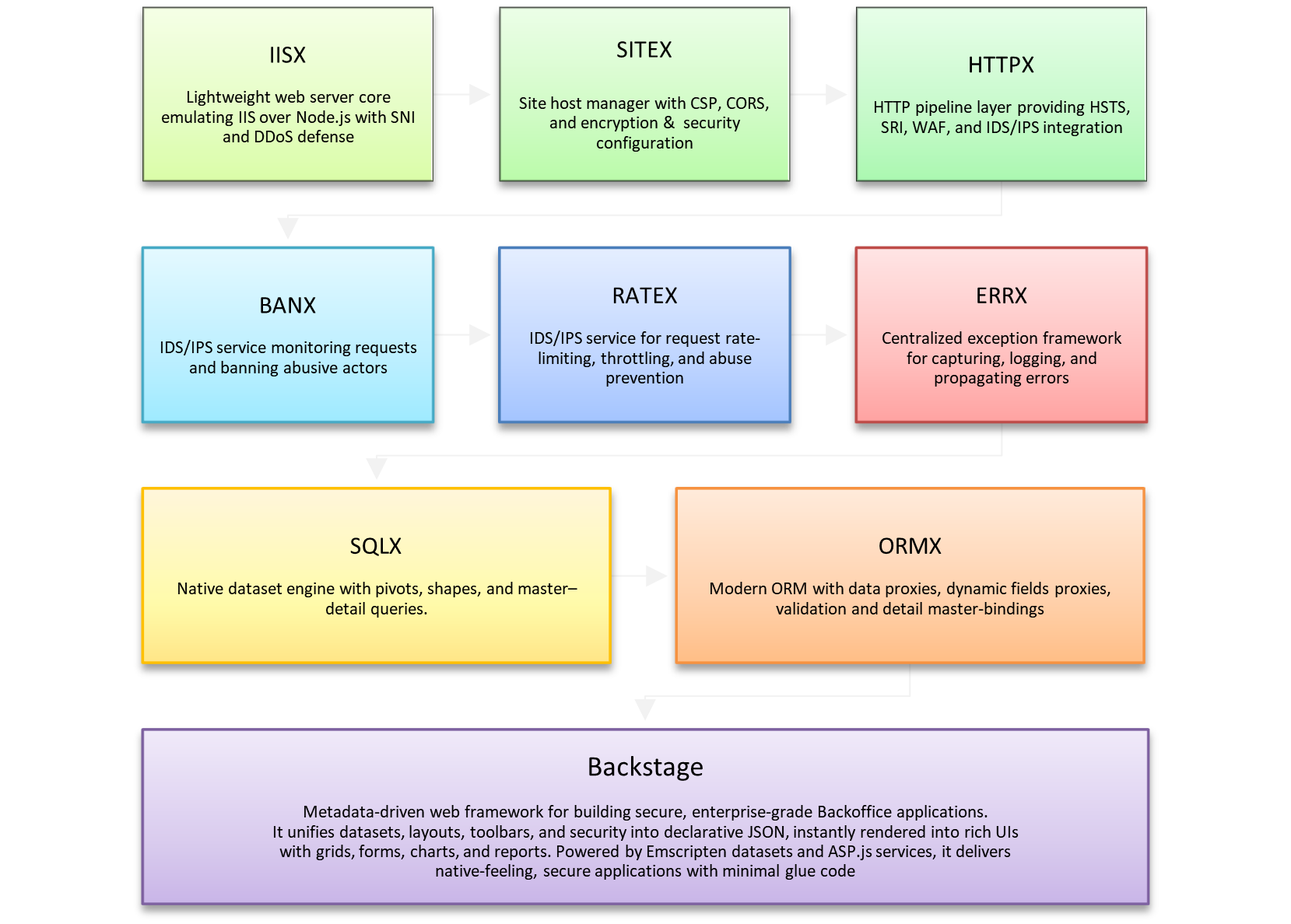
Objectives
- Provide a full-stack Backoffice MMV framework running on top of ASP.js + SQLX/ORMX, covering both server- and client-side.
- Deliver rapid prototyping of secure backoffice applications without writing endless boilerplate (routes, controllers, DTOs, REST endpoints).
- Generate metadata-driven UIs (forms, grids, calendars, email views, charts) directly from ORM models, with zero redundant code.
- Empower developers with a dual-tier debugger that seamlessly steps between browser client code and ASP.js/Node.js server code.
Architecture at a Glance
-
Server-side
-
Bootstraps models (Users, Settings, Rights, Audit, Business
Models) through
default.asp. -
Loads
application metadata
(
backstage.inc) that defines UI layouts, remote function calls, rights enforcement, and CSRF/session security. -
Executes remote commands (
commands.inc) bound to datasets or ORM objects. -
Security endpoints (
webauthn.asp,gmail_authorize.asp,oauth2.asp) provide authentication and integration without weakening the session model. - Supports Scheduled Jobs (Cron-like Tasks): recurring background operations (e.g., nightly reports, auto-ban purges, email digests) can be defined and monitored.
- Supports Long-Running Tasks with UI Feedback: background processes (e.g., bulk invoice generation, mass mailouts, data imports) report progress directly into the Backstage UI, so operators can track completion in real time.
- RSVP Support Built-In: Backstage natively handles RSVP flows for events or campaigns. Responses are captured as datasets, and SQLX PIVOT macros aggregate results in real time (e.g., YES vs NO vs MAYBE counts) for instant analytics inside grids, charts, or dashboards.
-
Bootstraps models (Users, Settings, Rights, Audit, Business
Models) through
-
Client-side
-
Loads UI metadata and renders
layouts, toolbars, tabs, grids via
databinding.js. -
Provides a
DataGrid controller (
datagrid.js) that can transform a dataset into any business view: grid, form, search, list, calendar, email, or chart. - Uses WebASM datasets (Emscripten-ported SQLX) for high-performance binding, keeping server and client in tight sync.
- Supports secure Remote Function Calls: select rows in the UI → send them encrypted → server executes model methods → result is reflected in real-time.
-
Loads UI metadata and renders
layouts, toolbars, tabs, grids via
Is Backstage MVC Framework?
-
ASP.js Backstage is not a textbook MVC (Model–View–Controller) framework like ASP.NET MVC or Ruby on Rails. It’s more of a metadata-driven runtime framework that borrows some MVC ideas but extends them in a different direction:
-
Model layer is largely handled by your SQLX and ORMX stack. Data comes in through datasets, shapes, pivots, and ORM proxies. These expose both relational and object-like views of data, with metadata for constraints, lookups, and detail bindings.
-
Controller layer in Backstage is implicit rather than explicit. Instead of you writing controllers that map HTTP routes to business logic, Backstage uses metadata and conventions to auto-wire data binding, actions, and UI events. It’s closer to a declarative configuration than imperative controllers.
-
View layer is highly dynamic and metadata-driven. Backstage takes dataset/ORM metadata and renders DataGrids, forms, toolbars, calendars, list views, charts, etc. automatically, respecting master–detail hierarchies and UI hints. This is not the same as templated views, but it fulfills the “V” role in MVC.
-
-
In other words Backstage is closer to a “Model–Metadata–View” (MMV) framework than a strict MVC. Controllers aren’t written by hand; they’re synthesized from metadata, conventions, and runtime binding logic.
Innovations Beyond SPA Frameworks
-
No REST, No GraphQL, No Glue Code Backstage eliminates the typical boilerplate stack (controllers, serializers, REST endpoints, Redux/Vuex state managers). The UI talks directly to datasets — securely and declaratively.
-
Metadata is the Contract In Angular or Vue, you spend weeks crafting forms and grids by hand. In Backstage, a few metadata lines in
backstage.incgenerate the full CRUD interface, including rights filtering, CSRF tokens, and encrypted Remote Call IDs. -
ASP Dual Debugger (Cross-Tier) Debug at both levels — client and server — in a single session:
- Step through browser JavaScript.
-
On a client
fetch, the debugger jumps into the server-side ASP.js/Node handler. - Step through business logic on the server.
- On return, the debugger jumps back to the browser code and continues execution.
- You can step in, out, over across tiers without losing context. 👉 No SPA stack offers this; Angular/Vue/React force you to juggle separate debuggers for front-end and back-end.
-
Unified Security Model SPA frameworks rely on patching security later (JWTs, CSRF tokens, CORS). Backstage bakes security into every layer: ASP Sessions, CSRF enforcement, encrypted function identifiers, auto-ban hooks, audit logs.
Differences vs Classic ASP & Modern SPA Frameworks
-
vs Classic ASP:
- Classic ASP required hand-coded grids and forms → Backstage generates them.
- Classic ASP had weak debugging → Backstage offers a debugger that crosses tiers (client ↔ server).
- Classic ASP security was bolted-on → Backstage enforces CSRF + session + autoban globally.
-
vs Modern SPA (Angular, Vue, React Admin):
- SPAs force you to create REST endpoints, serializers, DTOs, and then map them into state managers. Backstage removes all this by binding WebASM datasets directly to UI controllers.
- SPAs require manual rights enforcement per component. Backstage filters metadata per session, ensuring the UI only exposes what the user is allowed to do.
- SPAs need complex build pipelines. Backstage runs on plain ASP pages compiled into JavaScript, hot-reloaded and debugged seamlessly across client and server.
💡 Why It Matters Backstage flips the script: instead of wasting weeks wiring up REST APIs, controllers, reducers, and Angular forms, you focus only on your models and metadata. The framework gives you:
- A complete secure backoffice in hours, not months.
- A cross-tier debugger that follows execution seamlessly from browser → server → browser again.
- End-to-end architecture where server, client, and security are not patched together — they are designed as one. Backstage is not just another framework; it’s a radical acceleration layer for building business-critical applications with less code, more security, and unmatched debug visibility.
7.2 Server-Side Architecture
7.2.1 Session Bootstrapping & Model Preload (default.asp)
Objectives
- Act as the entry point for every Backstage request.
- Validate whether the user has an active ASP Session; if not, redirect to the WebAuthn login page (with fallback: captcha + user + password).
- Preload essential application models (Users, Settings, Rights, Audit, Mailer, Payment Gateways, etc.) into memory.
- Establish the execution context for the request: security level, user metadata, site preferences.
-
Include
backstage.incto load UI metadata after authentication succeeds.
Lifecycle
-
Session check
-
On every request,
default.aspverifies if a session token is present and valid. -
If not, user is redirected to the secure login flow
(
webauthn.asp).
-
On every request,
-
Model preload
-
Once authenticated, core ORMX models are instantiated (e.g.,
Users,UserRights,Settings,Audit). - Business-specific models (Mailers, Payment Gateways, custom Entities) are also initialized.
-
Once authenticated, core ORMX models are instantiated (e.g.,
-
Metadata load
-
Finally,
backstage.incis included, which drives the rendering of the user interface. - All subsequent UI rendering and Remote Function Call execution is shaped by this metadata.
-
Finally,
Security Considerations
- Session validation is first-class: Backstage does not proceed to metadata loading unless session integrity is confirmed.
- Session tokens are paired with CSRF enforcement, ensuring that all requests (including AJAX / Remote Function Calls) are tied to the authenticated session.
- Failed login attempts are recorded and can trigger AutoBan for brute-force prevention.
Innovations Beyond SPA Frameworks
-
Unified session + model bootstrap: in
Angular/Vue/React, you’d need a separate
auth middleware, an
API call to preload user state, and then
hydrate stores in the client. Backstage collapses
all of this into one step in
default.asp. - No redundant “state management” code: models live server-side, session-backed, and flow directly into the UI metadata.
Differences vs Classic ASP & Modern SPA Frameworks
- vs Classic ASP: previously every admin page manually checked session cookies and instantiated ADO connections. Here, Backstage centralizes and secures the session bootstrap with automatic model preload.
- vs Modern SPA: Angular or Vue require you to juggle OAuth flows, token refresh, and preload APIs; Backstage uses ASP Sessions with WebAuthn baked in, no glue code required.
💡 Why It Matters
default.aspensures that every Backstage request starts secure and consistent: sessions are validated, models are ready, metadata is loaded. Developers don’t waste time wiring login checks, preload calls, or boilerplate state hydration. Instead, you immediately step into building business logic — with security already guaranteed.
7.2.2 Application Metadata & UI Definition (backstage.inc)
Purpose
- Define the entire Backstage UI declaratively (navigation, layouts, datasets, controllers, charts) and deliver it to the client in one Session-bound, CSRF‑hardened JSON payload.
- Emit session‑encrypted Remote Function Call (RFC) identifiers inside toolbar/menu items. The client never posts raw method names or routes; it only echoes opaque IDs that the server can validate against the user’s session.
- Centralize access control (per‑node rights), fetch/update semantics (per‑dataset), and report/chart configuration into a single document consumed by the client binder.
What backstage.inc Produces
-
SideBar: hierarchical navigation
(
nodes[]) that the client renders with w2ui; clicking a node creates the full view it describes. - Layout: a w2layout definition (top/left/main/right/bottom). The client instantiates it verbatim and mounts the sidebar and toolbars.
- DefaultReportToolbar: default chart/report filters (e.g., fiscal year, intervals) that become interactive filter widgets in the report toolbar.
-
UI_ACCESS: a per‑node permission map
(
CAN_WRITE,CAN_DELETE, etc.) that the client uses to shape toolbars/buttons at runtime (e.g., hide “Add/Delete” if not allowed). -
Datasets: per‑node dataset specs (
type: 'master'|'detail',model,method: 'meta'|'fetch', optionalchartOptions, etc.). The client creates Emscripten‑backed datasets, fetches metadata or data, and wires master→detail invalidation. -
Panels & Tabs: visual areas bound to
controllers (e.g., DataGrid) or to plain HTML tabs.
Tabs can be data‑bound (with
boundControl) or static (HTML body provided by server). Switching tabs instantiates or swaps controllers/datasets on demand. - Node “group” editor: nodes marked as groups open a JSON editor for live inspection/tweaks of the emitted UI model (handy for admin/dev tools).
-
Chart area: if any master dataset declares
chartOptions, the client adds a dedicated Chart layout/panel beside the grid.
Security & Transport
-
CSRF: every fetch/save/RFC includes the CSRF token
(
x-csrf-token) that backstage.inc injects into the binder options. The client automatically attaches it on all requests. -
Model scoping: requests carry
x-sqlx-model-id(and when neededx-sqlx-model-property) so the server can route safely to the intended model surface—no free‑form routing from the browser. -
Session‑encrypted RFC IDs: toolbar items and menus
reference server actions by opaque IDs emitted in
metadata; the client just echoes
options.idback—never a human name. (Backstage design; IDs flow throughServerCall.)
Runtime Behavior (how the client consumes the metadata)
-
Layout & Navigation: the binder builds the
w2layout and sidebar from
UI_CONFIG. Node clicks callCreateModelView(node)which upgrades legacy nodes if needed, instantiates master datasets, auto‑discovers detail datasets, and renders/binds panels. - Master→Detail: when the master cursor moves, detail proxies are re‑created and their controllers rebound—so details always reflect the current master record.
-
Toolbars from Rights: per‑panel toolbars are
generated using
UI_ACCESSso “Add/Delete/Save” appear only when permitted. Advanced search/date range pickers and “Load By Value” overlays are added when the dataset advertises them. -
Reports & Filters:
DefaultReportToolbarentries render as interactive filters; selecting values can open a model picker popup backed by another dataset. -
JSON Group Nodes: nodes flagged as
groupopen the JSONEditor bound to the emitted UI object—useful for admins to tweak live config safely.
Remote Function Calls (RFC)
-
Invocation: any toolbar/menu item with a
serverpayload triggersServerCall(), which posts to?method=<opaque id>with CSRF + model headers. It can also attachsearchparams or a rawpayload. -
Selected Records: common UX like “Send email to
selected users” posts the
selected row IDs automatically if
postRecordsis set—no bespoke client code. -
Server‑generated Forms: for commands needing user
input, backstage.inc can embed a
pre‑rendered HTML form (Base64). The client
substitutes
${{SELECTED_RECORD_IDS}}and${{FIELD_ID}}variables, shows a popup, collects values, and posts a structured payload. -
Long Tasks with Progress: for async jobs, the
client sends a unique x-job-id, polls
server-job-progress, and shows a progress dialog with percentage + status until completion or error. -
File Responses: if the server answers with
Content-Disposition: attachment, the client auto‑downloads the file (e.g., “Export to Excel”, “Print PDFs”). -
Post‑actions: JSON responses may include
message(toast) oreval(client instruction) executed after success (e.g., refresh panel).
Developer Ergonomics
- Single source of truth: backstage.inc is the one document that declares navigation, datasets, panels, toolbars, and server actions. The client binder does the rest—wiring Emscripten datasets, grids, charts, search overlays, and security‑aware toolbars.
- Zero glue code: master/detail tabs, advanced search overlays (“Load By Value”), date‑range pickers, and JSON editor views fall out of metadata.
- Safe by default: CSRF is always on; model scoping is explicit; RFCs are opaque; rights prune client UI at render time—so users don’t see buttons they can’t use.
Differences vs Classic ASP & Modern SPA Frameworks
-
vs Classic ASP
-
From handcrafted pages to declarative screens:
instead of mixing ADO + HTML in
.asppages, Backstage declares layouts, datasets, toolbars, and actions in one metadata document the client renders verbatim. - Security is intrinsic, not afterthought: CSRF tokens, session‑encrypted RFC IDs, and per‑node rights shape the emitted UI; Classic ASP relied on ad‑hoc checks per page.
- Master–detail done right: consistent, automatic cursor‑driven invalidation of detail datasets replaces manual refresh logic sprawled across pages.
- Uniform actions: commands are named and dispatched once via opaque IDs; Classic ASP typically exposed stringly‑typed routes or query params.
-
From handcrafted pages to declarative screens:
instead of mixing ADO + HTML in
-
vs Modern SPA (Angular, Vue, React Admin)
- No REST/GraphQL boilerplate: Backstage’s metadata drives direct dataset binding; SPAs require building APIs, DTOs, services, and stores just to fill a grid.
- Rights prune the UI at the source: the server emits UI already filtered by session rights; SPAs usually ship a superset UI and hide/disable parts client‑side.
- Action integrity: the browser never posts method names—only opaque, session‑bound IDs. SPA stacks generally rely on public routes or action names plus additional ACL checks.
- End‑to‑end consistency: dataset fetch/update semantics, charts, search overlays, and long‑task progress are all declared once and realized uniformly; SPAs spread these concerns across components, stores, and custom hooks.
💡 Why It Matters With backstage.inc you don’t “code a screen,” you declare a screen. The client binder turns that declaration into a secure, rights‑aware UI with datasets, grids, charts, and RFC buttons—complete with CSRF, session‑encrypted action IDs, progress for long jobs, and file downloads. You get enterprise‑grade wiring (master→detail, search overlays, JSON config editors) without writing glue, and it all plays perfectly with Backstage’s dual debugger: step a toolbar click, hop into the server handler, and step right back into the client when the response lands. That’s RAD without compromise.
7.2.3 Remote Function Call Handlers (commands.inc)
Purpose
-
Implement the server-side logic behind the Remote
Function Calls (RFCs) declared in
backstage.inc(toolbar/menu actions, context actions). - Consume session‑bound opaque IDs and CSRF‑scoped requests from the client, dispatching them to concrete business functions (e.g., send emails, export XLSX/PDF, generate RSVPs, bulk updates).
-
Return typed outcomes: JSON (messages,
evalpost‑actions), file streams (withContent‑Disposition: attachment), or orchestration for long‑running jobs with progress polling.
Execution Flow (end‑to‑end)
-
Client action → opaque method A toolbar/menu item carries a session‑encrypted RFC ID. On click, the binder posts
?method=<opaque-id>with headers:x-csrf-token,x-sqlx-model-id(and optionallyx-sqlx-model-property), and a freshx-job-idfor tracking async tasks. -
Payload shaping (client) Depending on metadata, the binder may attach:
- Selected record IDs (bulk ops).
-
Form data collected from a
server‑provided HTML form (Base64) with
${{SELECTED_RECORD_IDS}}and${{FIELD_ID}}substitution. - Custom
payloadfor filters/criteria.
-
Dispatch (server)
commands.incvalidates CSRF + session, resolves the opaque ID to a handler function, instantiates the target Model, and executes business logic under current user rights. (Design per binder contract.) -
Response
-
Synchronous: return JSON. The client shows
messagetoasts, may executeeval, and refreshes views. -
Binary: stream a file with
Content‑Disposition: attachment—the client saves it automatically. -
Asynchronous: accept
x-job-id, start background work, and feed progress via theserver-job-progressendpoint. The client shows a progress dialog and polls untildone/error.
-
Synchronous: return JSON. The client shows
Handler Shape (typical patterns)
-
Bulk row operations Input: array of
record IDs; Output: JSON
message/eval(e.g., “Mailed 125 customers”). - Parameterized operations via server form Input: structured formData from your server‑rendered HTML (Base64); Output: JSON or file (e.g., export with filters).
- Report/Export/Print Input: filter payload; Output: file (XLSX/PDF/CSV). Client auto‑downloads through blob handling.
-
Long tasks (imports, mass mailers, invoice
generation) Input: IDs + options +
x-job-id; Output: immediate ACK; progress served viaserver-job-progress; final JSON/attachments returned when ready.
Input Types (what the client can send you)
-
payloadJSON (arbitrary object). - Selected records (from the active DataGrid).
- Form data captured from server‑generated HTML forms (with field substitutions from the current dataset).
-
Query parameters (optional
searchmap appended to URL).
Output Types (what you can return)
-
JSON:
{ message?: string, eval?: string, data?: any }(client runseval, shows toasts, refreshes). -
Binary file: set
Content‑Disposition: attachment; filename="..."and an appropriateContent‑Type. Client will save it. -
Async progress: accept the job, periodically update
server-job-progress(e.g.,{ progress: 37.5, message: "Rendering page 15/40" }); client renders a modal progress bar.
Security & Auditing
- CSRF token required on every call; rejected otherwise.
-
Opaque method IDs: the browser never sends function
names—only session‑bound tokens minted by
backstage.inc. (Prevents probing.) -
Model scoping via
x-sqlx-model-id/x-sqlx-model-propertyheaders (prevents routing outside authorized surfaces). - Audit log: log user, node/action, payload shape, results, duration, and errors. (Cross‑cutting practice; binder expects consistent error surfaces.)
Developer Ergonomics
- One function per business action: no controllers, DTOs, or Redux/Effects layers—just the handler function bound to an opaque ID.
- Form UX without coding forms: ship a pre‑rendered form (HTML/Base64) in metadata; the binder renders it, gathers values, and sends them back.
-
Progress with three lines of code: accept
x-job-id, update the progress endpoint while you work. The UI dialog and bar are automatic. - File streaming first‑class: set headers and write the stream; the browser save dialog “just works”.
Differences vs Classic ASP & Modern SPA Frameworks
-
vs Classic ASP
- Moves from ad‑hoc querystring actions to opaque, session‑encrypted calls with uniform CSRF + audit.
-
Separates UI from logic: handlers live in
commands.inc, not mixed into page markup. - Standardizes bulk selection, server forms, exports, and long jobs as first‑class patterns.
-
vs Modern SPA (Angular, Vue, React Admin)
- No REST/GraphQL boilerplate, no service/DTO layers: UI posts directly to handlers using dataset‑aware payloads.
- Long‑running tasks don’t require custom job queues + status UIs—the progress contract is built into the binder.
- Actions are unforgeable (opaque IDs) and rights‑scoped at emission time; SPA stacks typically expose public routes + scattered ACL checks.
💡 Why It Matters
commands.incis where business power meets framework discipline. You expose operations as small, testable functions; the framework supplies the rest—secure dispatch, CSRF, model scoping, selected‑row payloads, server‑rendered forms, streaming exports, and long‑task progress. Compared to Classic ASP or modern SPA stacks, it’s dramatically less boilerplate, more secure, and easier to reason about—and with Backstage’s cross‑tier Dual Debugger you can click a button, step into the server handler, and land back in the client as soon as the response arrives.
7.2.4 Authentication & Security Endpoints (webauthn.asp, gmail.asp, oauth2.asp, etc.)
Objectives
- Provide first-class, password‑less authentication via WebAuthn, with secure fallbacks (captcha + user + password).
- Integrate OAuth2 flows for third‑party services (e.g., Gmail) without weakening ASP Session guarantees.
- Enforce CSRF, rate‑limiting/AutoBan, and per‑session encryption for Remote Function Calls and datasets.
- Keep authentication orthogonal to business logic: endpoints issue/refresh session state; application code consumes it.
Endpoint Roles
-
webauthn.asp
- Registers and authenticates FIDO2/WebAuthn credentials (platform authenticators, security keys).
- Orchestrates fallback flow (captcha → username → password) when WebAuthn isn’t available or fails.
-
On success, establishes/refreshes ASP Session,
binds user identity & rights, and hands off to
default.asp.
-
gmail_authorize.asp / oauth2.asp
- Implements OAuth2 authorization code flow for Gmail and other providers used by Backstage mailers or integrations.
- Persists tokens/refresh tokens against the current user or application settings model (never in client storage).
- Runs entirely under CSRF protection and session context, so callbacks cannot be replayed outside the intended session.
Security Model (Cross‑Cutting)
- ASP Session as the trust anchor: all subsequent requests (UI metadata, dataset fetch/save, RFCs) rely on the established session.
- CSRF everywhere: the client automatically includes CSRF tokens on every server interaction; server validates per‑request.
- Opaque action identifiers: the browser never posts function names—only session‑encrypted IDs minted server‑side.
- Rate‑limiting & AutoBan hooks: repeated failures (auth, CSRF, tampered IDs) feed the ban pipeline to throttle abuse.
- Audit trail: all auth/OAuth events (login, failure, grant, refresh, revoke) are recorded in SQL audit logs.
Operational Behaviors
-
Seamless handoff: after WebAuthn/OAuth completes,
control returns to
default.asp, which preloads models and loads metadata; the UI renders according to the user’s rights. - Token hygiene: OAuth tokens are never exposed to the client; server‑side mailers or support modules use them via models.
- Re‑auth triggers: if sessions expire or tokens become invalid, endpoints can prompt step‑up auth (WebAuthn re‑assert) without dropping app state unnecessarily.
Innovations Beyond SPA Frameworks
- Security centered on the session, not scattered across layers: SPAs typically glue together cookies/JWTs, CSRF, and OAuth callbacks across multiple services. Backstage concentrates it into purpose‑built endpoints that the rest of the framework trusts.
- Password‑less by default: WebAuthn is the primary path, not an afterthought.
- Zero token sprawl: OAuth tokens stay server‑side, bound to user/application models—no localStorage, no accidental leaks.
Differences vs Classic ASP & Modern SPA Frameworks
- vs Classic ASP: moves from ad‑hoc form logins and hand‑rolled cookies to standards‑based WebAuthn, pervasive CSRF, opaque actions, and centralized audit logging.
- vs Modern SPA (Angular, Vue, React Admin): avoids multi‑toolchain complexity (front‑end auth libraries + API gateways + custom token storage). Backstage’s endpoints issue trust once, and the framework propagates it across datasets, RFCs, and UI metadata automatically.
💡 Why It Matters Authentication and integration are where many admin apps grow fragile. Backstage’s dedicated endpoints establish a single, durable trust boundary (ASP Session + CSRF + opaque actions) and keep OAuth tokens server‑side only. You get WebAuthn‑grade security, simpler code, and fewer moving parts—so you can focus on business features without risking your security posture.
7.3 Client-Side Architecture
7.3.1 UI Loader & Initialization (default.asp)
Objectives
- Load CSS/JS assets, fetch the UI metadata JSON from server, and bootstrap the binding engine.
- Initialize the master layout and sidebar, then hand control to the binder to render views and controllers.
- Install global security config (CSRF, model headers) used by all background requests.
Runtime Flow
-
Page loads → requests metadata (already
rights-pruned per session) → instantiates the
binder with
{ URL, CSRF, model }and renders the initial node. The binder manages the master w2layout and w2sidebar, and measures performance for diagnostics. - When users click a node, the binder calls CreateModelView(node) which upgrades legacy nodes if needed, destroys any prior layout, and renders the new one (main + nested layouts/tabs).
- Chart panels are auto-detected; a Report toolbar is inserted at top/bottom depending on device (desktop vs mobile).
Differences vs Classic ASP & Modern SPA Frameworks
- vs Classic ASP: no per-page glue; one loader initializes the app, and the binder takes care of layouts, nodes, and controllers from metadata.
- vs Modern SPA: no router/store bootstrapping or REST discovery step; the metadata is the contract, and the binder renders it directly.
💡 Why It Matters A one-shot loader plus a smart binder means instant boot, fewer moving parts, and zero “app wiring” code. You go from login → fully rendered, secured backoffice in one hop.
7.3.2 Data Circuits & Binding Engine (databinding.js)
Objectives
- Provide the DataBind runtime that turns metadata into a live UI: datasets, controllers, layouts, tabs, charts.
- Handle master → detail invalidation, toolbar creation, report filters, and cleanup of UI/resources between views.
- Offer secure ServerCall plumbing: CSRF headers, model scoping, session-encrypted RFC IDs, long-job progress.
Key Responsibilities
- CreateModelView(node) builds the full screen: upgrades legacy nodes, hooks master dataset, auto-discovers details, wires events, renders layouts/tabs, and refreshes bindings.
- Layout rendering: recursively composes nested w2layout trees; attaches controller handles to runtime panels; caches for cleanup on destroy.
- Chart toolbars & filters: injects a dynamic Report toolbar (Load/Reset + filter/argument widgets). On mobile/desktop, toolbars are placed bottom/top respectively.
-
ServerCall: posts to
?method=<opaque id>withx-csrf-token,x-sqlx-model-id, and a unique x-job-id; can render a server-provided HTML form (Base64) to collect additional inputs before sending; supports async jobs with progress polling. - Meta/Fetch helpers: convenience methods to request metadata or records for a dataset, honoring dataset options.
- Utilities: SVG fetch/sanitize cache for icons; environment detection (mobile/tablet/OS) that adjusts UI behavior.
Differences vs Classic ASP & Modern SPA Frameworks
- vs Classic ASP: replaces hand-coded ADO + DOM pages with a single orchestrator that understands datasets, panels, and controllers.
- vs Modern SPA: no Redux/Vuex or custom effects; binding is data-first (datasets), actions are opaque RFCs, and long jobs/progress are built-in—not ad-hoc.
💡 Why It Matters The binder is where Backstage earns its speed: one engine takes a secure, session-shaped JSON and materializes a complete application—layouts, filters, charts, and all—while keeping calls safe (CSRF, scoped headers) and surfacing long-task progress out of the box.
7.3.3 Interactive Data Presentation (datagrid.js)
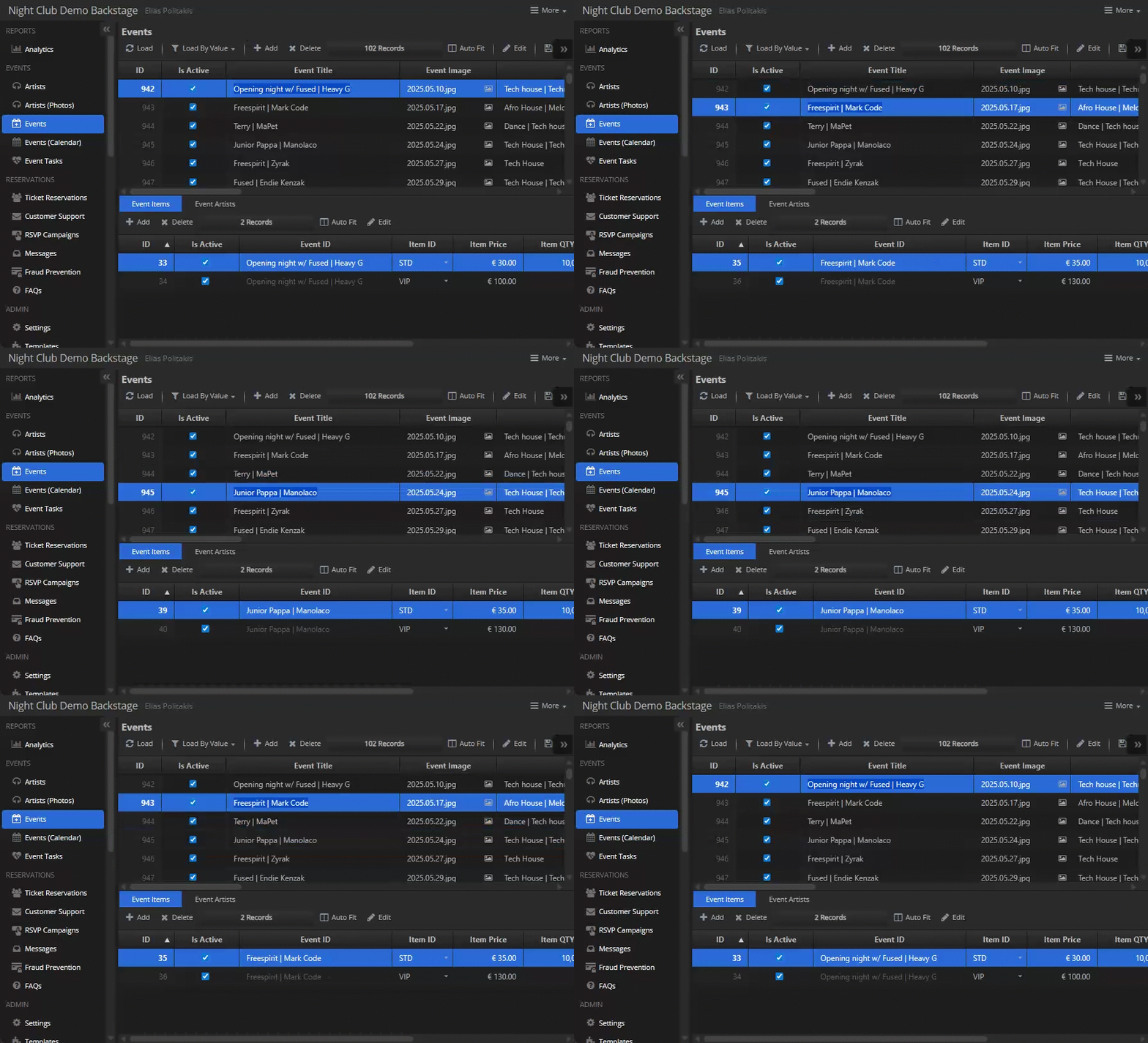
Objectives
- Provide a single, versatile controller that presents datasets as grid, form, search, list, calendar, email/chat, or chart-backed views.
- Support inline editing, sorting, column drag/reorder/resize, keyboard navigation, exports (Excel/Markdown/tab), and printing.
- Integrate lookup models, date-range search areas, and rich editors (upload boxes, enums, booleans, money-aware helpers).
Surface & Options
-
DataGridfocuses on UI/interaction; actual record binding comes from the WebASM dataset. Key capabilities and view modes are summarized in the header docs. -
DataGridOptionsconfigures everything from hidden/read-only columns to list/calendar/email fields, chart menu, filters, toolbar items, pagination, and more. - Specialized option sets exist for date-range search, upload editors, field options, and chart options (stacking, axes, legends, transposition, etc.).
Notable Behaviors
-
Multi‑view powerhouse (one controller, many faces). Renders the same dataset as a classic Grid, Form, Search Form, List View, Calendar View, Email View with minimap, and Chart View (ECharts) — all switchable without re‑binding.
-
Form & entry UX that auto‑fits itself. Smart label/value sizing and tabbed forms (DATAFORM + tabs) with canvas-based text measurement to align labels, plus field‑type cues (e.g., JSON/HTML fields get a
CODEclass). -
Inline editing that feels native. Click‑to‑edit cells with input/checkbox/textarea/contenteditable, double‑click to open editors, and bulk paste across multiple selected rows (grid mode) with debounce.
-
Keyboard navigation like a desktop app. Arrow Up/Down to move focus, PageUp/PageDown by visible block, Ctrl+Home/End to jump, Enter handling, Esc hides overlays, Tab/Shift+Tab across fields, Ctrl/Cmd+F opens Find, Ctrl/Cmd+0 clears current field.
-
Selection you can trust. API to get/set selected rows; preserves focus, repositions dataset, and keeps the focused row “on top” in selection arrays.
-
Strong column ergonomics. Drag‑reorder columns (with live DOM moves), resize with handles, auto‑fit or fit‑to‑width, sticky columns, hide/unhide, and persisted widths/sort in localStorage.
-
Context menus everywhere (and smart).
- Column header menu: visibility, filters (toggle & clear), search-in-column, sticky, export — plus a full Chart menu (choose X/Y, type, stacking, labels, legend, log scale, JSON config).
- Cell menu: select/deselect all, open Edit Form, copy value, copy table as Markdown or Excel (tab‑delimited), and export to .xlsx.
-
Copy & export that respects your tools. One‑click copy as Markdown (great for docs/ChatGPT), copy as Excel (tab‑delimited), and export to .xlsx (SheetJS) with auto‑sized columns and friendly filenames.
-
Search that matches how analysts think. A generated Search Form supports multi‑value OR groups, proper type coercion (numeric/date), and saves form state for rebuilds.
-
List View that actually sells the data. Image or icon thumbnails (auto‑detects URLs vs icon classes), captions + secondary text, ribbons with color mapping, tooltips, min‑height tuning, custom item classes, and click/dblclick hooks.
-
Calendar View for time‑series catalogs. Scans min/max date, builds per‑month calendars, drops record thumbnails into cells, adapts to mobile (days‑per‑row), and supports ResizeObserver.
-
Email View for casework threads. Full page-per-email rendering with a vertical minimap colored by tier; click to scroll; lazy auto‑fetch for message bodies; re‑enables text selection if it was disabled.
-
Charting that’s not an afterthought (ECharts).
- CreateChart / Chart View: dark/light skins, SVG renderer, toolbox (save, dataZoom, restore, rotate labels), persistent dataZoomItems, visibleSeries state, and live color picker on series (right‑click).
- Smart defaults: auto‑detect xField and best y‑series (prefer “percent”, then “total”, then any numeric).
- Aggregations & stacks: per‑series aggregations (sum/avg/min/max/count), stacked totals, optional dimension splitting, label rotation heuristics, gradient backgrounds per theme.
- Calendar charts: render bar/pie micro‑charts inside calendar cells; drag‑to‑scroll and wheel‑to‑zoom the chart canvas.
-
Lookups that scale from dropdown to popup. Uses lookup constraints to show an inline w2menu or opens a model‑driven popup DataGrid (read‑only, with filters) to pick records — with record‑status checks and helpful popups when selection isn’t valid.
-
Uploads where you need them. Field‑level UploadBox support (double‑click the cell) — the controller wires the right record id and delegates to the binder’s upload UI.
-
Mobile niceties (use it on a phone, really).
- Two‑step focus to avoid instant keyboard pop on touch inputs; supports contenteditable and inputs alike.
-
Long‑press = context menu. A document‑level
long‑press detector dispatches a
synthetic
contextmenuand suppresses native callouts/selection for a true desktop‑like feel.
-
Overlay hygiene & scrolling. Any scroll or Escape hides w2ui overlays safely, cleaning up
data-field-w2uiattributes to prevent stale UI. -
Focus that follows the data. Moving the dataset cursor updates selection, keeps
active_field_ordinal, and selects text in the right editor, with mobile exceptions handled.
Differences vs Classic ASP & Modern SPA Frameworks
- vs Classic ASP: from manual table/forms to a single controller that renders every business view consistently.
- vs Modern SPA: avoids writing separate components per view mode; one controller morphs to fit the dataset and metadata—less code, more coherence.
💡 Why It Matters DataGrid isn’t just a table — it’s the Backstage “view engine.” With one controller you jump from grid to form to calendar/email/chart without losing binding, selection, or context. Analysts get real keyboard power and one‑click exports; developers get rich context menus, bulk‑edit & paste, lookup popups, uploads, and first‑class charting with sensible defaults. It feels like a desktop client… in a browser… wired to your WebASM dataset.
7.3.4 UI Helpers & Widgets (sqlxems.js, w2ui.es6.js, multiselect.js, calendarpicker.js)
Objectives
- Provide the supporting widgets the binder and DataGrid rely on: w2ui layouts/sidebars/toolbars, multiselect token inputs, and a calendar range picker for reporting/search.
-
Supply the WebASM dataset surface
(
sqlxems.js) that powers high‑performance binding to controllers.
Role in the Stack
- w2ui.es6.js delivers the layout/sider/toolbar primitives used by the binder to assemble screens dynamically.
- multiselect.js powers the search overlay input UX for per-field multi-value filters.
- calendarpicker.js provides the date-range control used by reporting/search areas.
-
sqlxems.js exposes the
Emscripten dataset API (
Dataset,VectorInt), the backbone of all binding operations.
Differences vs Classic ASP & Modern SPA Frameworks
- vs Classic ASP: replaces ad-hoc widgets with cohesive, scriptable components integrated with datasets and toolbars.
- vs Modern SPA: instead of stitching many libraries and state managers, helpers slot directly into the binder/DataGrid contract—less wiring, fewer failure points.
💡 Why It Matters These helpers are purpose-built for Backstage’s binder and controllers. They enable complex screens (nested layouts, filters, calendars, multiselect search) to be declared in metadata and realized faithfully, without bespoke component code each time.
7.4 Data Binding & Controllers
Focus: CreateLayout (from databinding.js)
Objectives
-
Turn the metadata layout tree (from
backstage.inc) into live w2layout instances, and attach the right controller (DataGrid, or plain HTML tab) to each panel. - Resolve bound controls per panel/tab, hook datasets (master/detail), and bind them to controllers with the correct toolbar state.
- Recursively render nested layouts (e.g., ChartLayout) and wire tab switching + master→detail invalidation so details follow the current master record.
What CreateLayout Does
-
Walks panels & tabs to find a bound control For
each panel (or the active tab within a tabbed
panel), it looks for
boundControl. If none exists, the panel is rendered as plain HTML (static content or a customrender(container)callback). -
Lazy dataset hookup If the dataset for a bound
control isn’t yet hooked, the binder
derives detail proxies from the master
(
master._dataset.detail(name)) and callsHookDatasetso the controller can bind to a live dataset. -
Controller creation + toolbar preflight For
data‑bound panels, a
DataGridcontroller is created with merged options from the dataset spec and the bound control. The toolbar is prepared (preflight spec) or instantiated at runtime, depending on phase. -
Bind and refresh The dataset is bound to the
controller (
Bind), and the controller is optionally refreshed (focus/reposition controls are honored). References are stored on both the panel and controller for later cleanup. -
Recurse into child layouts Any panel that hosts a
nested
layout(e.g., a side ChartLayout) is visited recursively so its own panels/toolbars/tabs become active. -
Render to W2UI and relink
RenderLayout(parent, panelType, layout)converts logical panels to concrete w2layout configs, builds the layout, and relinks runtime panels/controllers back to their design‑time descriptors. -
Special handling for ChartLayout When a layout
named
ChartLayoutis encountered, the binder injects report toolbars (top on desktop, bottom on mobile) bound to the master dataset for immediate analytics. -
Tab lifecycle & events Tabs carry back‑pointers
(
_panel,_controller); the binder installsonClickso it can either render a plain tab or rehydrate/bind a data‑bound tab on demand, including re‑building the toolbar instance.
Key Helpers Around CreateLayout
-
CreatePanel(panel, …, hint)Handles both preflight (spec only) and runtime (live toolbar instance) phases; merges options, instantiates the controller, binds dataset, refreshes UI, and respects the active tab selection. -
RenderPlainTab(panel, tab, isRuntime)Cleans any controller/toolbar, mounts HTML (inline or fetched via URL) or calls a custom render function, and optionally attaches a tab‑level toolbar. -
RebuildPanelToolbar(panel, …, isRuntime)In design time it stores a spec; at runtime it swaps a livew2toolbarinto the panel’s slot and keeps a handle for controller refreshes. -
DestroyPanel/DestroyLayoutProperly unbinds controllers, drops toolbars, clears HTML, and walks nested layouts to avoid leaks; used before rebuilding or when navigating to a new node.
Algorithm (condensed)
-
For each panel in
layout.panels:-
Resolve active tab → locate
boundControl(panel‑level or tab‑level). - If none →
RenderPlainTab. - If exists → ensure dataset is hooked; create/rehydrate controller; bind dataset; (re)build toolbar; refresh if needed.
-
Resolve active tab → locate
-
For each panel with a child
layout, recurse (CreateLayout(child)). -
When rendering to DOM, call
RenderLayoutto construct w2layout, install ChartLayout toolbars if present, and relink descriptors ↔ runtime objects. - After the tree is mounted, refresh bindings; optionally open Report if a chart side‑panel is configured.
Master→Detail Cohesion
-
When the master moves, detail datasets are
unhooked & recreated from
master.detail(name); any controllers bound to those details are re‑created or re‑bound to reflect the current record—no stale data.
Quality‑of‑Life Details
-
Panels get default sizes/styles and border cues;
missing names are auto‑generated (
Layout1,Layout2, …). - Active‑tab detection ensures only the visible tab sets up a controller; others remain light until clicked.
- Cleanup is thorough: controllers are deleted, toolbars destroyed, HTML containers removed, report dataset/grid disposed.
Differences vs Classic ASP & Modern SPA Frameworks
- vs Classic ASP: replaces page‑level ADO+DOM assembly with a recursive, declarative renderer that understands datasets, panels, tabs, and toolbars; master→detail is standardized and automatic.
-
vs Modern SPA (Angular/Vue/React Admin): avoids
routers/reducers/custom hooks for view composition; a single
function (
CreateLayout) materializes nested layouts, data‑bound controllers, and live toolbars, while tab switching and long‑view lifecycles are handled uniformly by the binder—no component‑specific glue.
💡 Why It Matters
CreateLayoutis where Backstage’s metadata becomes a living app. With one pass it resolves bound controls, hooks datasets, binds controllers, renders nested layouts, wires tabs, installs report toolbars, and guarantees detail views track the master—then tears it all down cleanly when you navigate. It’s the reason you don’t need a SPA router, store, or hand‑written wiring: the binder does it once, the same way, everywhere, and your team ships features instead of scaffolding.
7.5 UI Components & Views
7.5.1 Grid View
The Grid View is the default presentation of datasets in Backstage. It offers:
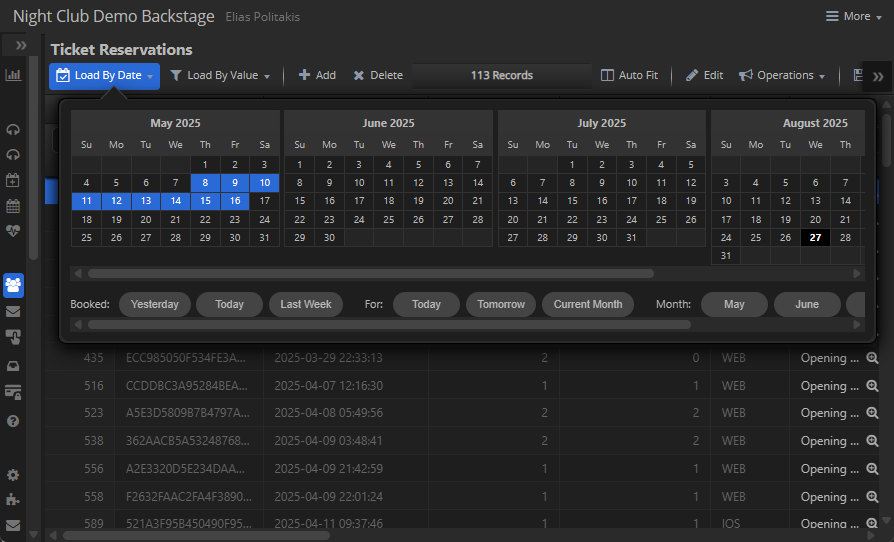
- A tabular layout with sortable, resizable, and reorderable columns.
- Inline editing for supported field types, with validation and lookups.
- Keyboard navigation (arrows, PageUp/Down, Home/End) and bulk paste support.
- Context menus on headers (column visibility, filters, export) and cells (copy, edit, export).
- Built-in export: Excel (.xlsx), Markdown, tab-delimited copy.
7.5.2 Form & Search Views
The Form View transforms a single record into a structured form:
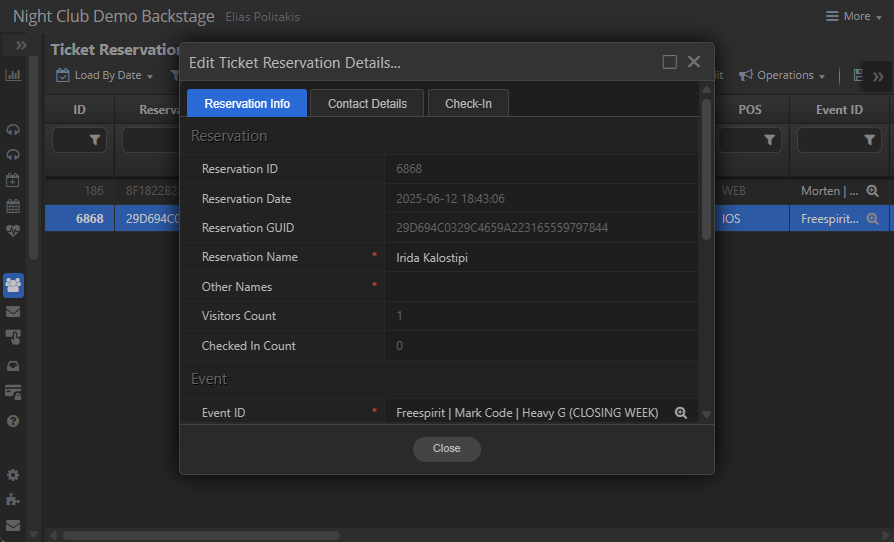
- Auto-aligned label/value pairs, with smart sizing for clean layouts.
- Tabbed forms for large datasets, grouping fields logically.
- Field-type aware editors: text, numbers, dates, booleans, enums, uploads, lookups.
The Search Form View provides query building:
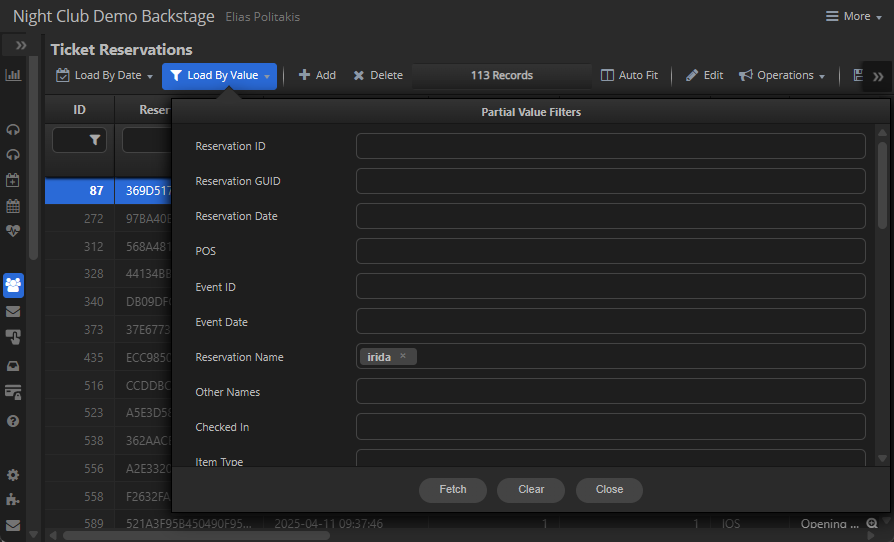
- Multi-value OR groups across fields.
- Proper type coercion for numeric/date searches.
- A reusable form that feeds filters directly into dataset fetches.
7.5.3 List & Calendar Views
List View displays records as rich cards or thumbnails:
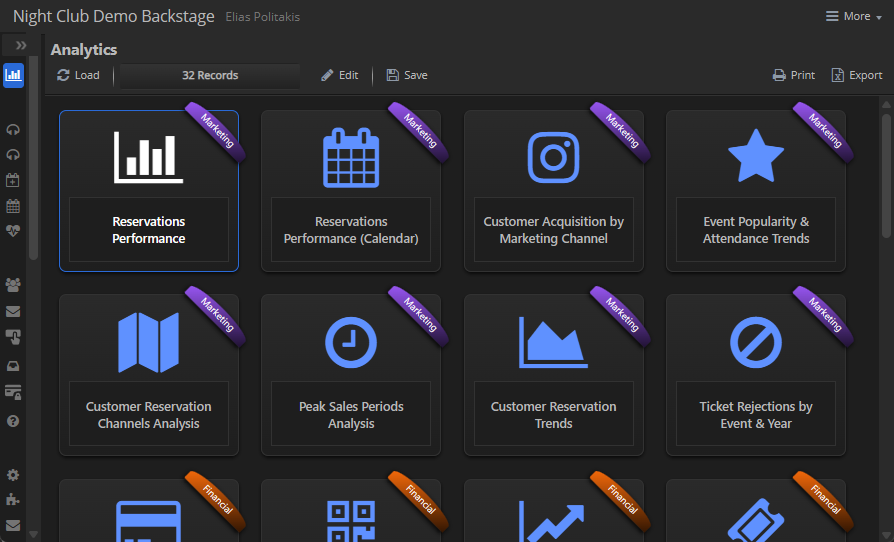
- Image or icon thumbnails (auto-detects URLs vs icons).
- Captions, subtext, ribbons, and tooltips for quick scanning.
- Custom CSS classes per item, ideal for catalogs or dashboards.
Calendar View organizes records over time:
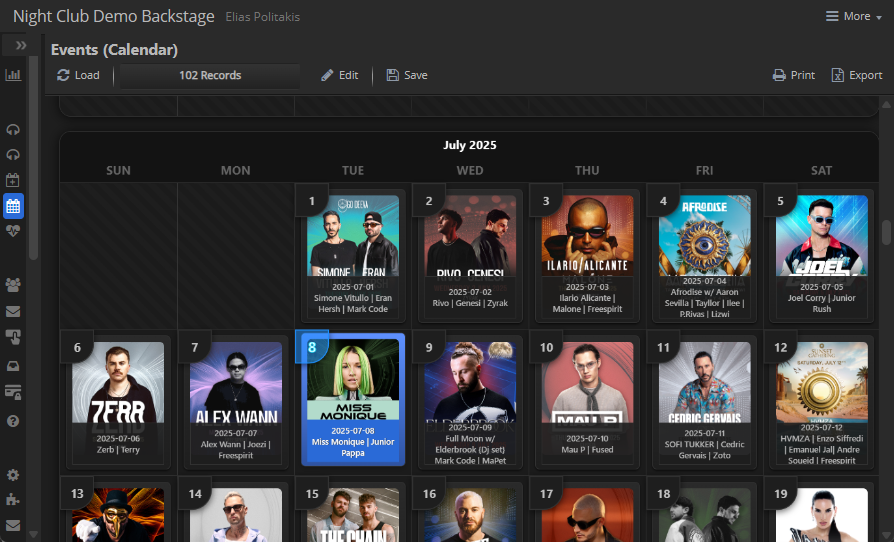
- Per-month calendar grids with records slotted into day cells.
- Thumbnail or icon previews inside cells.
- Responsive layout with drag-to-scroll and wheel-to-zoom support.
7.5.4 Email View
The Email View renders dataset records as styled message pages:
- Full email body rendering with headers and metadata.
- Vertical minimap for quick navigation across messages.
- Lazy loading for long threads, fetching content on demand.
7.5.5 Chart Views
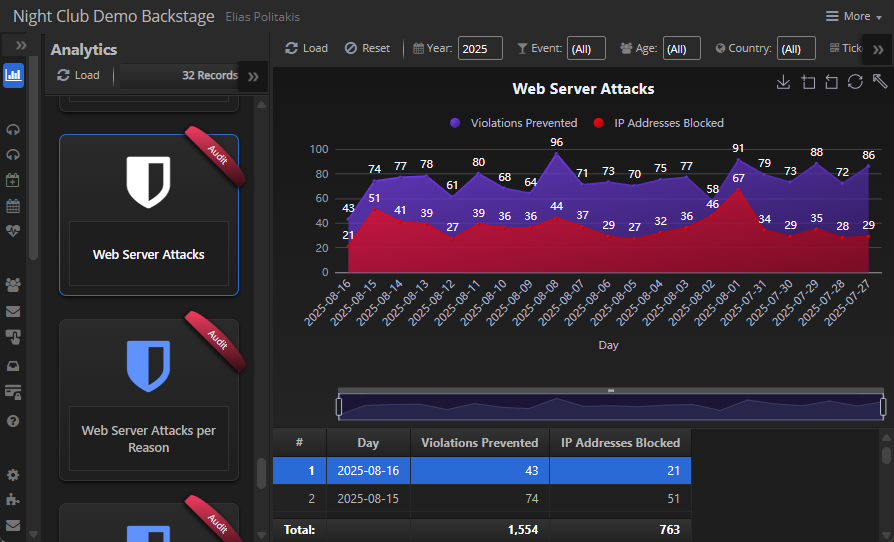
The Chart View brings visual analytics to datasets using ECharts:
- Multiple chart types: bar, line, area, pie, stacked charts.
- Aggregations per series (sum, avg, min, max, count).
- Interactive toolbox: save image, data zoom, restore, rotate labels.
- DataZoom sliders and persistent series visibility.
- Live color pickers on series; right-click to change.
- Calendar charts with embedded micro-charts per cell.
7.6 Security & Remote Calls
Objectives
- Ensure every server interaction (data fetch/save, Remote Function Call) is session‑scoped, CSRF‑protected, and model‑scoped.
-
Provide a
single, uniform client API
(
ServerCall,Fetch,Meta,Save) that handles headers, payload shaping, long‑task progress, file downloads, and UI feedback.
Client–Server Mechanics (What the binder actually does)
-
Data fetch / metadata
FetchandMetacallBrowse, which constructs a URL (?method=fetch|meta), appends optionalsearchparams, and sends JSON with headers includingx-csrf-token. On success, the returned ArrayBuffer is written straight into the WebASM dataset and the UI is refreshed. -
Saving changes
Saveposts the dataset binary diff (application/octet-stream) to?method=updatewithx-csrf-token. The response replaces the dataset and triggers a UI refresh. -
Remote Function Calls (RFCs)
ServerCall(dataset, options)posts to?method=<opaque id>with CSRF, model scoping, and (optionally) job id for long tasks. It can attach selected record IDs, and/or values from a server‑generated HTML form (Base64) after placeholder substitution.
Headers, Tokens & Scoping
-
CSRF: added to every request
(
x-csrf-token: this.options.CSRF). -
Model scoping: the active model is sent via
x-sqlx-model-id(and optionallyx-sqlx-model-property) so the server routes to the correct surface—no free‑form endpoints. -
Opaque action IDs: RFCs never post method names;
the client only submits the
session‑issued ID placed in metadata
(
options.id).
Payload Shaping & Selected Records
-
If
postRecordsis set,ServerCallautomatically sends the selected row IDs from the active grid. If a server‑form is included (postForm.html), the HTML is decoded,${{SELECTED_RECORD_IDS}}is substituted, field placeholders are replaced using the current dataset values, and the collected form data is posted.
Long‑Running Tasks (Progress UI)
-
For
options.async, the binder generates ax-job-id, fires the POST, opens a modal progress dialog, and polls?method=server-job-progresswithx-job-id(+ CSRF). It updates text and a progress bar until done/error, then closes and returns the final response.
Binary Responses (File Downloads)
-
If the server replies with
Content‑Disposition: attachment, the binder converts the response to a Blob, creates a temporary link, and downloads the file with the suggested filename—no extra client code needed.
Result Handling & Post‑Actions
-
After a JSON response, the binder will:
-
evalany client instruction returned by the server (e.g., refresh a panel). -
Show a toast/message if
messageis provided.
-
Errors & Guardrails
-
HTTP / server errors: status checked;
520server errors are parsed and shown; other statuses raise a descriptive error. - Fetch / Save failures: friendly notifications with the server message; spinner/state are always cleaned up.
- Unsaved changes: before destructive fetch, the binder prompts to confirm overwriting modified datasets.
Master→Detail Security & Consistency
- When the master cursor moves, detail dataset proxies are recreated and any bound controllers are re‑bound—preventing stale or cross‑record updates in dependent views.
Developer Tips (Using it well)
- Prefer server‑forms for parameterized actions; let the binder do placeholder substitution and form posting.
-
Mark bulk operations with
postRecords: true; the binder will attach the selected IDs automatically. -
For async jobs, set
async: true; you’ll get progress UI for free viax-job-id.
💡 Why It Matters Backstage’s binder turns security into a contract: every call ships CSRF, model scope, and opaque action IDs; long jobs get progress UI; files download cleanly; errors surface consistently. You write business logic—the plumbing is guaranteed.
7.7 Extensibility & Business Integration
7.7.1 What we’re building
This hands-on mini-project shows how to build an RSVP feature with ASP.js Backstage on top of SQLX/ORMX. You’ll create the database, models, email templates, an endpoint to capture clicks, and a Backstage node (metadata) that renders a full back-office UI with a pivoted overview and a chart.
Flow (high level):
-
Back-office user triggers an RSVP campaign (or your app does it automatically).
-
The system sends templated emails containing “answer buttons” (YES / MAYBE / NO).
-
Each button points to an endpoint like
/endpoints/survey.asp?type=rsvp&campaign=…&guid=…&answer=yes. -
When a customer clicks, the endpoint writes a row in
CampaignResults. -
The UI shows:
- Master grid of
Campaigns. -
Detail grid of
CampaignResultsfor the selected campaign. -
A
Pivot view (
CampaignResultsPivot) summarizing answers. - A Chart on top of the pivot for visual insights.
- Master grid of
7.7.2 Project Folder Structure
📄 server.js                               – Application entry point: initializes SiteManager and DB
📄 package.json                            – Node.js project manifest
📄 config.json                             – Web server configuration: ports, SSL, AutoBan, Security
📂 node_modules                            – Installed Node.js dependencies
 ┣ 📂 @mobilefx                            – mobileFX framework modules
 ┃ ┗ 📂 aspx                               – Core ASPX runtime (IISX, SITEX, HTTPX, etc.)
 ┗ 📂 @mycompany                           – Your company’s custom modules
   ┗ 📂 myapp                              – Your application package
     ┗ 📄 Model.js                         – ORM models and business logic
📂 .ssl                                    – SSL/TLS certificates and private keys
 ┣ 📂 .intermediate                        – Intermediate CA certificates (for trust chain)
 ┃  ┣ 📄 AAA_Certificate_Services.crt      – AAA Certificate Services intermediate certificate
 ┃  ┣ 📄 Sectigo_RSA_Domain_Validation.crt – Sectigo RSA Domain Validation intermediate certificate
 ┃  ┗ 📄 USERTrust_RSA_Authority.crt       – USERTrust RSA Certification Authority intermediate
 ┣ 📂 backstage.example.com                – SSL/TLS material for Backstage back-office
 ┃  ┣ 📄 CACert.crt                        – Intermediate CA certificates (for trust chain)
 ┃  ┣ 📄 backstage_example_com.pem         – Site certificate
 ┃  ┗ 📄 backstage_example_com.key         – Site private key
 ┗ 📂 example.com                          – SSL/TLS material for public website
 ┃  ┣ 📄 CACert.crt                        – Intermediate CA certificates (for trust chain)
    ┣ 📄 www_example_com.pem               – Site certificate
    ┗ 📄 www_example_com.key               – Site private key
📂 sites                                   – Root folder for hosted sites
 ┣ 📂 .data                                – SQLite data stores
 ┃ ┣ 📄 ASPX.db                            – ASPX internal DB (sessions, AutoBan, Audit)
 ┃ ┗ 📄 MyDatabase.db                      – Application DB (business data)
 ┣ 📂 backstage.example.com                – Backstage back-office web application
 ┃ ┣ 📂 .inc                               – Server-side include files (metadata & logic)
 ┃ ┃ ┣ 📄 backstage.inc                    – Application metadata: layouts, datasets
 ┃ ┃ ┣ 📄 commands.inc                     – Remote function call (RFC) handlers
 ┃ ┃ ┗ 📄 login.inc                        – Authentication logic (WebAuthn)
 ┃ ┣ 📄 default.asp                        – Bootstrap ASP page for Backstage client UI
 ┃ ┣ 📄 manifest.json                      – Web App Manifest (PWA metadata: name, theme, icons)
 ┃ ┗ 📄 favicon.ico                        – Backstage site favicon
 ┗ 📂 example.com                          – Example frontend site
    ┣ 📄 default.asp                       – Simple ASP.js demo application page
    ┣ 📄 enpoint.asp                       – RSVP Endpoint
    ┗ 📄 favicon.ico                       – Example site favicon
7.7.3 Backstage Server (/server.js)
This is the entry point of your Backstage application. Here we define the database connection string, import our framework, initialize the site manager, and schedule background jobs.
// Import core ASPX classes
const { SiteManager, Site, Proxy } = require("@mobilefx/aspx");

 // Set default SQLite connection
global.SQLX.Database.ConnectionString = `${__dirname}/sites/.data/MyDatabase.db`;

 // Import your framework
global.Cavo = require("@mycompany/myapp");

// Initialize Site Manager
const siteManager = new SiteManager();

// Start all configured sites
siteManager.Start();

// Create CronJob instance
global.cronJobsInst = new Cavo.CronJob();

// Schedule all active cron jobs
global.cronJobsInst.ScheduleJobs();
7.7.4 Web Host (/config.json)
This JSON file defines how your Backstage server will run. It sets up the second database (ASPX.db) used by ASP.js framework itself, security checks, ports, proxies, and site definitions (including SSL certificates). The options section configures defaults like AutoBan, CSRF checks, and allowed directories/extensions, while the sites array maps each hostname to its corresponding web root and SSL setup. In this example, we’re hosting backstage.example.com over HTTPS with its own certificate.
{
  "crudpads": [],
  "options": {
    "database": "sites/.data/ASPX.db",
    "autoban": {
      "blockListDatabase": "sites/.data/ASPX.db",
      "learningMode": false
    },
    "httpPort": 80,
    "httpsPort": 443,
    "internalPort": 10000,
    "localhostMode": true,
    "siteDefaults": {
      "allowedDirectories": null,
      "allowedExtensions": null,
      "enable_csrf_check": false,
      "securityChecks": [
        "FLOOD_ATTACK",
        "METHOD_NOT_ALLOWED",
        "INVALID_URL",
        "INVALID_MIME",
        "DIRECTORY_DENIED",
        "DIRECTORY_INDEXING",
        "HIDDEN_PATH_ACCESS",
        "EXTENSION_DENIED",
        "ACCESS_DENIED",
        "INVALID_HOST",
        "INVALID_SITE"
      ]
    },
    "webRoot": "sites"
  },
  "proxies": [],
  "sites": [
    {
      "HTTP_404_URL": "/page-404.asp",
      "aliases": [
        {
          "host": "www.example.com",
          "ssl": {
            "ca": [
              ".ssl/example.com/CACert.crt"
            ],
            "cert": ".ssl/example.com/www_example_com.pem",
            "key": ".ssl/example.com/www_example_com.key"
          }
        }
      ],
      "host": "example.com",
      "path": "example.com",
      "ssl": {
        "ca": [
          ".ssl/example.com/CACert.crt"
        ],
        "cert": ".ssl/example.com/www_example_com.pem",
        "key": ".ssl/example.com/www_example_com.key"
      }
    },
    {
      "host": "backstage.example.com",
      "path": "backstage.example.com",
      "ssl": {
        "ca": [
          ".ssl/backstage.example.com/CACert.crt"
        ],
        "cert": ".ssl/backstage.example.com/backstage_example_com.pem",
        "key": ".ssl/backstage.example.com/backstage_example_com.key"
      }
    }
  ]
}
7.7.5 Application Database
This schema defines the core tables needed for the RSVP feature:
-
Campaigns – stores each RSVP campaign, including its name, creation date, status (IsActive), reach/engagement counters, and the HTML messages shown to participants.
-
CampaignResults – records individual responses (YES / NO / MAYBE) linked back to a campaign. A unique index enforces that each (CampaignID, ReservationGUID, Tracker) combination can only appear once, preventing duplicate answers.
-
Settings – a generic key/value store for runtime configuration values (e.g., thresholds, system options).
-
Templates – reusable HTML templates for emails or engagement messages, referenced by campaigns.
Together these tables provide a full RSVP lifecycle: define a campaign, send messages, capture responses, and store results safely for reporting and pivots in Backstage.
💡Use mobileFX SQLite Express or any SQLite shell to run this DDL. The unique index prevents duplicate answers for the same
(CampaignID, ReservationGUID, Tracker).
CREATE TABLE IF NOT EXISTS [Campaigns] (
 [ID] INTEGER PRIMARY KEY AUTOINCREMENT NOT NULL ON CONFLICT ROLLBACK UNIQUE ON CONFLICT ROLLBACK ,
 [IsActive] BOOLEAN NOT NULL ON CONFLICT ROLLBACK DEFAULT (1) ,
 [Name] VARCHAR(50) NOT NULL ON CONFLICT ROLLBACK ,
 [Created] DATETIME NOT NULL ON CONFLICT ROLLBACK DEFAULT (GETDATETIME()) ,
 [ReachCount] INTEGER NOT NULL ON CONFLICT ROLLBACK DEFAULT (0) ,
 [EngagementCount] INTEGER NOT NULL ON CONFLICT ROLLBACK DEFAULT (0) ,
 [EmailMessage] HTML5 NOT NULL ON CONFLICT ROLLBACK ,
 [EngagementMessage] HTML5 NOT NULL ON CONFLICT ROLLBACK ,
 [ErrorMessage] HTML5 NOT NULL ON CONFLICT ROLLBACK );

CREATE TABLE IF NOT EXISTS [CampaignResults] (
 [ID] INTEGER PRIMARY KEY AUTOINCREMENT NOT NULL ON CONFLICT ROLLBACK UNIQUE ON CONFLICT ROLLBACK ,
 [CampaignID] INTEGER NOT NULL ON CONFLICT ROLLBACK REFERENCES [Campaigns] ([ID]) ON UPDATE CASCADE ON DELETE CASCADE , --[CMETA:eyJMT09LVVBfVkFMVUVfQ09MVU1OIjogIltOYW1lXSJ9]
 [ResponseDate] DATETIME NOT NULL ON CONFLICT ROLLBACK DEFAULT (GETDATETIME()) ,
 [ReservationGUID] VARCHAR(50) NOT NULL ON CONFLICT ROLLBACK ,
 [Tracker] VARCHAR(50) NOT NULL ON CONFLICT ROLLBACK ,
 [Value] VARCHAR(50) NOT NULL ON CONFLICT ROLLBACK );

CREATE INDEX [INDEX_CampaignResults_CampaignID__Campaigns_ID] ON [CampaignResults] ([CampaignID]);

CREATE UNIQUE INDEX idx_campaignresults ON CampaignResults (CampaignID, ReservationGUID, Tracker);

CREATE TABLE IF NOT EXISTS [Settings] (
 [ID] INTEGER PRIMARY KEY AUTOINCREMENT NOT NULL ON CONFLICT ROLLBACK UNIQUE ON CONFLICT ROLLBACK ,
 [Name] VARCHAR(50) NOT NULL ON CONFLICT ROLLBACK ,
 [Value] VARCHAR NOT NULL ON CONFLICT ROLLBACK );

CREATE TABLE IF NOT EXISTS [Templates] (
 [TemplateID] INTEGER PRIMARY KEY AUTOINCREMENT NOT NULL ON CONFLICT ROLLBACK UNIQUE ON CONFLICT ROLLBACK ,
 [Name] VARCHAR(50) NOT NULL ON CONFLICT ROLLBACK ,
 [Text] HTML5 NOT NULL ON CONFLICT ROLLBACK );
7.7.6 Email Templates
The Templates table holds the HTML fragments that are injected into outgoing RSVP emails. Each template uses placeholders (${{Message}}) that will be substituted with campaign-specific text at runtime.
-
RSVP Template – the main invitation message with custom tags for Yes / Maybe / No. These tags will be converted by the endpoint into actionable links (/endpoints/survey.asp?...).
-
Thank You Template – returned to the participant after a valid click.
-
Error Template – returned if the link is invalid, expired, or has already been used.
The DOMAIN_NAME (eg. backstage.example.com) constant
defines the base URL where the survey endpoint is hosted — make sure
it includes a trailing slash so generated links resolve correctly.
RSVP Template:
<div style="font-family:Arial,sans-serif">
  <p>${'{'}{Message}{'}'}</p>
  <p>Please respond:</p>
  <survey value="yes"  style="background-color:#28a745;width:160px;border-radius:6px">I’m coming</survey>
  <survey value="maybe" style="width:160px;border-radius:6px">Maybe</survey>
  <survey value="no"   style="background-color:#dc3545;width:160px;border-radius:6px">Can’t</survey>
</div>
Thank you Template:
<div style="font-family:Arial,sans-serif">
  <h2>Thanks!</h2>
  <p>${'{'}{Message}{'}'}</p>
</div>

Error Template:

```html
<div style="font-family:Arial,sans-serif">
  <h2>Sorry!</h2>
  <p>${'{'}{Message}{'}'}</p>
</div>
const DOMAIN_NAME = 'https://backstage.example.com/'; // trailing slash required
7.7.7 ORM Models (node_modules@mycompany/myapp/Models.js)
These ORM classes map directly to the RSVP schema and provide the business logic on top. They use SQLX.ORMBase to expose tables as live objects, automatically loading metadata, constraints, and detail relationships.
-
Templates – wraps
[Templates]and exposes template rows as a dictionary (Name → Text). Automatically loads them intoglobalThisso you can use template names directly in code. -
Settings – same dictionary pattern for
[Settings], making global configuration available through key/value pairs. -
Campaign – the master table for RSVP campaigns. It includes a detail relation to
CampaignResultsand methods for sending email (RSVP_Request) and handling clicks (RSVP_Response). The class handles:-
Building email HTML from
<survey>tags. - Substituting variables (campaign + reservation level).
- Inserting results while enforcing uniqueness.
- Returning Thank-You or Error templates.
-
Building email HTML from
-
CampaignResults – detail table holding the raw responses (one row per click).
-
CampaignResultsPivot – a virtual “pivot view” that aggregates results. Using
PIVOT, it expands values (yes,maybe,no) into columns and computes totals. This drives Backstage charts and summary grids.
Together, these models allow you to send campaigns, capture results, enforce rules, and display analytics — all using the declarative ORM style rather than raw SQL.
const { SQLX } = require('@mobilefx/aspx');
const crypto = require('crypto');
class Templates extends SQLX.ORMBase
{
constructor()
{
super();
this.meta.Class = Templates;
this.meta.TableName = '[Templates]';
this.meta.ID = '[Templates].[TemplateID]';
this.meta.Limit = 0;
this.meta.isDictionary = true;
this.meta.KEY = 'Name';
this.meta.VALUE = 'Text';
this.ReadAll();
this.RegisterVars(); // Load records as key-value pairs in globalThis
}
};
class Settings extends SQLX.ORMBase
{
constructor()
{
super();
this.meta.Class = Settings;
this.meta.TableName = '[Settings]';
this.meta.ID = '[Settings].[ID]';
this.meta.Limit = 0;
this.meta.isDictionary = true;
this.meta.KEY = 'Name';
this.meta.VALUE = 'Value';
this.ReadAll();
this.RegisterVars();
}
};
class Campaign extends SQLX.ORMBase {
constructor() {
super();
this.meta.Class = Campaign;
this.meta.TableName = '[Campaigns]';
this.meta.ID = '[Campaigns].[ID]';
this.meta.Limit = 0;
this.AddDetail(
CampaignResults,
"[CampaignResults]",
"[CampaignResults].[ID]",
[],
"[Campaigns].[ID]",
"[CampaignResults].[CampaignID]"
);
this.Meta();
}
static RSVP_Request(options) {
const mailer = new Mailer(options.Mailer || 'RSVP');
if (!mailer) throw new Exception('RSVP Mailer not found');
const tEmail = globalThis[options.TemplateEmail];
const tThanks = globalThis[options.TemplateThankYou];
const tError = globalThis[options.TemplateError];
if (!tEmail) throw new Exception(`Template ${options.TemplateEmail} not found`);
if (!tThanks) throw new Exception(`Template ${options.TemplateThankYou} not found`);
if (!tError) throw new Exception(`Template ${options.TemplateError} not found`);
const campaignHash = crypto.createHash('md5').update(options.Campaign, 'utf8').digest('hex');
const vars = Object.assign({}, options.Vars || {});
const trackerVal = vars[options.TrackerKey || 'Tracker'] || '';
const guidVal = vars[options.GuidKey || 'GUID'] || '';
// Load or create campaign
const campaign = new Campaign();
campaign.ReadByName(options.Campaign);
if (campaign.EOF) {
campaign.Insert();
campaign.Name = options.Campaign;
// Build the email body from the template, convert <survey> tags to buttons
let html = String(tEmail).replace('${{Message}}', options.MessageEmail || '');
html = html.replace(/(?:\s*<survey[\s\S]*?<\/survey>\s*)+/gi, (group) => {
const rxTag = /<survey\b([^>]*)>([\s\S]*?)<\/survey>/gi;
const btns = [];
let m;
while ((m = rxTag.exec(group)) !== null) {
const attrs = m[1] || '';
const label = (m[2] || '').trim();
const vm = /(?:^|\s)value\s*=\s*"([^"]+)"/i.exec(attrs);
const value = encodeURIComponent((vm && vm[1] || '').trim());
const sm = /(?:^|\s)style\s*=\s*"([^"]+)"/i.exec(attrs);
const style = {};
if (sm) {
sm[1].split(';').forEach(rule => {
const [k, v] = rule.split(':').map(s => s && s.trim());
if (k && v) style[k.toLowerCase()] = v;
});
}
const val = decodeURIComponent(value).toLowerCase();
const bg = style['background-color'] || (val === 'yes' ? '#28a745' : val === 'no' ? '#dc3545' : '#007BFF');
const color = style['color'] || '#ffffff';
const width = style['width'] || '160px';
const radius = style['border-radius'] || '4px';
const url =
`${DOMAIN_NAME}endpoints/survey.asp?type=rsvp` +
`&campaign=${campaignHash}` +
`&tracker=${encodeURIComponent(trackerVal)}` +
`&guid=${encodeURIComponent(guidVal)}` +
`&answer=${value}`;
btns.push({ label, bg, color, width, radius, url });
}
let fragment = '<table border="0" cellspacing="0" cellpadding="0" style="margin:16px 0;"><tr>';
btns.forEach((b, i) => {
if (i > 0) fragment += '<td style="width:24px;"> </td>';
fragment += `
<td align="center">
<!--[if mso]>
<v:roundrect xmlns:v="urn:schemas-microsoft-com:vml" xmlns:w="urn:schemas-microsoft-com:office:word"
href="${b.url}" style="height:40px;v-text-anchor:middle;width:${b.width};"
arcsize="10%" stroke="f" fillcolor="${b.bg}">
<w:anchorlock/>
<center style="color:${b.color};font-family:Arial,sans-serif;font-size:14px;font-weight:bold;">
${b.label}
</center>
</v:roundrect>
<![endif]-->
<!--[if !mso]><!-- -->
<a href="${b.url}" target="_blank"
style="background-color:${b.bg};border-radius:${b.radius};color:${b.color};display:inline-block;
font-family:Arial,sans-serif;font-size:14px;font-weight:bold;line-height:40px;text-align:center;
text-decoration:none;width:${b.width};-webkit-text-size-adjust:none;">
${b.label}
</a>
<!--<![endif]-->
</td>`;
});
fragment += '</tr></table>';
return fragment;
});
// Persist templates at campaign level
campaign.EmailMessage = html;
campaign.EngagementMessage = String(tThanks || options.MessageThankYou || '').replace('${{Message}}', options.MessageThankYou || '');
campaign.ErrorMessage = String(tError || options.ErrorMessage || '').replace('${{Message}}', options.ErrorMessage || '');
campaign.Write();
}
// Personalize and send using ORM's substitution
const personalized = campaign.ReplaceVars(campaign.EmailMessage, vars);
// If your mailer/stack supports extracting inline attachments from HTML, keep this;
// otherwise, pass options.attachments straight through.
const attachments = options.attachments || [];
mailer.Send({
to: options.To,
subject: options.Subject || 'Invitation',
html: personalized,
attachments
});
}
static RSVP_Response() {
try {
const type = Request.QueryString("type");
const name = Request.QueryString("campaign"); // md5 of Campaign.Name
const tracker = Request.QueryString("tracker"); // arbitrary tracker
const answer = Request.QueryString("answer"); // yes/no/maybe
const guid = Request.QueryString("guid"); // arbitrary GUID (optional)
if (type !== 'rsvp') throw new Exception('Invalid RSVP Campaign');
// Find active campaign by md5(Name)
const campaign = new Campaign();
campaign.meta.Filters = [
new SQLX.FILTER("md5\\([Campaigns].[Name]\\)", "=", name),
new SQLX.FILTER("[Campaigns].[IsActive]", "=", 1)
];
campaign.Read();
if (campaign.EOF) throw new Exception(`Invalid RSVP Campaign '${name}'`);
// Count engagement
campaign.EngagementCount++;
campaign.Write();
// Insert row (unique index prevents duplicates)
try {
SQLX.Exec(
'INSERT INTO CampaignResults (CampaignID, ReservationGUID, Tracker, Value) VALUES (?, ?, ?, ?)',
[[campaign.ID, guid || '', tracker || '', answer || '']]
);
} catch (e) {
throw new Exception(`Duplicate RSVP not allowed (${tracker || 'tracker'})`);
}
// Render Thank-You using campaign-level substitution only
const ctx = { GUID: guid || '', Tracker: tracker || '', Answer: (answer || '').toUpperCase(), Campaign: campaign.Name };
const body = campaign.ReplaceVars(campaign.EngagementMessage, ctx);
Response.AddHeader('Content-Type', 'text/html; charset=utf-8');
Response.Write(body);
} catch (e) {
Response.AddHeader('Content-Type', 'text/html; charset=utf-8');
Response.Write(e.message);
}
}
}
// Raw clicks (detail of Campaign)
class CampaignResults extends SQLX.ORMBase
{
constructor()
{
super();
this.meta.Class = CampaignResults;
this.meta.TableName = '[CampaignResults]';
this.meta.ID = '[CampaignResults].[ID]';
this.meta.Limit = 0;
this.Meta();
}
}
// Pivoted overview (yes/no/maybe counts per campaign)
class CampaignResultsPivot extends SQLX.ORMBase
{
CUSTOM_SQL = `
WITH P AS (
SELECT * FROM PIVOT(CampaignResults, CampaignID, Value, 1)
)
SELECT
C.[Name],
PIVOT_COLUMNS(P.*, CampaignID),
PIVOT_SUM(P.*, CampaignID, [no]) AS [Positive],
PIVOT_SUM(P.*, CampaignID) AS [Total]
FROM P
JOIN Campaigns C ON C.[ID] = P.[CampaignID];
`;
constructor()
{
super();
this.meta.Class = CampaignResultsPivot;
this.meta.TableName = '[CampaignResultsPivot]';
this.meta.ID = '[CampaignResultsPivot].[CampaignID]';
this.meta.IsView = true;
this.meta.Limit = 0;
this.SetCustomSQL(this.CUSTOM_SQL);
this.Meta();
}
}
PIVOT(CampaignResults, CampaignID, Value, 1) groups by
CampaignID, spreads distinct
Value (yes/no/maybe…) into columns, and fills with
1 (counts). PIVOT_COLUMNS expands those
columns, PIVOT_SUM(...,[no]) sums a specific column,
PIVOT_SUM(...) totals all pivots.
7.7.8 Endpoint Wiring
<%
const { Campaign } = require('@mycompany/myapp');
Campaign.RSVP_Response();
Response.End();
%>
7.7.9 UI metadata (Backstage node)
This Backstage JSON node defines master and detail datasets, and binds them to DataGrids on a complex yet intuitive UI layout. The UI is divided in a main master area on the top and the details area on the bottom. Details are assigned to tabbed-panels.
Add the following to backstage.inc:
{
  id: 'rsvp-campaigns',
  text: 'RSVP Campaigns',
  icon: SVG('button-choice'),

  datasets: [
    { model: 'Campaign', type: 'master', name: 'Campaign', options: { showFilters: true, showAdvancedFetch: true } },
    { model: 'Campaign', type: 'detail', master: 'Campaign', name: '[CampaignResults]', options: { showFilters: true } },
    { model: 'CampaignResultsPivot', type: 'master', name: 'CampaignResultsPivot', options: { showFilters: true, readOnly: true } },
  ],

  layout: {
    panels: [
    {
      type: 'main',
      style: 'overflow:hidden',
      resizable: true,
      hidden: false,
      layout: {
      panels: [
        {
        type: 'main',
        style: 'overflow:hidden',
        resizable: true,
        hidden: false,
        boundControl: {
          dataset: 'Campaign',
          options: { type: 'grid' }
        }
        },
        {
        type: 'bottom',
        size: '70%',
        style: 'overflow:hidden',
        resizable: true,
        hidden: false,
        tabs: {
          active: '[CampaignResults]',
          tabs: [
          {
            id: '[CampaignResults]',
            text: 'Results',
            icon: 'fa fa-list',
            boundControl: {
            dataset: '[CampaignResults]',
            options: { type: 'grid' }
            }
          },
          {
            id: 'tab-overview',
            text: 'Overview',
            icon: 'fa fa-info-circle',
            boundControl: {
            dataset: 'CampaignResultsPivot',
            options: { type: 'grid', readOnly: true }
            }

          },
          {
            id: 'tab-insights',
            text: 'Insights',
            icon: 'fa fa-bar-chart',
            boundControl: {
            dataset: 'CampaignResultsPivot',
            toolbar: false,
            options: { type: 'chart', readOnly: true,
              chartOptions: {
              type: 'bar',
              transpose: false,
              stack: false,
              showLegend: true,
              labels: true,
              xField: 0,
              xAxisName: 'Campaign',
              dimensionName: 'Name',
              ySeries: [1, 2, 3],

              seriesColors: {
                yes: '#17751aff',
                maybe: '#aa4400ff',
                no: '#6e110aff',
              }
              }
            }
            }
          }
          ]
        }
        }
      ]
      }
    }
    ]
  }
},
7.7.10 Bootstrapping
TODO
7.7.11 Smoke Tests
// Fire a single email
await Campaign.RSVP_Request({
    Mailer: 'RSVP',
    Campaign: 'Opening Night 2025-09-05',
    TemplateEmail: 'RSVP_TemplateEmail',
    TemplateThankYou: 'RSVP_TemplateThankYou',
    TemplateError: 'RSVP_TemplateError',
    Tracker: 'ReservationID',
    Subject: 'Can you make it?',
    MessageEmail: 'We’d love to see you!',
    MessageThankYou: 'Thanks for responding!',
    ErrorMessage: 'This invite is no longer valid.',
    email: 'customer@example.com'
  });
7.7.12 Production notes & gotchas
-
Idempotency: That unique index guarantees a single answer per
(CampaignID, ReservationGUID, Tracker). Your endpoint’s try/catch reports duplicates cleanly. -
Security:
-
Don’t leak raw IDs. Using
md5(Campaign.Name)in the link masks your internal keys. - Consider adding HMAC signing to query params if link tampering is a concern.
-
Don’t leak raw IDs. Using
-
Deactivation: Set
IsActive = 0to instantly stop accepting clicks. -
Deliverability: Keep button styles inline and include the VML fallback (already done) for Outlook.
-
Internationalization: Your
<survey>labels can be localized; the storedValueis what analytics/pivot uses (yes/no/maybe/other). -
Metrics:
EngagementCountincrements on every click (visit). UseCOUNT(*)onCampaignResultsfor unique submission counts.
That’s it
You now have a replicable, full-stack example: DB → models → emails → endpoint → Backstage UI with pivot & chart. Paste the code as shown, wire the single endpoint, and you’ve got a working RSVP pipeline that your team can extend safely.
8. Part VIII – Monitoring & Analytics
Contents
- 8.1 Monitoring Framework
- 8.2 Security & Audit Compliance
- 8.3 Users, Assets & Role Rights
- 8.4 Network Whitelist
- 8.5 Reporting Engine
8.1 Monitoring Framework
-
Built-In Telemetry
ASP.js embeds monitoring at the database schema level. Instead of requiring third-party APM agents or custom log shippers, the framework writes structured telemetry directly into first-party SQLite tables. This means:
- No external dependency: monitoring is available out-of-the-box.
- Data is queryable with plain SQL, enabling immediate dashboards in Backstage.
- Storage and retention are under your control, no hidden costs.
-
Core Structures
-
UserSessions Tracks active sessions per host and per time bucket (
DateSlot). Provides the baseline for traffic analytics and capacity planning. -
UserAgents Captures parsed client fingerprints (browser, platform, version, OS, device, bot flag). Enables compatibility tracking, bot detection, and QA regression baselines.
-
ExceptionsLog Records every unhandled error with full context: message, stack, file/line, HTTP request, session/user identity, form data, and cookies. Each entry is a self-contained incident capsule that supports root cause analysis without guesswork.
-
-
Benefits
- Cheaper DevOps: No need to wire logging libraries; every ASP.js app emits telemetry the same way.
- Unified data plane: Telemetry is relational, living next to business tables; cross-domain queries are trivial.
- Instant dashboards: Backstage DataGrid + Charts render monitoring tables directly, no ETL required.
8.2 Security & Audit Compliance
-
Audit as a Database Primitive
ASP.js treats auditing as a schema-level concern. Triggers on sensitive tables populate
AuditLogwith readable diffs, ensuring every insert/update/delete is attributable.-
AuditLog
-
Captures
AuditUser,Operation,TableName,PrimaryKey, andChanges. -
Populated by triggers such as
TRIGGER_<Table>_INSERT_AUDIT,TRIGGER_<Table>_DELETE_AUDITandTRIGGER_<Table>_UPDATE_AUDIT. -
Uses helper functions (
CURRENT_USER(),GETDATETIME(),DIFF_IF_CHANGED()) to automate attribution.
-
Captures
This means developers don’t need to manually instrument updates — the database itself records “who did what, when, and how”.
-
-
Security Controls
-
AutoBanBlockList
- Stores banned IPs with reason, offending URL, and expiry.
- Populated automatically by runtime enforcement (e.g., failed CSRF checks, sealed-ID mismatches).
- Forms a real-time defense perimeter without code changes.
-
ExceptionsLog as Security Log
- Records security-related incidents alongside dev errors.
- When coupled with AutoBan, it forms a closed loop: suspicious attempts escalate to bans.
- Room for intergration with Graylog in Exception class.
-
-
Benefits
- Lower compliance cost: No SIEM integration required; SQL queries answer audit questions.
- Consistency: Every ASP.js app emits identical audit and security records.
-
Preventive posture: By combining sealed IDs
(
H()), CSRF, and AutoBan, many attacks are stopped at the database boundary.
8.3 Users, Assets & Role Rights
-
Core Idea
ASP.js extends its schema-first philosophy to access control. Rights are expressed as relational data, not code paths, enabling administrators to configure, audit, and evolve security without touching business logic.
-
Structures
-
Users Store account data, credentials, PINs, and encrypted OAuth tokens. Link each user to a role via
UserRoleID. -
UserRoles Define business roles (Administrator, Manager, Agent). Lightweight but meaningful groupings.
-
UserAsset Abstract both menu entries and reports as “assets”. Reports are linked to
Analytics.ID. -
UserRoleRights The heart of RBAC. Defines per-role permissions on each asset (
ReadAccess,WriteAccess,DeleteAccess,AIAssistant).
-
-
Benefits
- Rights as data: Permissions are records, not scattered across controllers.
- Auditable & queryable: Easy to report “who can do what”.
-
Extensible: New rights (like
AIAssistant) can be added without redesign. - Uniform: Menus, reports, and datasets all pass through the same RBAC layer.
8.4 Network Whitelist
-
Core Idea
While AutoBan blocks offenders,
NetworkWhitelistdefines who is allowed in. It enforces a proactive zero-trust perimeter for Backstage access. Unlike a raw blocklist, the whitelist can also hold network masks, enabling controlled access for trusted external services (e.g., search engine crawlers, social media bots). -
Structure
- Records trusted hosts and IPs, with optional masks to cover subnets or provider ranges.
-
Tracks DNS resolution and
TTLfor dynamic hosts. -
IsStaticmarks permanent entries; dynamic entries are resolved on schedule.
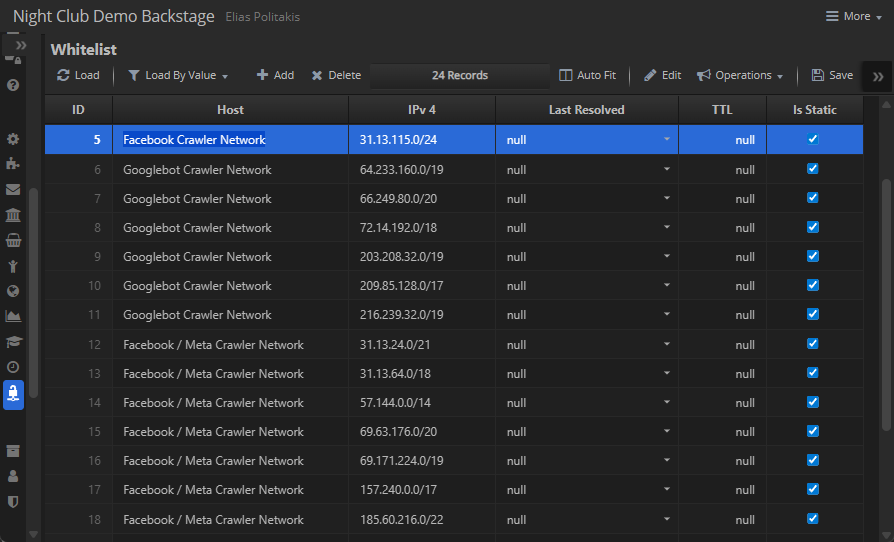
-
Features
-
Mask support: allows entire address ranges
(e.g.,
66.249.64.0/19for Googlebot). This ensures Facebook, Instagram, Google crawlers and other approved bots can reach the site without whitelisting every single IP. - Fine-grained host/IP control: supports exact IPs, hostnames, and subnets.
- Operational safety: prevents accidental public exposure of Backstage or admin consoles.
- Complement to AutoBan: whitelist defines legitimate traffic, blocklist excludes abusers — together forming a two-sided defense model.
-
Mask support: allows entire address ranges
(e.g.,
-
Benefits
- Compliance alignment: Explicit allow-listing aligns with security standards requiring known traffic sources.
- Controlled bot access: Marketing and SEO bots are permitted in a measured way, with visibility into which IP blocks were allowed.
- Cheap enforcement: Enforcement is just a SQL lookup with mask matching, no external firewall rules required.
- Dynamic adaptation: DNS resolution and TTL handling let hybrid/static setups evolve naturally.
💡 Why It Matters The whitelist doesn’t just protect internal staff — it also governs external actors. By supporting masks and subnets, ASP.js lets admins safely admit essential crawlers (Facebook, Instagram, Google) without opening the floodgates. This provides measurable, auditable bot access and ensures security and marketing can coexist in the same operational framework.
8.5 Reporting Engine
-
Core Idea
Backstage doubles as a self-service BI platform. Reports are stored in the
Analyticstable, promoted to assets (UserAsset), and governed by RBAC (UserRoleRights). This makes analytics a first-class feature, not an integration. -
Structures
-
Analytics Each report has metadata (
Name,Category,Icon,Description), SQL text,ChartOptionsJSON, and an optionalConnectionString.
-
Integration Every report is also a
UserAssetof typeReport, with access rights assigned inUserRoleRights.
-
-
Runtime Behavior
- Reports appear in a dedicated Reports Layout, rendered as cards or list items.
-
When selected, Backstage executes the stored SQL, applies
ChartOptions, and binds the result to a DataGrid or Chart view. - Reports can prompt users with filter toolbars, binding parameters safely into SQL.
- Exports (Excel, PDF) and security (CSRF, session sealing) are built-in.
- Users can generate their own reports and charts using specialized context menus, directly from the UI.
-
Benefits
- Self-service analytics: Analysts can create reports by authoring SQL + ChartOptions.
- Unified governance: Reports follow the same asset/rights model as menus.
- Flexible presentation: Any report can render as grid, chart, or list.
- Cost-effective BI: Eliminates the need for external reporting servers.
💡 Why It Matters ASP.js doesn’t bolt on monitoring, auditing, or analytics — they are part of the schema contract. Sessions, user agents, exceptions, audits, bans, rights, whitelists, and reports are all first-class tables. This makes DevOps and compliance dramatically cheaper: dashboards, audits, and BI reports are just SQL away. By elevating these concerns to the database, ASP.js ensures observability, governance, and intelligence are defaults, not afterthoughts.
9. Part IX – Developer Experience
Contents
9.1 Developer Tools
-
Dual Debugger
- Step seamlessly between browser JavaScript and ASP.js/Node.js server code.
- Follow execution across tiers: click a button in the client, step into the server handler, and resume in the client once the response is back.
- Supports step in/out/over across tiers, giving developers full-stack visibility without juggling multiple debuggers.
-
Visual Studio Code Integration
- Breakpoints can be set in both Classic ASP pages and compiled JavaScript output.
- Model inspectors display ORM objects and their fields in real time.
-
Live metadata editing: tweak
backstage.incand reload to instantly see new layouts, toolbars, or dataset bindings.
-
Logging & Diagnostics
-
Structured logs (requests, queries, errors) unified under
ERRX.js. - Query tracing for SQLX datasets with pivot/shape expansions.
- Progress overlays for long tasks, directly surfaced in the UI.
-
Structured logs (requests, queries, errors) unified under
9.2 Extensibility
-
Custom Actions
-
Define new server commands in
commands.inc, expose them as toolbar items inbackstage.inc, and they become instantly available to users — secured by CSRF, sessions, and sealed IDs (H()).
-
Define new server commands in
-
Custom Views & Controllers
-
Add a new tab with custom HTML and a
render(container)function to host bespoke widgets (maps, KPIs, specialized charts). -
Use the
DataGridcontroller for 95% of cases, but drop to custom rendering when needed.
-
Add a new tab with custom HTML and a
-
Scheduled Jobs
- Use the built-in scheduler to register cron-like tasks (nightly audits, reminders, digests).
- Results can be surfaced into dashboards or emailed automatically.
-
Integrations
- OAuth2 endpoints let you securely connect Gmail, payment gateways, and external APIs.
- Tokens are stored server-side only and consumed by models — never exposed to the browser.
-
Reusable Models
-
ORMX makes it trivial to share model packs (
Users,Support,Reservations, etc.) across applications. - Each model comes with metadata, fields, validations, and lookups, ready to drop into Backstage.
-
ORMX makes it trivial to share model packs (
9.3 Deployment Models
-
Classic IIS / Node Hybrid
- Host ASP.js applications alongside traditional ASP or IIS apps for smooth migration.
-
Containerized Deployment
- Bundle ASP.js + SQLite + Backstage metadata into Docker images.
- Perfect for dev/test environments or horizontally scaled deployments with stateless containers.
-
Cloud-Native
- Run in Kubernetes with persistent volumes for SQLite or switch to remote DBs (Postgres, MySQL) through the SQLX abstraction layer.
- Integrates with service meshes for secure session handling and CSRF enforcement.
-
Serverless Mode (future-ready)
-
Handlers in
commands.incare naturally idempotent; they can be refactored into serverless functions (AWS Lambda, Azure Functions) with minimal adjustments. - Backstage metadata + binder logic remains unchanged — making serverless migration largely transparent.
-
Handlers in
-
On-Prem Enterprise
- Full control: ASP Sessions stored in SQLX audit tables, all traffic under strict CSRF enforcement.
- Perfect for industries with compliance needs (finance, healthcare, government).
💡 Why It Matters Developer experience isn’t just about APIs — it’s about flow. With ASP.js and Backstage you get a debugger that spans client and server, a metadata contract that renders complete screens, extension points that don’t require glue code, and deployment models that fit everything from legacy IIS to Kubernetes. The result: developers spend less time wiring, more time shipping.
10. Part X – Conclusion
Contents
10.1 Key Takeaways
-
ASP.js recreates the Classic ASP runtime model in modern Node.js while extending it with async execution, debugger integration, and hardened security.
-
ASPX.js provides the runtime substrate, delivering familiar objects (
Request,Response,Session,Application,Server) but augmented with hash parsing, upload hardening, and CSRF hooks. -
ERRX.js centralizes error handling with structured exception objects and consistent propagation across server and client tiers.
-
SQLX.js establishes the data plane, wrapping SQLite with pivot macros, shape queries, and a dataset model that powers master–detail and reporting scenarios.
-
ORMX.js builds on SQLX to generate models dynamically, wrapping fields and details with proxies to give entities both record and generator semantics.
-
UTILX.js provides utility primitives — string substitution, name normalization, safe SQL value stringification, and caption generation — ensuring consistency across layers.
-
Backstage Framework unifies the stack:
- Server-side: sessions, metadata, commands, security endpoints, scheduled jobs, and long tasks with progress feedback.
- Client-side: binder, DataGrid, layout engine, multiview controllers (grid, form, list, calendar, email, chart), and secure Remote Function Calls.
- Debugger: cross-tier stepping from browser → server → browser, unmatched in SPA frameworks.
-
Taken together, ASP.js is not just a compatibility layer — it is a secure, metadata-driven RAD environment for building backoffice and operational apps with less code, more consistency, and stronger guarantees.
10.2 Future Directions
- Expanded charting and visualization: native connectors to more chart types (heatmaps, Sankey, geo maps) with richer metadata defaults.
- Workflow and process automation: metadata-driven definitions for multi-step processes (approval chains, escalations) layered atop datasets and commands.
- Cloud-native scaling: run ASP.js apps seamlessly in containerized or serverless environments while preserving session security and CSRF contracts.
- AI-powered insights: leverage existing Backstage datasets with AI/ML assistants for anomaly detection, automated classification, and natural language queries.
- Ecosystem expansion: grow reusable model packs (Users, Support, Payments, Reservations) and publish them as importable modules.
- Developer tooling: richer Visual Studio Code integration — model inspectors, live metadata editors, and debugger enhancements to further flatten the learning curve.
💡 Why It Matters ASP.js began as an emulation of Classic ASP but has evolved into a full-stack application framework where runtime, data, models, utilities, and UI converge. It modernizes familiar patterns without losing their simplicity, while adding the rigor, security, and debugging depth demanded by today’s applications. The journey ahead is about making this ecosystem even more expressive, visual, and intelligent, so developers can deliver robust business software at unprecedented speed.
11. Licensing
Access to the source code of the ASP.js VSCode Extension, ASP.js Runtime Framework and SQLX Native Data Access requires obtaining a Source Code License, enabling advanced customization and full transparency. For more information, contact info@mobilefx.com.
12. Publisher Information
- Publisher: mobileFX
- Contact: info@mobilefx.com
- Homepage: https://www.mobilefx.com